
Still losing time to back-and-forth scheduling? AI that can book meetings in your calendar automatically removes you from the loop and fills your week.
In this article
Every meeting on your calendar started with the same ritual. Check availability, send options, wait for a reply, confirm, add it to the calendar, and hope nothing clashes. Multiply that by ten bookings a week, and you've lost hours to work that adds zero revenue. For service businesses doing $1M to $5M, that time isn't just wasted. It's the gap between staying where you are and growing without hiring another person to manage your diary.
This post covers how AI that can book meetings in your calendar automatically removes you from the scheduling loop entirely, why that matters more than any tool comparison, and what to get right before you make the switch.
The Scheduling Tax You Don't See
You feel the cost of missed calls and lost leads because those have a dollar figure attached. The cost of scheduling is harder to spot because it hides inside tasks that feel productive. Checking your calendar, typing a reply, and sending a confirmation all look like work, but none of it moves the business forward.
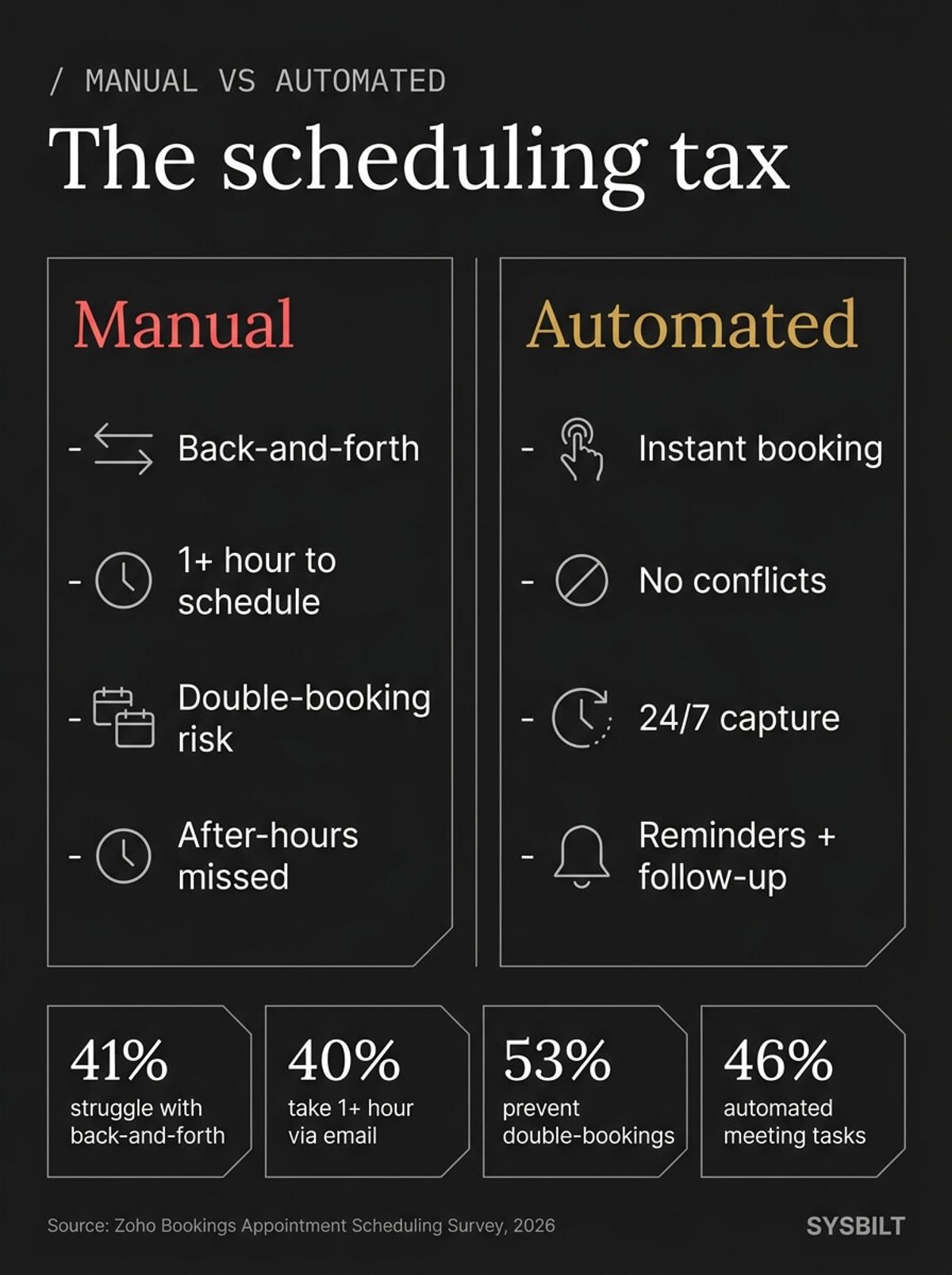
41% of businesses struggle with the back-and-forth of scheduling (Zoho Bookings, 2026). 40% of organisations take more than an hour to schedule a single appointment via email, and for 23%, that figure climbs past six hours (Zoho Bookings, 2026). Add those numbers across a typical week, and scheduling becomes one of the largest invisible admin costs in the business.
The problem compounds when you're the one everyone needs to book with. Every discovery call, client check-in, and team catch-up routes through your availability. Your team can't book on your behalf because they don't know your real schedule. Clients can't self-serve because your calendar changes by the hour. So every booking becomes a mini-negotiation that pulls you out of the work that actually generates revenue.
"In knowledge work, when you agree to a new commitment, you also agree to the overhead tax that comes with it. This overhead tax activates as soon as you take on a new responsibility. As your to-do list grows, so does the total amount of overhead tax you're paying."
Scheduling is exactly that kind of overhead. Every new client and every new project adds another round of calendar coordination that compounds quietly until it consumes your week.
What AI Scheduling Actually Does
Not every scheduling tool is the same, and the differences matter more than most comparison articles let on. The landscape breaks down into three tiers, and understanding which one you actually need saves you from buying the wrong thing.
Booking Links
Tools like Calendly or Acuity let people pick a time from your available slots. They're useful, but they still require someone to visit the link and self-serve. If a customer calls your business and wants to book on the spot, a link doesn't help them.
Smart Calendars
Tools like Reclaim or Motion reorganise your existing schedule around priorities. They're good for internal time management, but they don't handle inbound booking requests on their own. They optimise your time without capturing new demand.
AI Scheduling Agents
This is where the real shift happens. An AI scheduling agent can answer a phone call or a website chat, qualify the enquiry, check your calendar in real time, and book the appointment without you touching anything. Some handle the full conversation by voice. Others work through chat on your website or respond to email threads automatically.
The key difference is that the AI manages the full interaction, not just the time-slot selection. It can ask qualifying questions before offering a slot, avoid booking the wrong type of appointment, and handle the confirmation and reminder sequence afterward. For a growing service business, this distinction matters because your bottleneck isn't picking a tool. It's removing yourself from the loop entirely so the business can take bookings whether you're in a meeting, on the road, or finished for the day.
Where the Real Business Impact Is
The biggest gain isn't saving time on individual bookings. It's what happens when your calendar fills without requiring your attention.
After-Hours Capture
Customers search for services at 8 PM. If your booking process requires a reply from you, that enquiry sits until morning. By then, they've already booked with the competitor who answered at 8:01 PM. An AI scheduling agent captures that booking the moment the customer reaches out, regardless of the time.
For Australian service businesses, this is particularly sharp. Customers across three or four time zones expect responsiveness, and the businesses that capture after-hours demand consistently outperform those that rely on callbacks the next morning.
The System Effect
30% of businesses saw an increase in sales and revenue after adopting scheduling software (Zoho Bookings, 2026). Another 46% automated tasks around their meetings that were previously manual (Zoho Bookings, 2026). But those numbers only tell part of the story.
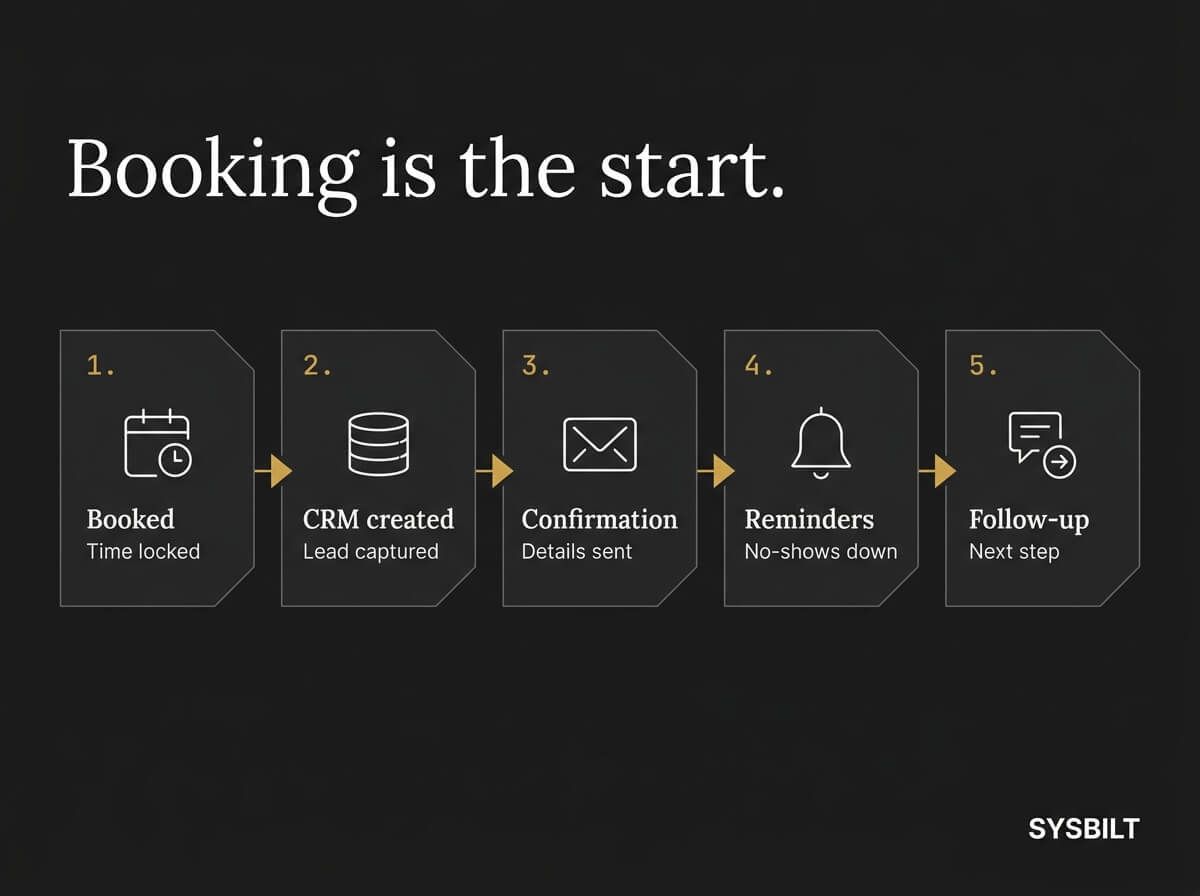
When scheduling connects to your CRM, it can create a new contact record automatically. When it connects to your automation platform, it triggers a confirmation email, a reminder sequence, and a post-meeting follow-up without you building each step manually. That's the same principle behind automating your first three business tasks, applied to the calendar specifically.
The compound effect is the real prize. A standalone booking tool saves you time. A booking system connected to your CRM, your follow-up sequences, and your reporting dashboard gives you a pipeline that runs itself.
What to Get Right Before You Switch
AI scheduling works well for repeatable booking types: discovery calls, consultations, service appointments, and follow-ups with a fixed duration. It works less well for complex multi-party coordination or sensitive meetings where context matters more than speed. Before you switch, get these foundations in place:
- Calendar sync. The AI needs live access to your Google Calendar or Outlook calendar so it can see conflicts in real time. If your team uses shared calendars, make sure the sync covers all of them, not just yours
- Booking rules. Define buffer times between meetings, maximum bookings per day, and which days are available. Without these guardrails, the AI will pack your calendar back to back with no breathing room
- Service types. If you offer different appointment lengths (a 15-minute intro call versus a 60-minute strategy session), map them clearly so the AI offers the right option based on what the customer needs
- Escalation path. Decide what happens when the AI can't handle the request. Complex situations, VIP clients, or unusual booking types should route to a team member with a warm handoff rather than a dead end
- Timezone handling. If you serve clients across Australian states or internationally, make sure the system accounts for timezone differences automatically. A booking system that shows Sydney times to a Perth client will cost you appointments
53% of businesses report that scheduling software prevents double-bookings (Zoho Bookings, 2026). That number only holds if the sync and rules are set up properly from the start. The most common failures aren't in the AI itself. They're in the setup: incomplete calendar permissions, missing buffer times, and no escalation path for edge cases.
What Changes When You're Not the AI Scheduling Bottleneck
When you remove yourself from the scheduling loop, two things happen. First, your calendar fills based on demand rather than your availability to reply. Bookings come in at 6 AM and 10 PM without you touching your phone. The business operates on the customer's timeline instead of yours.
Second, you get unbroken time back. Every scheduling interaction you eliminate is a context switch you don't take. Instead of jumping between client work and calendar admin ten times a day, you stay in the work that actually grows the business. For a business owner doing $2M in revenue, those recovered hours compound into capacity that used to require hiring another person.
This is also where the voice AI angle becomes relevant. An AI agent that answers your phone line, qualifies the caller, and books directly into your calendar isn't a scheduling feature. It's a front-line team member that never clocks off. When that agent connects to your CRM and triggers a follow-up sequence after the booking, you've moved from a standalone tool to a system that captures, confirms, and nurtures without your involvement.
A scheduling tool on its own is useful. But AI scheduling connected to your CRM, your follow-up automation, and your client communication system becomes infrastructure that scales with you. This is the difference between using AI as a feature and building it into how your business operates.
If you want AI scheduling built into your business as a connected system rather than a standalone tool, start with the AI Assistants service and see how it fits alongside everything else.

WRITTEN BY
Felipe Chaparro
Systems Architect and Founder of SYSBILT. Felipe engineers custom automation, AI workflows, and performance web architectures for scaling Australian service businesses.