
Client details scattered across phones, inboxes, and spreadsheets? Learn the best way to store client details for your service business in one shared CRM.
In this article
The Best Way to Store Client Details for a Service Business
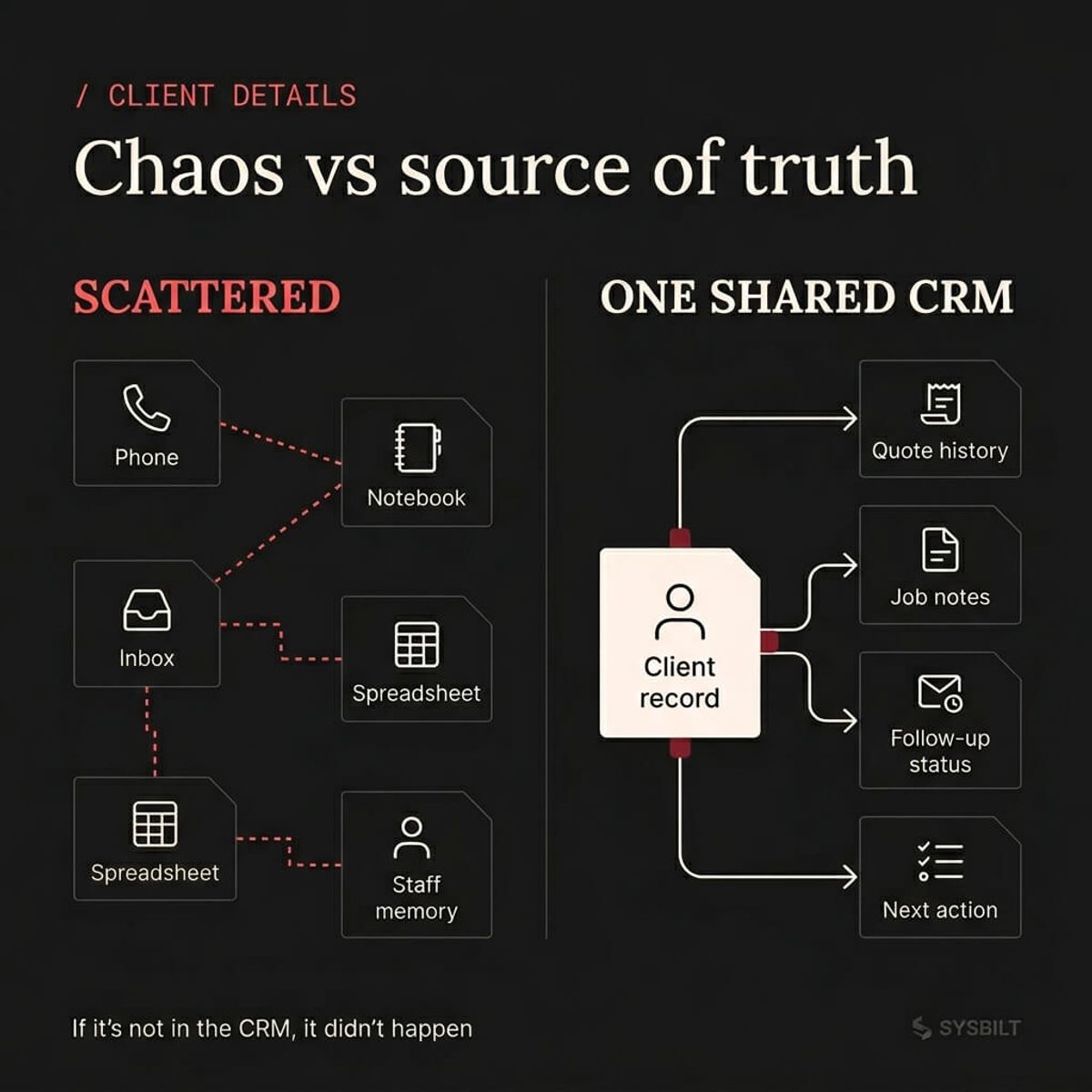
If you're running a service business, client details are probably scattered across your phone, your inbox, a notebook, and spreadsheets only one person understands. That's not a record system, it's a lead-loss system. This post covers the best way to store client details for a service business so your team can find anyone and act fast.
Why Most Service Businesses Lose Client Details in the First Place
It rarely starts as a conscious decision. A lead calls while you're busy, so you save the number in your phone. You send a quote from your personal email because it's faster.
Your office manager writes the job notes on a sticky pad. Somebody else logs the follow-up in a spreadsheet on their desktop. Within six months, client information is everywhere and nowhere.
No single person has the full picture. When someone is away or leaves, the rest of the team is guessing. The result is missed follow-ups, duplicated work, and lost jobs.
The real cost isn't just one lost lead, it's the compounding effect over time. Every scattered record makes the next follow-up harder and the next new hire slower. This isn't a technology problem, it's a structure problem.
The Best Place to Store Client Details
The answer is straightforward: one shared CRM your whole team can access, update, and search from anywhere. A spreadsheet with 14 tabs won't cut it, and neither will a shared Google Doc or a buried email folder.
A CRM gives you three things a spreadsheet never will: speed, visibility, and accountability. You can search a name and see the full history in under ten seconds. Your whole team sees the same information without calling each other, and every record has a clear next step.
For every $1 spent on CRM, businesses see an average return of $8.71 (Nucleus Research, 2024). That return comes from fewer lost leads and less time hunting for information. It's not about fancy features, it's about having the basics in one place.
A spreadsheet works when you have ten clients and one person doing everything. It breaks when you have a hundred and a lead calls while you're busy. The best way to store client details for a service business is a system that grows with you.
"Your business's memory should not live in one person's head, inbox, or spreadsheet." That's the test. If a team member quit tomorrow, how many client relationships would walk out the door?
What Information a Service Business Should Actually Store
Most CRM advice tells you to capture everything. That's how you end up with 40 fields nobody fills in. A service business needs a short list that covers the essentials.
Here's what matters:
- Name and phone number, stored in one shared place
- Email address for quotes, receipts, and follow-ups
- Suburb or location, especially if you travel to the client
- Service needed, in plain language your whole team can understand
- Source, meaning how they found you (Google, referral, ad, repeat)
- Quote status showing sent, accepted, declined, or waiting
- Notes covering anything the next person on the phone needs to know
- Next action and date, the most important field in the whole system
If you can fill those fields in under 60 seconds after a call, your team will use the system. Start with this core list and add more fields once the habit is locked in.
80% of customers value the experience a company provides as much as its products (Salesforce, 2023). When a client calls and you already have their full history, that's what turns one-off jobs into long-term relationships. You can't deliver that from a notebook.
How to Set Up Client Records So Your Team Actually Uses Them
The biggest risk with any new system isn't the software, it's adoption. If the CRM takes longer to update than a sticky note, your team will go back to the sticky note.
Fewer fields, faster updates. Every field you add is friction between your team and the record. Start with the eight essentials and resist the urge to add extras during setup. Once the daily habit is locked in, you can always expand later.
Mobile access is mandatory. Your team isn't at a desk all day, they're between appointments or in transit. If they can't update a record from their phone in 30 seconds, the system won't last. Pick a CRM with a strong mobile app and test it before rollout.
Shared ownership with clear expectations. The CRM only works if everyone uses it the same way. Set one rule: every interaction gets logged, every quote gets a status, and every job gets a next action. Make this the team's operating rhythm from day one.
93% of Australian businesses already use a CRM (Capterra Australia, 2026). The gap isn't awareness, it's implementation. Most have the tool but haven't set it up to match how their team works.
How to Move From Scattered Records to One Clean System
If you're running on spreadsheets, inboxes, and phone contacts, the migration doesn't need to be painful. Most businesses can switch in under a fortnight. Here's the simplest path:
- 01Export what you have. Pull your spreadsheet data, export phone contacts, and gather email lists into one folder. Don't worry about cleaning anything yet
- 02Pick one CRM and commit. Choose something your team can learn in a day, not something that takes months to configure
- 03Import your records and deduplicate. Most CRMs merge duplicates on import. You'll have some manual cleanup, but it's a one-time cost
- 04Set the rule: new records go in the CRM only. If it's not in the CRM, it didn't happen. This rule needs to come from the business owner
- 05Review weekly for the first month. Spend ten minutes each Monday checking records and habits. After four weeks, the new way becomes the default
The goal isn't a perfect database on day one. It's a single source of truth that gets better every week because your team is using it.
SYSBILT builds CRM systems for service businesses that need clean records and fast follow-ups. If you're ready to move from scattered details to one shared system, see how we set it up.
If this sounds like your business, book a call and we'll walk you through how this applies to your situation.

WRITTEN BY
Felipe Chaparro
Systems Architect and Founder of SYSBILT. Felipe engineers custom automation, AI workflows, and performance web architectures for scaling Australian service businesses.