Still stuck doing admin after hours, start with the first business processes to automate, so follow ups and cashflow run without you.
In this article
- //Why you feel busy but still stuck
- //The rule for what to automate first
- //The first 3 tasks to automate
- //Task 1: Lead capture and follow up that happens without you
- //Task 2: Quote to job to invoice handoff without re typing
- //Task 3: Overdue invoice reminders and cash chasing
- //How to implement without creating a new mess
- //Where this fits in the SYSBILT system
If you feel flat out but the business still relies on you for everything, it's usually not because you need more software. It's because your follow up, handoffs, and cash chasing all happen “when you get a minute”, and you never get a minute.
In this post, we'll walk you through what tasks should a service business automate first, and why these three come before everything else.
Why you feel busy but still stuck
When a service business hits the scaling phase, the work changes. You're not only delivering the service anymore, you're also managing a pipeline, quoting, invoicing, and making sure the team doesn't drop the ball.
The problem is that most of those tasks live in the cracks between your tools. They're small individually but constant, and that's why the day feels full while the week still feels stuck.
AMP found that more than 1 in 3 (35%) Australian business owners feel they could be working more efficiently (AMP, 2025). AMP also found that 2 in 5 say administration time gets in the way of the day-to-day running of their business (AMP, 2025).
You don't need 10 automations to fix that. You need 3 that protect revenue, cashflow, and founder time first.
The rule for what to automate first
A good first automation has four traits.
- It's repetitive. The trigger happens the same way most of the time.
- It's rule based. You can clearly describe what “should happen next.”
- It touches money. It affects lead response time, quoting speed, delivery handoff, or getting paid.
- It removes you as the default fallback. The business doesn't stall when you're in a meeting or driving.
There's one important warning. Don't automate a broken process.
If you're currently losing leads because nobody owns follow up, automation will just make you lose them faster. Fix the ownership first, then automate the handoff.
The first 3 tasks to automate
These are the three places we see the biggest impact in a service business, because they sit right on the revenue and cashflow line.
| Where the leak happens | What to automate first | Evidence (Australia) |
|---|---|---|
| Admin creep steals hours you should spend on delivery or sales | Remove re typing and copy paste handoffs between tools | 30–40% of admin work can be automated * |
| Follow up happens late, or not at all | Assign the next step to a person, with a due time | Leads die when nobody owns the next step |
| Cash arrives late, and nobody has time to chase it properly | Overdue reminders that escalate and get tracked | Paid in 23.9 days on average, 6.6 days late (Xero, 2026) |
* Expeed Technology, 2026 · ** AMP, 2025 · *** Xero Small Business Insights, 2026
Task 1: Lead capture and follow up that happens without you
This is the highest leverage automation in most service businesses. Not because it's fancy, but because speed wins.
If a lead comes in and nobody replies for hours, you're hoping the customer waits. A simple automation removes that risk.
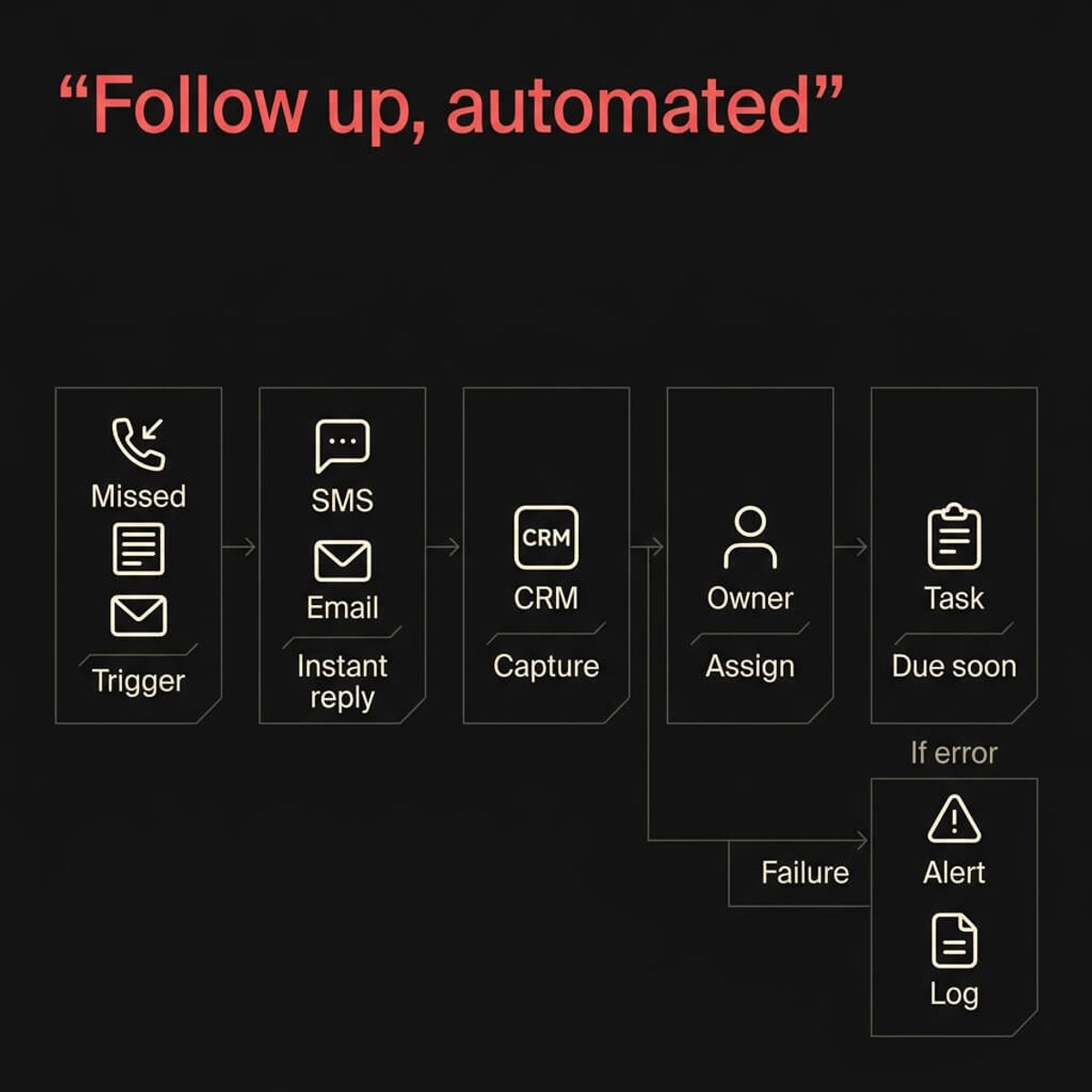
What it looks like in real life
Pick one or two lead sources first.
- Missed calls
- Website forms
- New emails to your enquiries address
Your first version should do three things.
- Acknowledge the enquiry instantly. A text or email that says you got it, and what happens next.
- Capture the details in one place. Put the lead into your CRM with the source, timestamp, and contact details.
- Create the next step. Assign a follow up task to a real person, with a due time.
Then you add the smarter layer.
- Route based on service type or location.
- Send a booking link if the enquiry is a good fit.
- Create a quote request task with a checklist, not an open ended note.
How to avoid annoying customers
The key is to automate the acknowledgement, not the relationship. Keep the message short and specific.
- Say when they can expect a reply.
- Ask one question that helps you respond properly.
- Don't send a chain of reminders to the customer, that's what internal reminders are for.
Internal CTA: If your leads are coming from three different places and nobody trusts the numbers, this is exactly what we build in our Automation pillar.
Task 2: Quote to job to invoice handoff without re typing
In most service businesses, the quote to invoice path is full of manual steps. Someone copies details from an email into a spreadsheet, someone re types the same info into the invoicing system, and someone forgets to tell the team a job is approved.
The customer waits, and the team scrambles. This is where Expeed’s estimate matters.
If 30–40% of admin work in a typical SME can be automated, this is one of the biggest pockets of it (Expeed Technology, 2026).
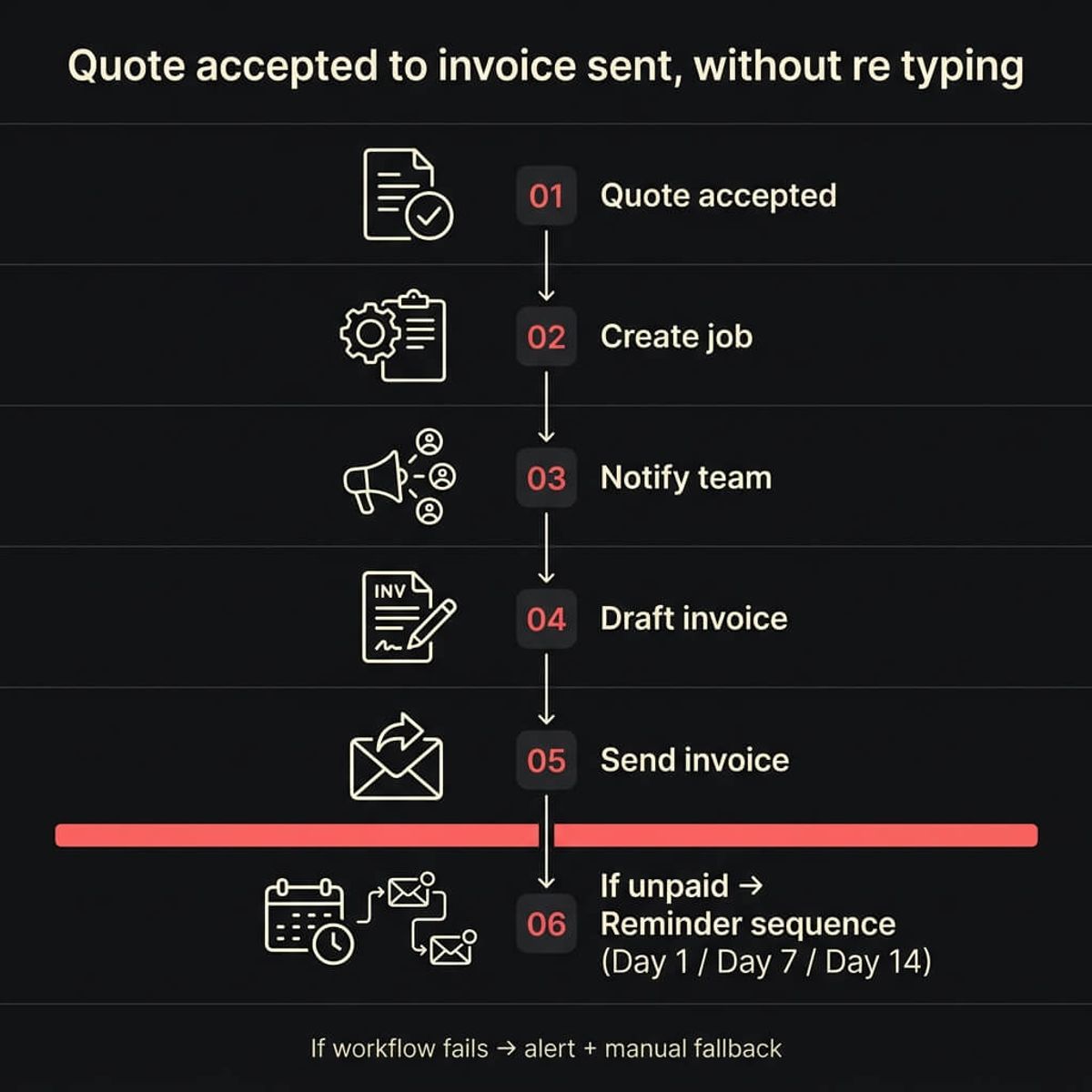
The clean workflow
Your trigger should be one clear event.
- Quote accepted
- Deposit paid
- Job marked as approved
From there, the automation can.
- Create the job or project record.
- Notify the right person in the team.
- Create the invoice draft with the customer details already filled.
- Set a follow up task if the invoice isn't sent within a set time.
This doesn't remove judgement. It removes the re typing and the “did anyone do that yet” check ins.
Task 3: Overdue invoice reminders and cash chasing
If you don't have a consistent reminder system, getting paid becomes a mood. Sometimes you chase, sometimes you forget, and sometimes you feel awkward and avoid it.
The problem is that cashflow doesn't care how busy you are. Xero reported that Australian businesses were paid on average in 23.9 days, and late payment times were 6.6 days (Xero, 2026).
That “almost a week late” is the bit that hurts.
"Australian businesses are still being paid almost a week late. When you're running on tight margins, being paid six or seven days late is the difference between investing in growth and covering payroll."
What an overdue automation should do
Keep it simple and escalate.
- Day 1 overdue: polite reminder with invoice link
- Day 7 overdue: firmer reminder, ask for a payment date
- Day 14 overdue: internal alert to call, stop work where appropriate, or escalate based on your policy
The important part isn't the email wording. It's that the system tracks what happened, so you're not guessing.
How to implement without creating a new mess
Most automation failures aren't technical. They're ownership failures.
Before you build anything, write down.
- The trigger
- The inputs you need
- The output that must happen every time
- The human fallback when something breaks
Then ship one workflow, not three. Measure it for two weeks.
- Did response time improve
- Did quoting happen faster
- Did overdue chasing become consistent
Only then do you add the next workflow.
Also, build basic error handling from day one.
- Alert someone if a workflow fails
- Log every run in one place
- Keep a manual “plan B” so the business doesn't stall
Where this fits in the SYSBILT system
These three automations sit in Pillar 3, Automation, but they only work properly when they connect to the tools around them. Your website is the front door that captures the lead, your CRM is the memory that stores it, and automation is the engine that moves it through follow up and delivery.
If you want to see what that looks like as a complete system, start here: Automation.
If this sounds like your business, book a call and we'll walk you through how this applies to your situation.

WRITTEN BY
Felipe Chaparro
Systems Architect and Founder of SYSBILT. Felipe engineers custom automation, AI workflows, and performance web architectures for scaling Australian service businesses.