Losing reviews because nobody asks? Build a system to automate Google review requests after job completion and grow your reputation without lifting a finger.
In this article
Your team finishes a job, the customer is happy, and nobody sends a review link. By the time someone remembers, the moment has passed.
If you want to automate Google review requests after job completion, you don't need a new app or another subscription. You need a system that fires the right message at the right time, without anyone having to remember. This post walks through how to build that system using tools you probably already own, what Australian law requires, and the mistakes that cause most review automations to fail within a month.
Why Most Service Businesses Lose Reviews They've Already Earned
Here's the uncomfortable part: your customers aren't reluctant. 83% of people asked to leave a review actually go ahead and leave one (BrightLocal, 2026). The gap isn't willingness, it's that nobody asks consistently.
The manual process breaks within a week. Your team moves on to the next job and you're juggling quotes and callbacks. The happy customer who would've left five stars gets on with their day. Meanwhile, 47% of consumers won't use a business with fewer than 20 reviews (BrightLocal, 2026), and 68% won't use a business rated below four stars (BrightLocal, 2026). That's not a vanity metric. That's a direct line between your review count and the number of enquiries coming through the door.
Recency makes it worse. 74% of consumers only care about reviews written in the last three months (BrightLocal, 2026). A three-month drought makes your business look inactive to everyone searching right now, regardless of how many reviews you've collected over the years.
The real cost isn't the missing review itself. It's the compounding effect of not having a system. Every month without automated review collection is a month where your Google ranking stagnates and your local search visibility drops. Your competitors who ask consistently look more trustworthy online, even if their actual service is no better than yours.
"We have moved past the era where reviews were just a nice-to-have marketing tactic. They have become an essential piece of evidence that your business is active, reliable. Also that it is worthy of prominent visibility and citation within traditional Google search and LLMs like ChatGPT, and AI search."
How Automated Review Requests Actually Work
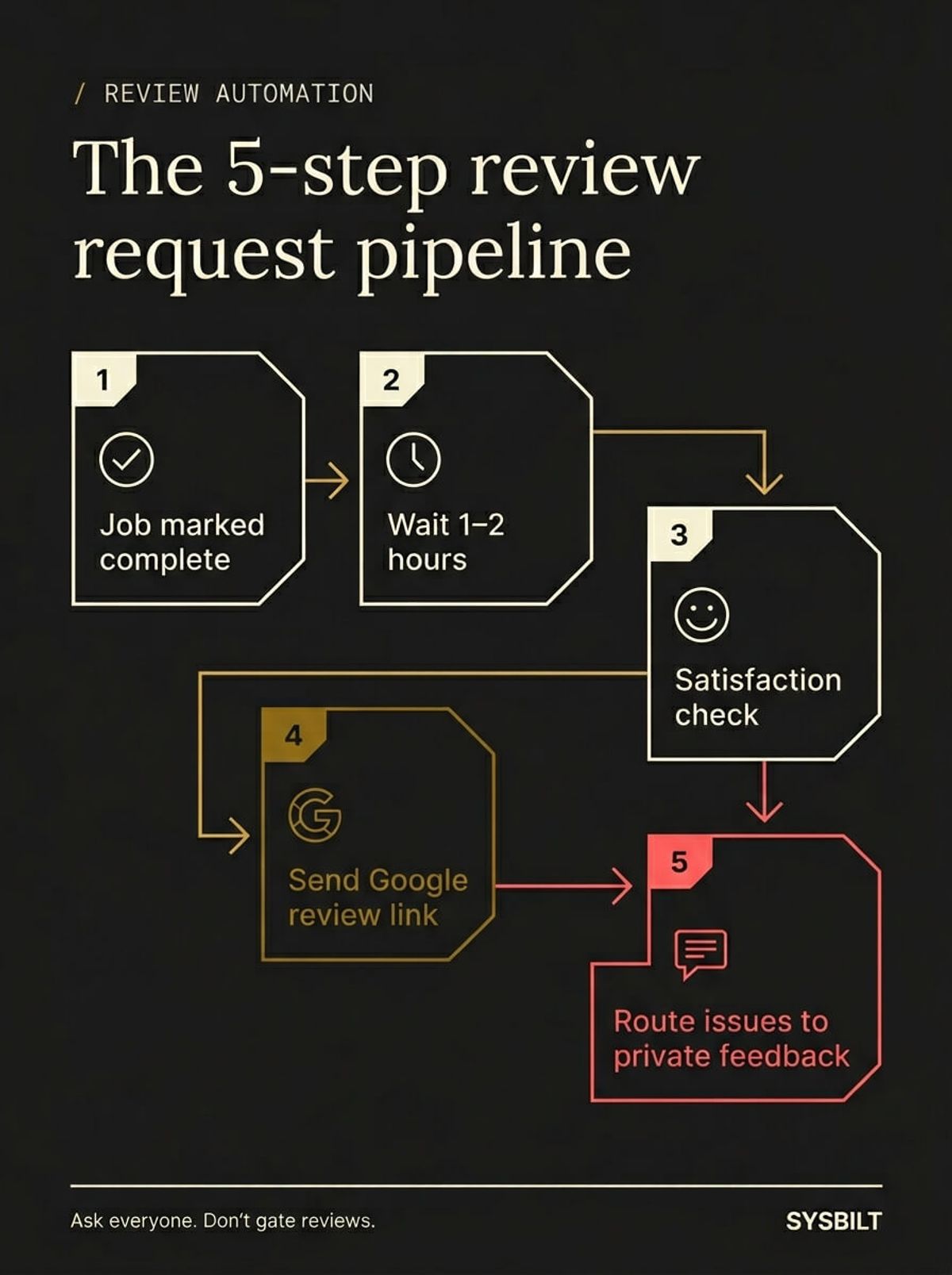
The logic is simpler than most business owners expect. It's a five-step pipeline that connects your job completion trigger to a Google review link, with a satisfaction check built in.
- 01A job is marked complete in your CRM or job management tool
- 02A short delay fires (1–2 hours, not immediately)
- 03An automated message asks the customer if they were happy with the work
- 04Positive responses receive a direct link to your Google review page
- 05Negative responses route to a private feedback channel so you can address the issue before it goes public
You don't need new software for this. If you've got a CRM (or even a spreadsheet tracking completed jobs), an automation connector like Make.com, and your Google review link, you've got everything required. It's the same logic behind automated appointment reminders or follow-up emails: a trigger, a condition, and two paths.
What If You Don't Have a CRM
You can still build this. If your job tracking lives in a Google Sheet or an Airtable base, the automation works the same way. When a row gets updated with a completion date, the automation platform detects the change and triggers the message sequence. The pipeline doesn't care where the trigger comes from, it only needs a reliable signal that a job has finished.
If you've already automated your first few business tasks, review requests are a natural next step in the same system.
What to Say and When to Send It
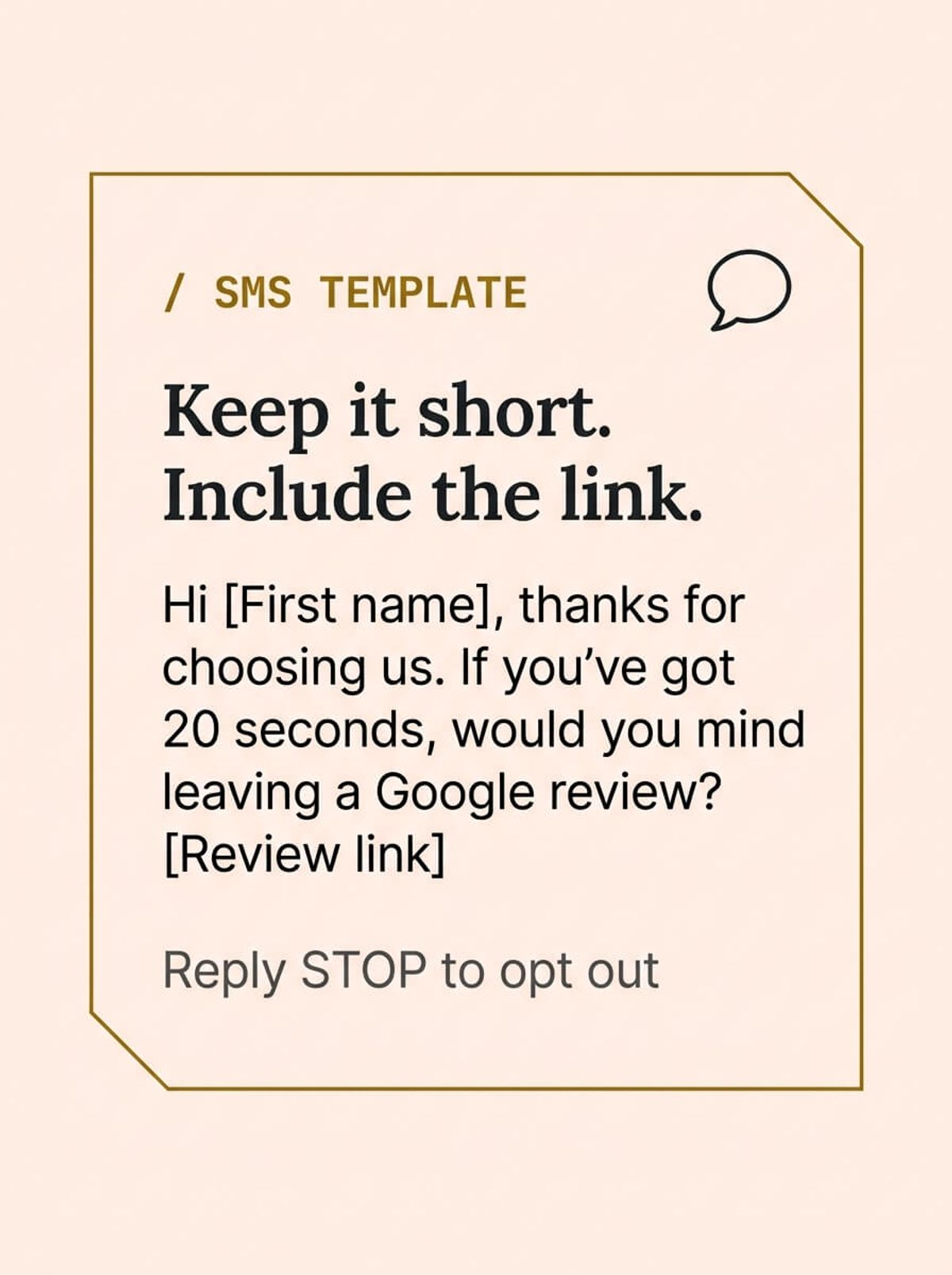
Timing matters more than wording. The sweet spot for service businesses is 1–2 hours after job completion, when the customer has had time to appreciate the result but the experience is still fresh enough to motivate action.
SMS outperforms email for review requests. It's direct, immediate, and open rates are dramatically higher. Keep the message short and personal, and include the direct Google review link rather than your homepage.
A good review request includes four things:
- The customer's first name
- One sentence thanking them for choosing your business
- A direct question: "Would you mind leaving us a quick Google review?"
- The link to your Google review form, nothing else
What kills response rates is length and friction. Long messages, multiple links, or anything that asks the customer to navigate your website first will cost you completions at every extra step. The customer should go from reading your message to writing their review in a single tap.
What a Bad Review Request Looks Like
The most common mistake is sending a message that reads like marketing copy instead of a genuine request. "Dear Valued Customer, we would appreciate it if you could take a moment to share your experience" doesn't sound like a real person. It sounds like an automated email from a company that doesn't know their name. Keep it short, personal, and conversational. Write it the way you'd text a customer you actually know.
What Google and Australian Law Actually Allow
Automated review requests are legal in Australia, but there are rules you can't ignore. Getting this wrong doesn't just risk a fine, it can get your Google Business Profile suspended.
Google's policy is clear on one point: review gating is prohibited. You can't selectively ask only happy customers to leave reviews. Your automation must give everyone access to the review link, regardless of their satisfaction response. The satisfaction check can route negative feedback privately, but it can't block unhappy customers from reviewing if they choose to. Google actively looks for patterns that suggest gating, and businesses caught doing it risk having their reviews removed entirely.
The Spam Act 2003 permits automated SMS to existing customers as long as you have a prior business relationship and include a clear opt-out mechanism. You're not cold-messaging strangers. You're following up with someone whose job you just completed. The key requirements are: identify your business in the message, and ensure the opt-out works immediately.
Australian Consumer Law adds two more boundaries: no incentives for reviews (no discounts, no gift cards, no "leave a review and get 10% off") and no selective publishing of reviews on your own platforms. You can't offer something in exchange for a review, and you can't cherry-pick which reviews to display publicly.
The plain-language version: ask everyone, don't filter, don't bribe, and include an opt-out. Stay inside those lines and your automation is fully compliant.
Common Mistakes That Kill Review Automation
Most review automations fail within the first month, not because the technology breaks, but because the setup had a problem nobody noticed.
Sending the request too late. If your automation fires a review request three days after the job, the customer has moved on. The emotional peak of satisfaction happens within the first few hours. After 24 hours, the urgency to respond drops significantly, so check your delay settings and make sure they're measured in hours, not days.
Using the wrong link. Your Google review link should take the customer directly to the review form with the star rating visible. If you link to your Google Business Profile homepage instead, you're adding an extra step that costs you completions. Test the link on a phone before you go live.
Forgetting the opt-out. The Spam Act 2003 requires a working opt-out in every automated message. If your SMS template doesn't include "Reply STOP to opt out" or an equivalent, you're non-compliant. Add it to the template and make sure your automation platform actually processes the opt-out.
Not monitoring the results. Setting up the automation and walking away is a common trap. Review request performance changes over time as your customer base shifts and your message gets stale. Check your numbers monthly and adjust the timing or wording if response rates drop.
Asking for a specific rating. "Please leave us a 5-star review" violates Google's review policies. Ask for a review, not a rating. Let the customer decide what score to give based on their genuine experience.
How to Automate Google Review Requests This Week
You can build this in an afternoon. Here's the step-by-step:
- 01Create your Google review link. Search for your business on Google, click "Ask for reviews" in your Business Profile dashboard, and copy the direct link
- 02Identify your job completion trigger. This is the moment in your CRM or job management tool when a job status changes to "complete"
- 03Connect the trigger to your automation platform. Tools like Make.com or Zapier watch for that status change and fire the next step automatically
- 04Write your SMS template. Keep it under 160 characters, include the customer's first name, paste in your Google review link, and add "Reply STOP to opt out" at the end
- 05Set the delay. 1–2 hours after completion. Not immediately (feels pushy), not the next day (the moment has passed)
- 06Add the satisfaction gate. Route positive responses to the review link and negative responses to a private feedback form or email
- 07Test it. Mark a test job as complete and confirm the SMS arrives with the correct link and timing
What to Measure Each Month
Once it's running, track these numbers:
- Total new reviews per month — the primary output of the system
- Average star rating — if this drops, you have a service quality issue, not an automation issue
- SMS response rate — if fewer than 15% of recipients leave a review, the timing or message needs adjusting
- Negative feedback volume — how many issues your satisfaction gate catches before they become public reviews
Reviews feed your Google ranking, which feeds your lead flow, which feeds your revenue. It's one automation that touches every part of how your business gets found online. If you want this built and connected to your existing systems without doing it yourself, that's what we do.

WRITTEN BY
Felipe Chaparro
Systems Architect and Founder of SYSBILT. Felipe engineers custom automation, AI workflows, and performance web architectures for scaling Australian service businesses.