
Your team can't answer every call. Learn how to build an AI chatbot for your business without coding and capture leads around the clock.
In this article
- //What an AI Chatbot Actually Does for a Business Like Yours
- //How to Build an AI Chatbot Without Coding: Platforms That Work
- //How to Set One Up in a Weekend
- //The Step Most Guides Skip: Connecting Your Chatbot to Your Business
- //What to Expect in the First Month
- //When the Chatbot Becomes Part of Your System
Your business is growing, but your team can't answer every call, reply to every message, and still do the work they were hired for. Customers reach out at 9pm on a Tuesday, and nobody's there to respond. This post shows you how to build an AI chatbot for your business without coding, and how to connect it to your systems so the leads it captures actually go somewhere useful.
What an AI Chatbot Actually Does for a Business Like Yours
An AI chatbot on your website answers the questions your team is tired of repeating every day. It captures enquiry details when nobody's available and qualifies leads based on what the customer needs. Nothing falls through the cracks while your team focuses on the work that actually requires their skills.
Here's what that looks like in practice. A potential customer visits your site at 10pm and asks whether you service their area. They get a useful answer within seconds, the chatbot collects their name, email, and what they need, and that information is waiting for your team first thing in the morning.
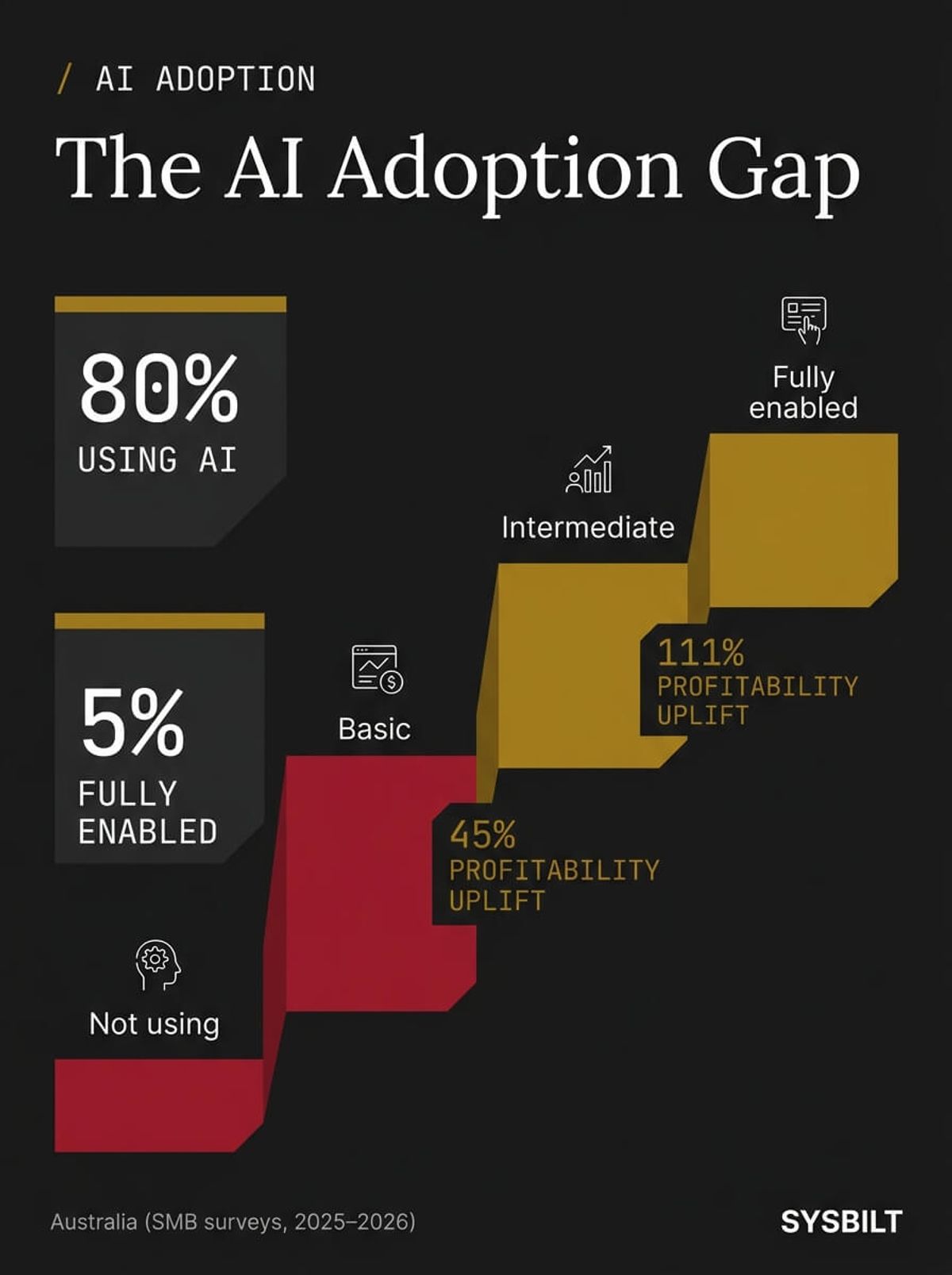
The numbers back this up. 80% of Australian businesses are already using AI in some form, from standalone tools like ChatGPT to embedded features like website chatbots (Small Business Loans Australia, 2026). But only 5% of Australian businesses are fully enabled to realise AI's potential benefits (Deloitte Access Economics, 2025). Most businesses have started using AI without connecting it to anything meaningful.
57% of Australian businesses are using AI-enhanced customer service tools such as chatbots and virtual assistants, and 55% of those report improved customer satisfaction scores since adopting (Capterra Australia, 2025). The technology works when it's set up with intent. The gap isn't whether to use a chatbot. It's whether yours will deliver real business results or sit in the corner collecting dust.
"One-third of the businesses not currently using AI say they don't know where to start, while around half of those using the technology have only an intermediate level of understanding. We can do better — the AI adoption challenges confronting SMBs can be easily overcome with a little help."
The question for most business owners isn't whether AI chatbots are worth trying. It's whether to build one yourself using a no-code platform, buy a pre-built solution, or hire someone to set it up for you. For businesses at the growth stage, the no-code path sits in the sweet spot. It costs a fraction of custom development, gives you enough control to tailor the experience, and doesn't require ongoing developer fees to maintain.
Consider the alternative. A part-time receptionist in Sydney costs the equivalent of a full receptionist salary per year and only covers set hours. Most capable AI chat tools run from $29 to $99 per month on a subscription platform, with advanced features pushing to $150 to $300 per month. Pricing varies significantly by platform and usage volume, so check vendor sites directly. A no-code chatbot runs around the clock and handles dozens of conversations at once. It won't replace every human interaction, but for the repetitive questions and after-hours enquiries that currently go unanswered, the economics aren't close.
How to Build an AI Chatbot Without Coding: Platforms That Work
You don't need a developer to get a chatbot live on your website. Several no-code platforms let you train a chatbot on your own business data, customise how it talks to customers, and embed it on your site within a few hours. Here are four platforms worth considering for Australian businesses.
| Platform | Best For | Starting Price | Key Strength |
|---|---|---|---|
| Chatbase | Simple FAQ and lead capture bots | Free tier, paid from ~$19/mo | Upload your website URL and it trains automatically |
| Tidio | Businesses wanting live chat + AI | Free tier, paid from ~$29/mo | Human handoff when the bot can't handle a question |
| Voiceflow | Custom conversation flows | Free tier, paid from ~$50/mo | Full control over conversation logic and branching |
| Zapier Chatbots | Businesses already using Zapier | Included in Zapier plans | Direct connection to CRM, email, and calendar tools |
A few things to keep in mind for Australian businesses specifically. Check where the platform stores customer data, since the Australian Privacy Act places obligations on how personal information is handled and where it's stored. Make sure it handles Australian spelling and terminology properly, because a chatbot that spells "colour" as "color" will feel immediately off. And confirm it integrates with the tools you're already running, whether that's HubSpot, Xero, or your booking system.
The platform you pick matters less than what you do with it after setup. A chatbot that captures a lead but doesn't route it anywhere useful is a novelty, not a system.
How to Set One Up in a Weekend
Most business owners expect the process to take weeks. In reality, you can go from nothing to a working chatbot in a single weekend. The process is more about knowing your business than knowing how to code.
Define what the chatbot should handle
Before you open any platform, write down the ten questions your team answers most often. Pricing, availability, service areas, how to book, and "do you offer X" are almost always on the list. These are the questions eating your team's time, and they're the chatbot's first job.
Think about what happens outside business hours too. If most of your website traffic arrives in the evening, the chatbot needs to handle those enquiries, collect details, and set expectations about when a human will follow up.
Here's a practical way to build your list. Open your email inbox and search for the last 30 customer enquiries. Group them by question type. You'll probably find that five or six questions account for 80% of the total. Those are your chatbot's starting playbook.
Choose your platform and train it
Pick one of the platforms from the table above and upload your business information. This includes website content, FAQs, service descriptions, and pricing guides. Most platforms can ingest your website URL and build a working chatbot from your existing content in under an hour.
Don't overthink the training at this stage. Start with what you have and improve it based on real conversations later. The chatbot doesn't need to know everything about your business on day one. It just needs to handle the most common questions better than silence does.
Customise the tone and set guardrails
Set the chatbot's tone to match how your team actually talks to customers. If you're friendly and straightforward, the chatbot should sound the same way. Generic, corporate-sounding responses will feel off-brand and reduce trust.
More importantly, set clear boundaries. Tell the chatbot what it shouldn't answer, such as detailed legal questions or firm pricing without context. Configure a human handoff for anything it can't handle with confidence, so the customer gets transferred to a real person rather than getting a bad answer.
The common fear is "what if it says something wrong to a customer." It's a fair concern. Every decent platform lets you review conversations, flag uncertain responses, and route difficult questions to your team. You're giving the chatbot a playbook and checking its work, not handing over control.
Embed it on your website and test
Most platforms provide a small code snippet to paste into your site, or a plugin if you're on WordPress or Shopify. Get it live, then spend thirty minutes testing it yourself. Ask the questions your customers ask, try to confuse it, and fix what breaks before it goes public.
Get a few people on your team to test it too. They'll phrase questions differently from you and they'll find gaps you didn't think of. A quick round of internal testing before launch saves you from awkward customer interactions in the first week.
The Step Most Guides Skip: Connecting Your Chatbot to Your Business
This is where most "how to build a chatbot" articles end. They help you pick a tool, get it live, and wave goodbye. But a chatbot that stores leads inside its own dashboard, disconnected from everything else in your business, is a dead end you'll stop checking within a month.
Here's what should happen every time someone talks to your chatbot:
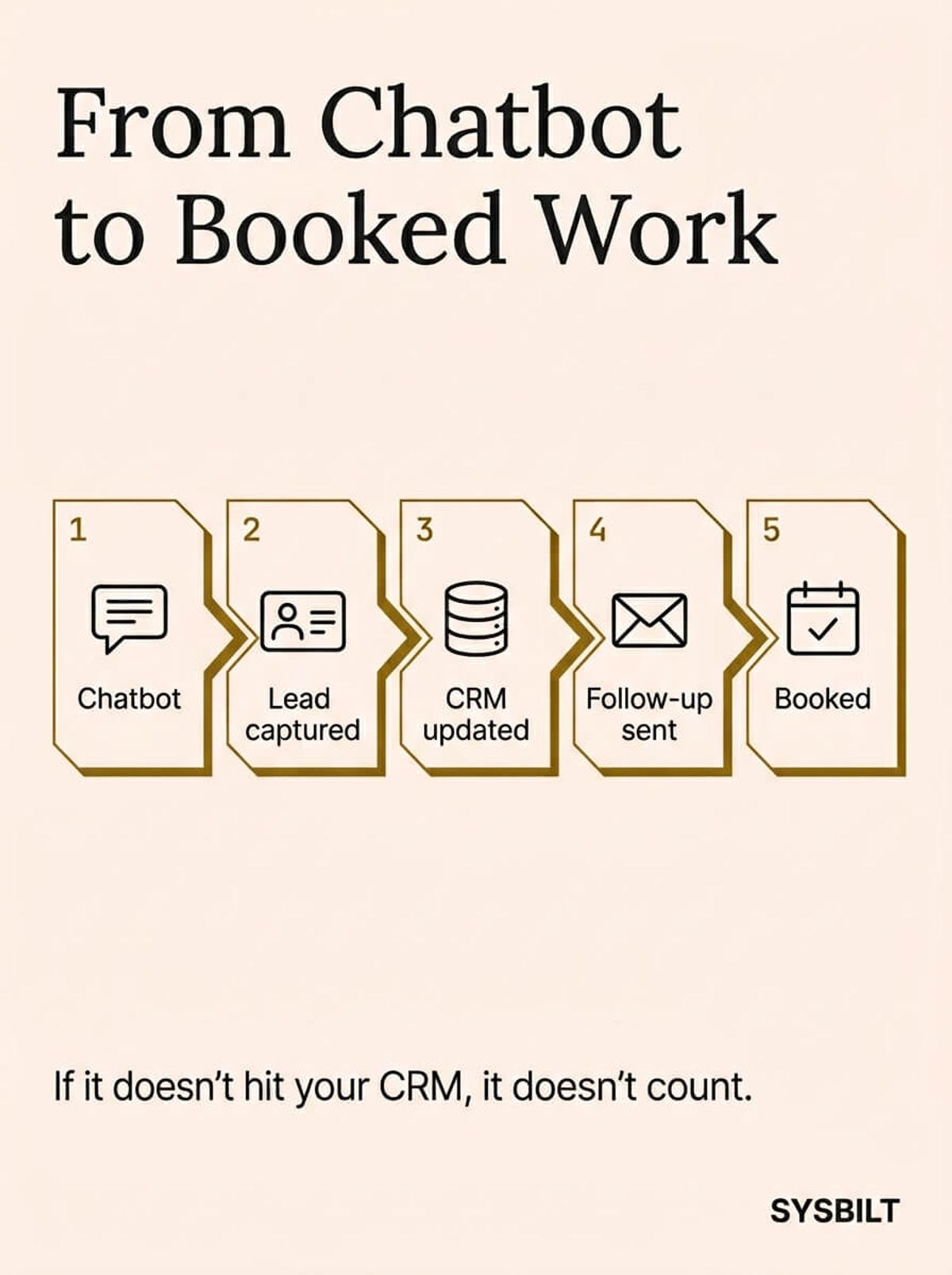
- 01The chatbot captures their name, contact details, and what they need
- 02That information flows automatically into your CRM
- 03A follow-up email goes out within minutes confirming the enquiry
- 04The lead appears in your sales pipeline with the right context attached
- 05If the enquiry is urgent or high-value, your team gets an instant notification
Think of it as a chain where every link matters. If the chatbot captures a lead but it sits in a platform your team never opens, the chain breaks at link two. If the lead reaches your CRM but nobody follows up because there's no automation, it breaks at link three. The value of the chatbot isn't in the conversation itself. It's in what happens after the conversation ends.
For most service businesses, the follow-up sequence is where the real revenue sits. A lead that gets a personalised email within five minutes of their enquiry is far more likely to convert than one that waits until Monday morning. Automation makes that response possible even when your whole team has gone home.
Tools like Make.com or Zapier bridge the gap between your chatbot platform and your CRM, email tool, and calendar. If you're already using automation in other parts of your business, adding the chatbot as a new trigger point is straightforward work. If you're not, the chatbot is a great reason to start.
To see how a chatbot fits into a complete business system, take a look at how we approach AI assistants for growing businesses. The chatbot is one part of a broader approach to making your business responsive around the clock without adding headcount.
What to Expect in the First Month
Your chatbot won't be perfect on day one. That's normal and expected. The first month is about watching how customers interact with it, learning from the gaps, and making it better each week.
Week 1: Monitor every conversation
Read every chatbot conversation for the first seven days. You'll quickly see where it handles questions well and where it stumbles. Common early issues include answering too broadly, missing details about specific services, or not recognising how Australian customers phrase their requests.
This review also reveals questions you hadn't anticipated. Customers will ask things your team knows the answer to but that weren't in the original training data. Note these down and add them.
Weeks 2–3: Improve and expand
Update the chatbot's training data based on real conversations. Add answers for questions it couldn't handle and refine the tone where it sounds too generic or too formal. Most platforms make this a matter of typing in the correct response and retraining, which takes minutes.
The improvements compound quickly. Each fix means fewer awkward interactions and more leads captured cleanly. By week three, the chatbot should handle the majority of common enquiries without issues.
Week 4: Check the numbers
Run a simple ROI calculation. If your average job is worth $2,000 and the chatbot captured three after-hours leads that would have otherwise been lost, that's $6,000 in potential revenue. Most capable AI chat tools run from $29 to $99 per month, with advanced features up to $150 to $300 per month, so the maths tends to work quickly for service businesses with decent job values.
Track two numbers specifically: how many conversations the chatbot handles per week, and how many of those turn into qualified leads your team follows up on. These two metrics tell you whether the chatbot is earning its keep. If the numbers are low, the fix is usually better training data or clearer calls to action in the conversation flow, not a different platform.
40% of Australian SMEs are currently adopting AI, up 5% from the previous quarter (Australian Government, 2024). The businesses moving fastest aren't waiting for perfect conditions. They're starting with one tool, learning from it, and expanding when the results prove themselves.
One thing to watch: don't try to make the chatbot handle everything from day one. Start with the basics, handle them well, and expand gradually. A chatbot that answers five questions perfectly builds more trust than one that attempts twenty and gets half of them wrong.
When the Chatbot Becomes Part of Your System
A chatbot on its own is useful. Connected to your CRM, automation workflows, and follow-up sequences, it becomes a real competitive advantage. Your business responds to every enquiry, qualifies every lead, and follows up without anyone on your team needing to remember.
This is what we mean by building a system rather than just buying another piece of software. The chatbot captures the lead, the CRM stores and organises it, the automation follows up on your behalf, and the dashboard shows you what's converting and what's not. Each piece feeds the next, and the whole thing runs whether you're at your desk or not.
You don't have to build all of it at once. Start with the chatbot, connect it to your CRM when you're comfortable, and layer in automation as your business grows. The system scales with you, one piece at a time.

WRITTEN BY
Felipe Chaparro
Systems Architect and Founder of SYSBILT. Felipe engineers custom automation, AI workflows, and performance web architectures for scaling Australian service businesses.