Tired of checking five apps for your numbers? Build a live KPI dashboard without coding using tools you already have. Here's the exact stack and steps.
IN THIS ARTICLE
- //Why Most Business Owners Still Run Blind
- //Decide What Goes on the Dashboard Before You Build It
- //The No-Code Stack That Works for Most Australian Service Businesses
- //How to Connect Everything in an Afternoon
- //The 15-Minute Weekly Review That Makes It Worth It
- //What This Looks Like When It All Connects
You're checking Xero on your phone, logging into HubSpot on your laptop, and opening Google Ads in another tab. By the time you've gathered the numbers, the meeting is half over and the data is already stale. This post shows you how to build a live KPI dashboard without coding, using tools most Australian service businesses already have. No software comparison, no 14-platform roundup. Just the stack, the steps, and the weekly routine that turns scattered data into real decisions.
Why Most Business Owners Still Run Blind
Here's the strange part: 96% of Australian business leaders agree that data and analytics improve decision-making (Salesforce AU, 2025). Yet only 57% feel their data strategy is actually aligned with their business goals (Salesforce AU, 2025). That's a massive gap between believing in data and being able to use it.
The problem isn't a lack of tools. It's that the tools don't talk to each other. Your CRM knows your pipeline, your accounting software knows your cash position, and your ad platform knows your cost per lead. But none of them share a screen. You end up logging into five different apps every Monday morning and piecing the picture together in your head, if you have time to do it at all.
For businesses in the $1M to $5M revenue range, that fragmentation isn't abstract. 81% of analytics and IT leaders in Australia say their organisations struggle to drive business priorities, with data fragmentation as a top challenge (Salesforce AU, 2025). In practical terms, it means you're making hiring decisions, marketing spend decisions, and pricing decisions based on gut feeling when the actual answers are already sitting in systems you've paid for.
If you've ever wondered why your business keeps growing but cash stays tight, the answer is often hiding in data you can't easily see. The cost of running blind compounds quietly. A marketing channel that's burning cash doesn't announce itself, and a margin squeeze on a specific service line doesn't send you a notification. By the time you feel it, the damage has already landed.
Decide What Goes on the Dashboard Before You Build It
Most dashboard guides skip this step and jump straight into which tool to use. That's how you end up with a beautiful dashboard tracking the wrong things.
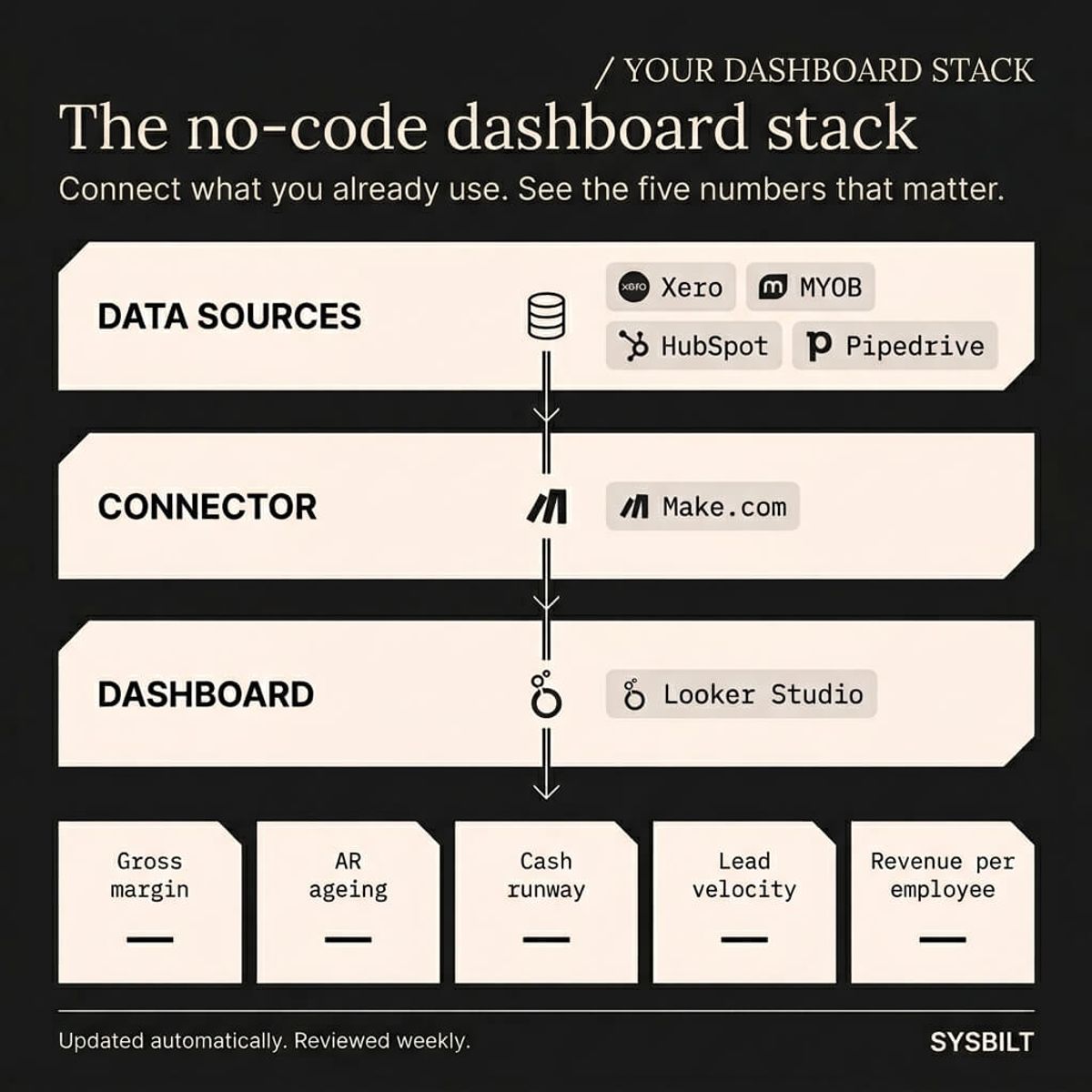
For a service business in the $1M to $5M range, you need five numbers:
- Gross margin — are you actually making money on the work you're doing, or are certain job types eating your profit without you realising?
- Accounts receivable ageing — who owes you money, and how long have they owed it?
- Cash runway — how many weeks of operating expenses can you cover with what's in the bank right now?
- Lead velocity — are new enquiries trending up or down compared to the same period last month?
- Revenue per employee — is the team getting more productive, or are you just adding headcount to keep up with demand?
These five metrics cover profitability, cash flow, sales momentum, and operational efficiency. If something is going wrong in your business, at least one of these numbers will move before you feel it in your day-to-day operations. For a deeper breakdown of which KPIs matter at different revenue stages, What KPIs Should a $5M Business Track Weekly covers the full list.
Start with five. Resist the urge to add more until you've built the weekly habit of actually checking them. A dashboard with twenty metrics is a spreadsheet with a better font.
The No-Code Stack That Works for Most Australian Service Businesses
You don't need to evaluate 14 platforms. For the majority of Australian service businesses, the stack looks like this:
| Layer | Tool | What it does | Cost |
|---|---|---|---|
| Financial data | Xero (or MYOB) | Revenue, expenses, invoices, cash position | Existing subscription |
| Pipeline data | HubSpot or Pipedrive | Leads, deals, conversion rates, source tracking | Existing subscription |
| Visualisation | Google Looker Studio | Pulls data into one dashboard with charts and scorecards | Free |
| Connector | Make.com | Moves data from Xero and HubSpot into Looker Studio automatically | Free tier available |
Google Looker Studio is completely free (SmartBizMetrics, 2026). It connects to almost anything through Google Sheets, and it handles everything we've seen at businesses under $10M in revenue. If your company runs on the Microsoft ecosystem, Power BI Pro at approximately $10 per user per month (SmartBizMetrics, 2026) is the alternative. For most Australian SMEs though, Looker Studio is the better starting point because there's no cost barrier and no procurement approval required.
Make.com sits in the middle as the connector. It pulls data from Xero and HubSpot on a schedule, pushes it into a Google Sheet, and Looker Studio reads the sheet automatically. You set it up once and the dashboard stays current without anyone touching it. The free tier handles typical volumes comfortably.
About 70% of new applications are now expected to be created with low-code or no-code approaches (Gartner, 2025), and internal dashboards are one of the most common use cases. This isn't experimental anymore. It's how modern businesses build internal tools without hiring a developer.
"The ability to take data, to be able to understand it, to process it, to extract value from it, to visualize it, to communicate it, that's going to be a hugely important skill in the next decades."
If you want to see how we build this kind of reporting infrastructure for service businesses, take a look at our Dashboards & Reporting service.
How to Connect Everything in an Afternoon
You don't need a developer and you don't need a weekend. Here's how the connection works in practice.
Step 1: Connect your data sources to Make.com. Create a free Make.com account and set up two scenarios. The first pulls financial summaries from Xero, covering revenue, expenses, and outstanding invoices. The second pulls pipeline data from HubSpot or Pipedrive, covering deals by stage, new leads this week, and conversion rate. Each scenario writes to a dedicated Google Sheet with a clean, consistent structure.
Step 2: Build your Looker Studio dashboard. Open Looker Studio, connect it to your Google Sheets, and build five panels with one for each KPI. Use the scorecards widget for single numbers and a simple time series chart for weekly trends. Keep the layout clean with one row of five cards at the top and trend lines below. Resist the urge to add twenty more metrics on the first day.
Step 3: Schedule automatic refresh. Set your Make.com scenarios to run daily, or hourly if your business moves fast enough to warrant it. Looker Studio reads the sheet in near-real time, so every time the underlying data updates the dashboard updates with it. You never manually export, copy, or refresh anything.
Step 4: Share it with your team. Looker Studio lets you share a view-only link with anyone who has a Google account. Your operations manager sees the pipeline, your bookkeeper sees the AR ageing, and you see the full picture. Everyone gets the same source of truth without needing a login to your CRM or accounting software.
The whole process takes an afternoon if your data sources are relatively clean. If they're messy, with inconsistent naming conventions or duplicate records, budget a second afternoon to standardise the fields before you connect them. That cleanup is worth doing regardless, because dirty data will undermine any reporting tool you use.
The 15-Minute Weekly Review That Makes It Worth It
A dashboard nobody checks is a waste of an afternoon. The tool isn't the hard part. The habit is.
Set a recurring 15-minute review every Friday morning. Open the dashboard, look at the five numbers, and ask three questions:
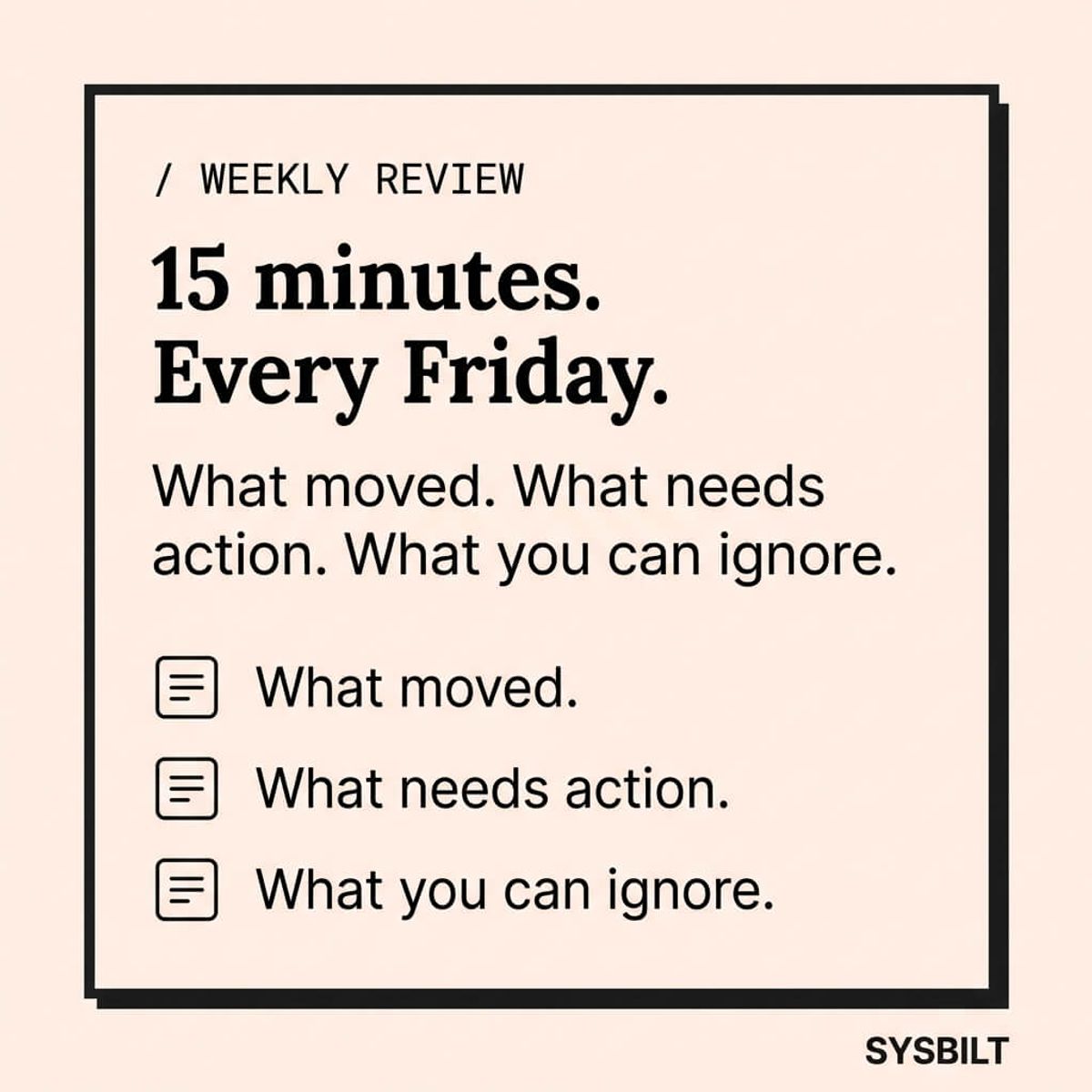
- What moved? If gross margin dropped or lead velocity spiked, something changed this week. Dig into the cause before it compounds into a bigger problem next month.
- What needs action? If AR ageing has invoices sitting at 60+ days, that's a cash flow problem forming right now. If lead velocity has been falling for three consecutive weeks, your pipeline will feel it in six weeks.
- What can I ignore this week? If revenue per employee is steady and cash runway is healthy, move on. The dashboard tells you what deserves your attention so you stop worrying about everything equally.
This isn't a reporting exercise. It's a decision-making ritual. The businesses that track their numbers consistently don't just spot problems faster. They also stop wasting energy on problems that don't exist. When the dashboard says things are on track, you trust it and redirect your attention to the work that actually moves the business forward.
Over time, you'll start to see patterns that were invisible before. You'll notice that lead velocity dips every January, or that margin tightens whenever a specific service type spikes in volume. Those patterns don't reveal themselves when the data lives in five separate apps, checked sporadically and never compared side by side. They become obvious when it's on one screen, updated weekly, and reviewed with the same three questions.
What This Looks Like When It All Connects
A standalone dashboard shows you the present. When it's connected to your CRM, your automation layer, and your financial tools, it becomes something closer to a control room. You see what happened, what's happening right now, and what's likely coming next.
That's the difference between checking a spreadsheet once a month and running your business with live intelligence. You stop making decisions based on what your accountant told you three weeks ago and start making them based on what's actually happening today.
At SYSBILT, Dashboards & Reporting is the layer we build on top of everything else. It reads from your website, your CRM, and your automations so the numbers aren't just accurate, they're connected. One screen, every number that matters, updated live.

WRITTEN BY
Felipe Chaparro
Systems Architect and Founder of SYSBILT. Felipe engineers custom automation, AI workflows, and performance web architectures for scaling Australian service businesses.