Google Ads spend is easy to see, profit isn't. Learn how to calculate ROI on Google Ads accurately, using margin and closed-loop tracking.
IN THIS ARTICLE
- //ROI vs ROAS, and why most dashboards lie
- //The only ROI formula that matters for business owners
- //How to calculate Google Ads ROI for lead gen (step-by-step)
- //What costs to include (so you do not fool yourself)
- //How to track it properly (without an enterprise data team)
- //Where this fits in the SYSBILT system
If you're spending money on Google Ads, you can see clicks, calls, and cost per lead in minutes. What you usually cannot see is the one number that matters, whether those ads actually made you money.
This post shows you how to calculate ROI on Google Ads accurately, using gross profit from won work, not just leads and not just revenue. We'll also show you the simplest way to close the loop from Google Ads to your CRM and back to what got invoiced, so your numbers stop changing depending on who made the spreadsheet.
"Half the money I spend on advertising is wasted; the trouble is I don't know which half."
That quote is over a century old, and it still describes how most business owners feel about Google Ads. The difference now is that you don't have to guess. The data exists. You just need to connect it properly.
ROI vs ROAS, and why most dashboards lie
Most Google Ads reporting is clean because it focuses on what Google can see.
That usually means:
- Clicks
- Cost per click (CPC)
- Leads and cost per lead (CPL)
- Return on ad spend (ROAS)
None of those are the same thing as profit.
ROI is a business number, ROAS is a marketing number
Google defines ROI as the ratio of net profit to costs (Google Ads Help, 2026).
That is a business answer.
ROAS is a marketing answer. It is usually calculated as revenue attributed to ads divided by ad spend. It can be useful early on, but it has a big blind spot.
ROAS does not know:
- Whether the job was profitable
- Whether you had to discount to win it
- Whether you had to refund it
- How much staff time it took to fulfil
- Whether the customer ever paid
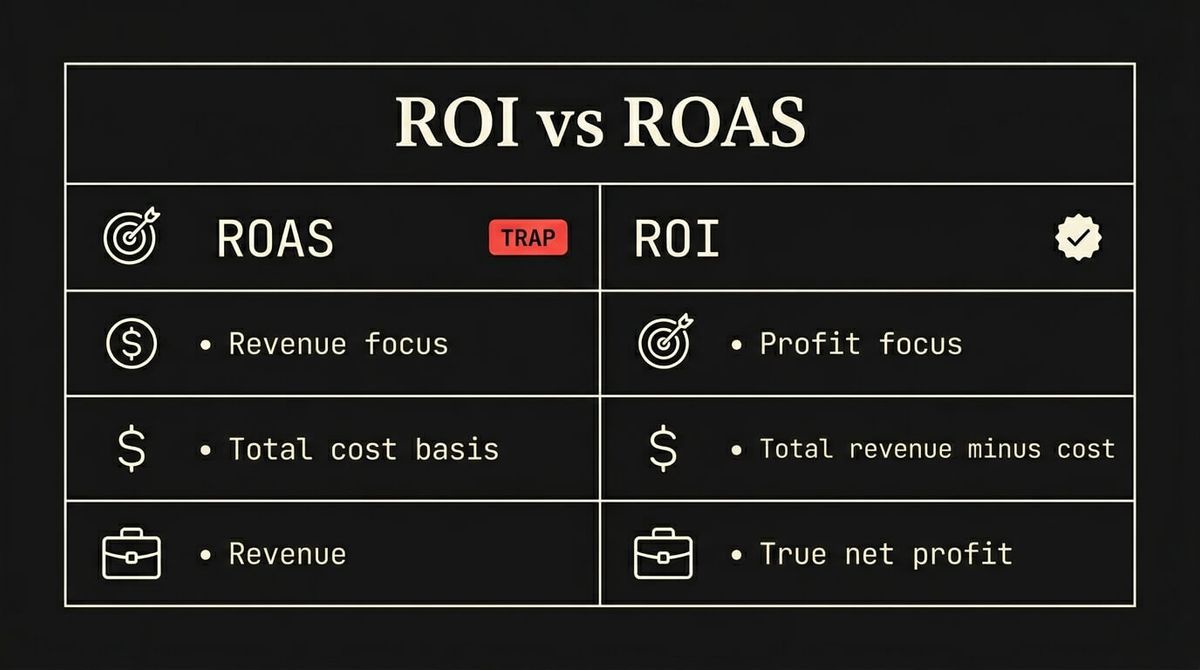
This is how you end up with a dashboard that looks great, while cash is tight and margins are shrinking.
A quick reality check
If your reporting stops at CPL or ROAS, you're not measuring ROI. You're measuring activity.
That might be fine when you're testing ads.
It is not fine when you're deciding whether to scale spend.
The only ROI formula that matters for business owners
The simplest definition is still the right one.
Google’s own documentation frames ROI as net profit relative to cost, which is a useful starting point. Now we translate that into a service business, because this is where most advice goes wrong.
Use gross profit, not revenue
Revenue is not return.
If you do $20,000 in revenue and it costs $14,000 to deliver, your return is not $20,000. Your return is the $6,000 that is left after delivery cost.
That is gross profit.
The practical formula we use
ROI % = (Gross profit from Google Ads jobs − Total Google Ads costs) ÷ Total Google Ads costs × 100
You can also write it as a ratio, but the percentage version is easier to compare month to month.
What Google’s formula misses in real life
Google also provides an ROI formula in its help documentation that uses revenue and cost of goods sold (Google Ads Help, 2026).
That is useful framing, but most service businesses do not have a clean, consistent “cost of goods sold” field per job.
So we work with what you can actually measure:
- Invoiced revenue from won deals
- Delivery cost (even if it is a tracked estimate)
- The full cost of running ads
How to calculate Google Ads ROI for lead gen (step-by-step)
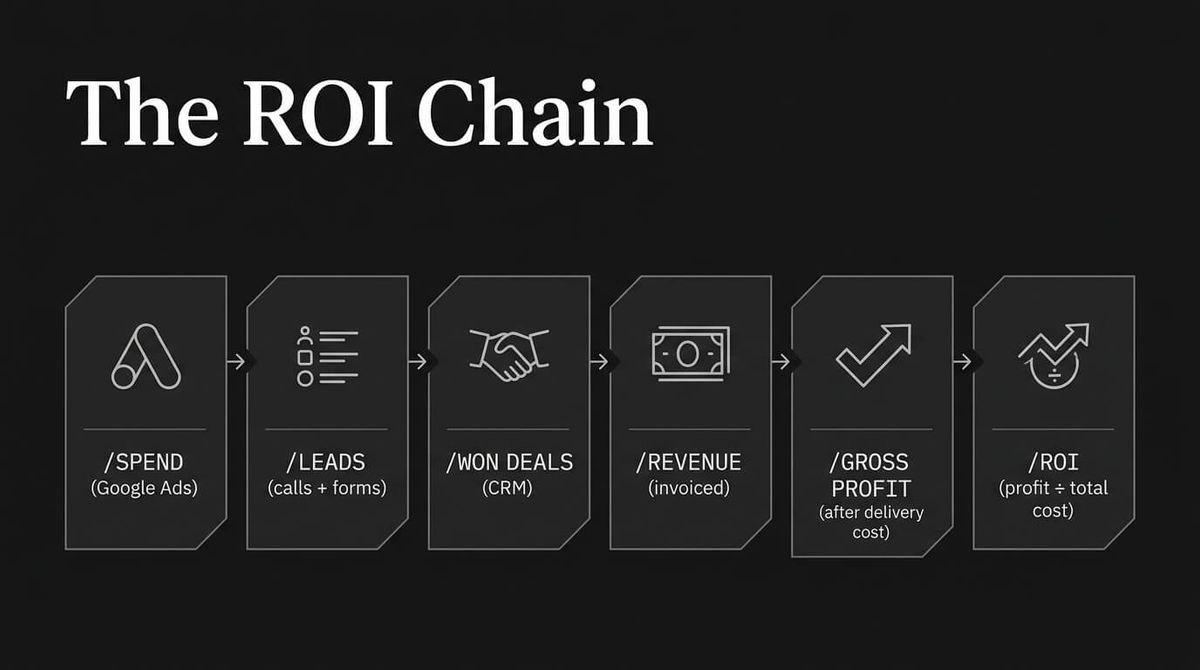
If you want accuracy, you need a chain you can audit.
Not a report you "feel good about."
Step 1: Start with spend
Pick a time window.
For most businesses, weekly for pacing and monthly for ROI is a good rhythm.
Write down:
- Google Ads spend for the period
If you're using an agency or contractor, you're not done yet. We'll add that in the costs section.
Step 2: Count leads, but do not stop there
Leads are still a useful early signal.
The 3P Digital AU benchmark puts average conversion rate at 6.96% across industries (3P Digital, 2024).
Your number will vary, but you want a stable way to compare.
Track:
- Calls from ads
- Form fills from ads
- Bookings from ads
If you only track “conversions” inside Google Ads without knowing what the conversion actually was, you're guessing.
Step 3: Track qualified leads and won deals in your CRM
This is where most ROI calculations fall apart, because the lead left Google, then disappeared into inboxes.
You need two things in your CRM:
- A way to identify that the lead came from Google Ads
- A consistent pipeline stage so you can count outcomes
Minimum viable stages:
- New lead
- Qualified
- Quote sent
- Won
- Lost
If you already have different stages, keep them. Just make sure "Won" and "Lost" are used consistently.
Step 4: Tie won deals to revenue that was invoiced
Revenue is not what someone said yes to.
Revenue is what was invoiced, and ideally what got paid.
If you do not connect won deals to invoicing, you will always overstate ROI.
This is where the pain shows up most, because the numbers start arguing:
- Marketing says the lead was worth $X
- Sales says the deal was worth $Y
- Finance says the invoice was $Z
You want to get to $Z.
Step 5: Calculate gross profit from those ad-sourced jobs
To calculate ROI, you need profit, not just revenue.
At a minimum, capture delivery cost per job as either:
- Actual cost, if you track it
- A consistent estimate, if you do not
Then calculate:
Gross profit = Invoiced revenue − Delivery cost
Step 6: Calculate ROI
ROI % = (Gross profit from ad-sourced jobs − Total Google Ads costs) ÷ Total Google Ads costs × 100
Worked example (with lead gen lag)
Let’s say in March:
- Spend: $5,000
- Total costs (including management): $6,200
- Won deals attributable to March leads: 8
- Invoiced revenue from those deals (when delivered): $32,000
- Delivery cost: $20,000
Gross profit = $12,000
ROI % = ($12,000 − $6,200) ÷ $6,200 × 100 = 93.5%
Notice what happened there.
If you only looked at revenue, you might think the return was massive.
If you only looked at CPL, you would have no idea.
The ROI number is the only one that can justify scaling.
What costs to include (so you do not fool yourself)
This is where ROI calculations get optimistic.
If you want the accurate version, include everything that had to be true for the sale to happen.
Include:
- Google Ads spend
- Agency or contractor management fee
- Call tracking software cost (if used)
- Landing page build and ongoing hosting cost (if the ads rely on it)
- Sales time, if you have a way to estimate it reliably
- Refunds, rework, or churn that directly relates to the ad-sourced work
Most businesses undercount costs by accident.
The most common one is delivery cost, because it does not live in the marketing tool.
But if delivery cost is ignored, you're not calculating ROI, you're calculating a best-case scenario.
How to track it properly (without an enterprise data team)
If your goal is accurate ROI, you need closed-loop tracking.
That means every ad-sourced lead can be followed through three systems:
- Google Ads (spend and click data)
- Your CRM (lead, pipeline stage, won or lost)
- Your finance system (invoice, delivery cost, gross profit)
The minimum viable tracking stack
You do not need an enterprise setup.
You do need consistency.
Here is the minimum that works for most Australian service businesses:
- Google Ads conversion tracking for forms and key actions
- Call tracking so phone leads are captured as conversions
- CRM source fields so every lead has a channel source
- Offline conversion imports so Google can learn from real outcomes, not just clicks
The weekly numbers that matter
If you want a dashboard you can trust, track these weekly:
- Ad spend
- Gross profit from ad-sourced work
- Payback time (how long between spend and gross profit)
If you want one screen that ties all of this together, that is exactly what we build in Dashboards & Reporting. The job is not just reporting, it is making sure marketing, sales, and finance stop arguing about the numbers.
Where this fits in the SYSBILT system
Paid ads are only one input.
The real advantage comes when your website, CRM, automation, and finance data are connected.
That is how you go from "we think it is working" to "we can prove it, and we know what to do next."
If this sounds like your business, book a call and we'll walk you through how this applies to your situation.
SEE HOW WE FIX THIS
See the exact system we build to fix this
Book a Dashboards and Reporting walkthrough
WRITTEN BY
Felipe Chaparro
Systems Architect and Founder of SYSBILT. Felipe engineers custom automation, AI workflows, and performance web architectures for scaling Australian service businesses.