Still manually reconciling Stripe in Xero? Learn how to connect Stripe to Xero automatically and stop losing hours to bookkeeping.
In this article
You're collecting payments through Stripe and managing your books in Xero, but every month you're still manually matching deposits to invoices. How you connect Stripe to Xero automatically depends on your transaction volume and the complexity of your payment flow. A business sending 20 invoices a month needs a different setup than one processing 500 e-commerce transactions a week.
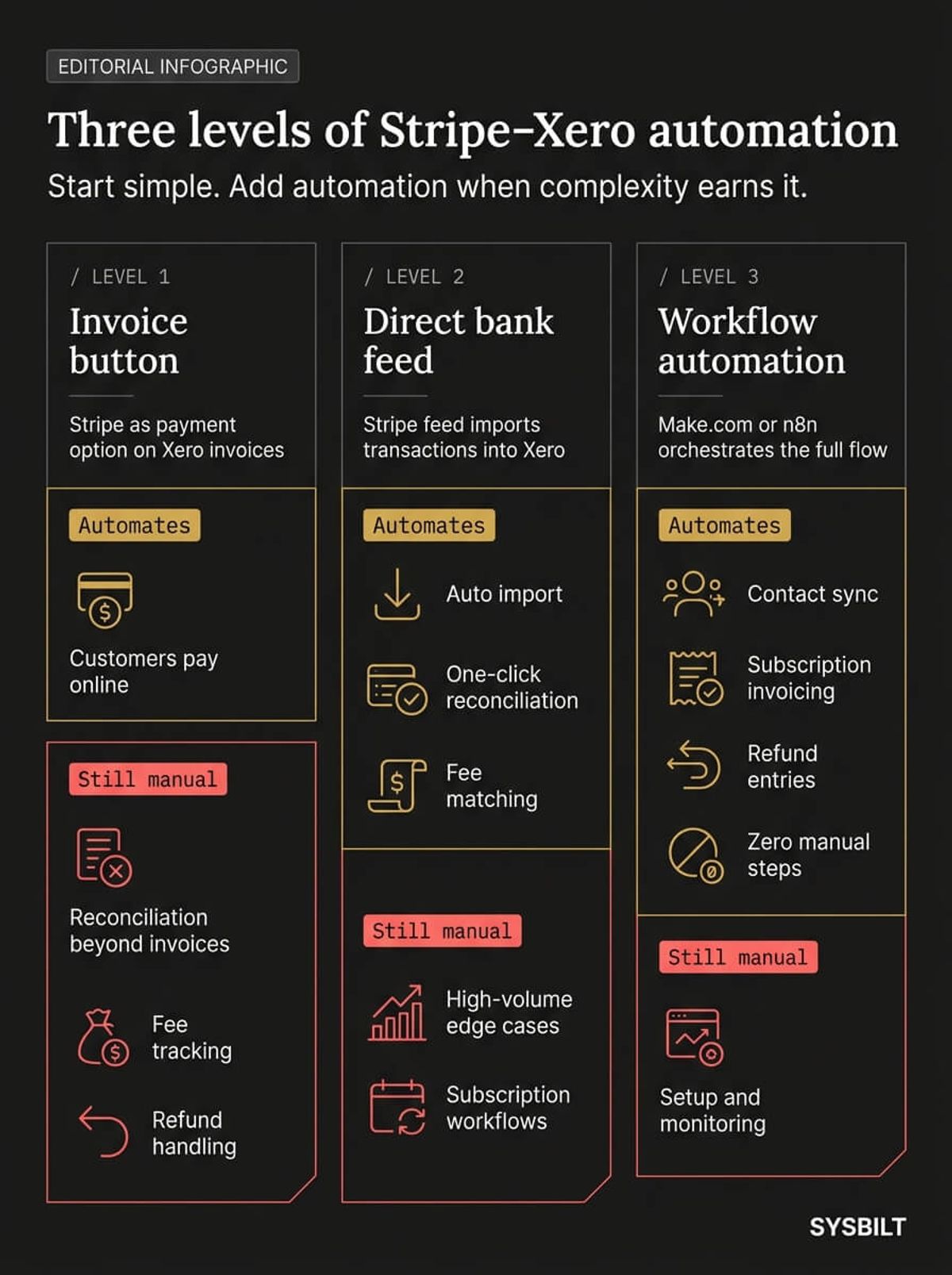
This post covers three levels of connection, from a basic invoice button to full workflow automation. It also covers the Australian-specific details that most guides skip entirely: GST on Stripe fees, clearing accounts, and what to do when the native integration can't keep up with your volume.
"Getting paid quickly can be a matter of survival for any growing business in the current economic climate."
Why Your Stripe Payments and Xero Books Still Don't Match
You've connected Stripe and Xero, but somehow the numbers still don't line up at month-end. The problem is usually the lump-sum payout.
Stripe doesn't send individual payments to your bank one at a time. It bundles multiple customer payments into a single deposit, minus processing fees. When that deposit hits Xero, it shows up as one line item that doesn't match any individual invoice.
Your bookkeeper then spends hours breaking it apart, matching fragments of a single bank deposit to dozens of separate transactions. Australian businesses lost $15,257 on average last financial year due to late payments alone (Xero, 2026). When reconciliation is already a mess, chasing those overdue invoices gets even harder because you can't see what's actually been paid.
Then there's the fee problem. Stripe charges a processing fee on every transaction and deducts it before the payout reaches your bank. That fee includes GST, which needs to be recorded separately in Xero so your BAS is correct. Most business owners don't realise this until their bookkeeper flags it or their accountant catches it at BAS time.
There's also a timing gap. Stripe typically takes two business days to deposit funds into your Australian bank account. If a customer pays on Friday, the funds might not arrive until Wednesday. That creates a mismatch between when the transaction appears in Stripe and when it shows up in your bank feed.
Add refunds to the mix and the picture gets worse. A refund in Stripe reduces the next payout, but it doesn't automatically create a credit note in Xero. If nobody records it manually, your revenue is overstated and your books don't match your bank.
42% of Australian SMB owners have missed business opportunities because of time consumed by financial admin (Dext, 2025). Stripe reconciliation is one of those admin tasks that compounds silently across the year.
Three Ways to Connect Stripe to Xero Automatically
Not every business needs the same setup. The right level depends on your transaction volume, whether you run subscriptions, and how much manual reconciliation you're willing to tolerate.
Level 1: Xero Invoice Payment Button
You add Stripe as a payment service inside Xero. Your customers get a "Pay Now" button on their invoices, and Xero marks the invoice as paid when they use it.
Best for: Service businesses sending fewer than 50 invoices a month where every payment comes through a Xero invoice. The limitation is that reconciliation stays manual for anything outside those invoices. Website checkout payments, subscription charges, and ad hoc Stripe payments won't match automatically, and fees need to be recorded separately.
Level 2: Stripe Direct Bank Feed
You connect Stripe as a bank feed in Xero so every transaction imports automatically. Each payment, fee, and payout appears as a separate line item, and you match them to invoices with one click instead of hunting through bank statements.
Best for: Most Australian businesses processing regular payments. Xero customers who use Stripe for online payments get paid 14 days faster on average (Stripe, 2024). The direct feed handles most reconciliation, but high-volume periods still require manual matching, and subscription workflows won't generate invoices on their own.
Level 3: Workflow Automation with Make.com or n8n
When you're processing hundreds of transactions daily or running subscriptions, the native integration starts to strain. A workflow automation tool sits between Stripe and Xero and handles what the native connection can't. It creates Xero contacts from new Stripe customers, generates invoices from subscription events, records refunds as credit notes, and splits complex payouts into clean line items.
Best for: E-commerce businesses, subscription-based services, and any business processing more than 100 transactions per week where manual reconciliation isn't sustainable.
How to Set Up Each Level
Level 1: Add Stripe as a Payment Service
In Xero, go to Settings, then Payment Services, and add Stripe. Connect your Stripe account and confirm your AUD currency settings. Stripe then appears as a payment option on every invoice you send.
Make sure GST settings in both Stripe and Xero are aligned. If they're not, you'll create mismatches that are painful to untangle later. In Xero, check that your default tax rate for income matches your Stripe configuration.
Level 2: Enable the Stripe Direct Feed
In Xero, go to Accounting, then Bank Accounts, and add Stripe as a bank feed. Then set up a clearing account in Xero specifically for Stripe.
This is the step most people skip, and it's the reason their reconciliation breaks. The clearing account acts as a holding area where Stripe transactions land before they're matched to your main bank account. Without it, Xero tries to match Stripe payouts directly to individual transactions, and the numbers never align because the payout includes multiple transactions bundled together minus fees.
Once the clearing account is set up, Stripe transactions flow in as individual line items. You match each one to the corresponding invoice, or create bank rules in Xero to automate the matching for recurring transaction types.
Common mistakes to avoid:
- Connecting Stripe to your main bank account instead of a dedicated clearing account
- Forgetting to set the feed currency to AUD
- Not creating a separate expense account for Stripe fees (record as a bank fee with GST credited)
- Ignoring the timing difference between when Stripe processes a payment and when funds hit your bank
Level 3: Build the Automation Layer
This is where Make.com or n8n comes in. You create workflows (called "scenarios" in Make.com) that trigger on Stripe events.
A typical automation setup watches for three event types:
- New charge: Creates a Xero contact (if new), generates an invoice, and marks it paid
- Subscription renewal: Logs the recurring invoice with correct line items and tax codes
- Refund: Creates a credit note in Xero applied to the original invoice with GST adjusted
Here's how a Make.com scenario works in practice. Stripe fires an "invoice.payment_succeeded" webhook. The scenario checks whether the customer already exists as a Xero contact and creates one if not. It generates a Xero invoice with the correct line items, applies the appropriate GST rate, marks the invoice as paid, and records the Stripe fee as a separate bank fee expense. The entire chain runs in under five seconds.
The setup takes more upfront work, but the payoff is clear. Businesses running 200+ transactions a week can save several hours of manual bookkeeping every month, and the error rate drops to near zero because no human is copying data between systems.
How to Handle Stripe Fees and GST in Xero
This is the section most guides skip entirely, and it's where Australian businesses get caught out the most.
Recording Stripe Processing Fees
Stripe deducts its processing fee before sending the payout to your bank. The amount hitting your account is less than what your customer paid. In Xero, you need to record both the gross payment and the fee as separate entries, otherwise your revenue is understated and your expenses don't reflect the true cost of payment processing.
Create a dedicated expense account in Xero called "Stripe Processing Fees" under your bank fees category. When reconciling, split the transaction into the gross revenue amount and the fee amount. If you're using the direct bank feed (Level 2), Xero can suggest this split automatically once you've set up bank rules for common transaction patterns.
GST on Stripe Fees
Stripe charges GST on its processing fees for Australian businesses. This GST is claimable as an input tax credit on your BAS, but only if it's recorded correctly in Xero. Make sure the fee line in your reconciliation is coded to a GST-inclusive tax rate so the credit flows through to your BAS automatically.
If you're processing a high volume of transactions, these GST credits add up quickly. Missing them means you're overpaying on your quarterly BAS. Most businesses don't notice until a review or an accountant flags it months later. Stripe provides a monthly fee summary that breaks down the GST component, which you can use as a reference when reconciling.
Multi-Currency Payments
If you accept payments in currencies other than AUD, Stripe converts the funds at its own exchange rate before depositing into your AUD account. The rate Stripe uses may differ from what Xero applies, creating small discrepancies during reconciliation.
For most businesses processing occasional international payments, the discrepancies are minor and can be written off as exchange rate adjustments. For e-commerce businesses selling globally, set up a foreign currency clearing account in Xero for each currency you accept. Let the exchange rate adjustment flow through as a realised gain or loss to prevent small discrepancies from compounding over time.
What to Do When the Native Integration Isn't Enough
You'll know you've outgrown the basic connection when:
- Reconciliation takes longer than 30 minutes each week
- Subscription billing doesn't generate recurring invoices in Xero automatically
- Refunds aren't logged as credit notes
- Multi-currency transactions create conversion mismatches
- You're manually creating Xero contacts for every new Stripe customer
Over 500,000 Australian businesses now use Stripe, with payment volume growing 5x from 2019 to 2023 (Stripe, 2024). As your transaction volume grows, the gap between what the native integration handles and what your business needs gets wider.
The automation layer closes that gap. A Make.com scenario watches for specific Stripe webhook events and translates them into precise Xero actions. A "charge.refunded" event becomes a credit note applied to the correct invoice with the GST entry adjusted. A new subscription creates a recurring invoice with the right line items and tax codes. Each workflow runs in seconds with zero manual input.
The real advantage isn't just saving time on one task. It's that every payment, refund, and fee is recorded accurately and consistently. For quarterly BAS lodgement, the difference is dramatic. Businesses using manual reconciliation often spend days preparing their Stripe data. With the automation layer, every transaction is already categorised, every fee has GST recorded, and every refund is matched to a credit note. Your accountant gets clean data and you stop paying professional fees for data cleanup.
If you're not sure which level is right for your business, start with Level 2 (the direct bank feed and clearing account). It covers most reconciliation needs with minimal setup. If you find yourself spending more than 30 minutes a week on Stripe reconciliation after three months, that's your signal to invest in the automation layer.
How This Fits Into Your Bigger Business System
Connecting Stripe to Xero isn't just an accounting task. It's one piece of a broader automation system that determines whether your business can grow without adding headcount.
When payments flow cleanly into your books, everything downstream improves. Your dashboard shows real revenue instead of estimates. Your CRM data matches your financial data, so you can see which clients and services are actually profitable. Your team stops spending time on work that should run itself.
When your payments, CRM, onboarding, and reporting are all connected, you start seeing patterns that manual processes hide. You can identify which acquisition channels deliver the most profitable customers, spot payment failures before they become churn, and make decisions based on data you trust.
The businesses that scale fastest connect their tools so data moves without anyone pushing it. Stripe to Xero is one connection, but the automation engine underneath ties everything into a single system. That's the difference between a business that scales and one that just gets busier with every new customer.
If this sounds like your business, book a call and we'll walk you through how this applies to your situation.

WRITTEN BY
Felipe Chaparro
Systems Architect and Founder of SYSBILT. Felipe engineers custom automation, AI workflows, and performance web architectures for scaling Australian service businesses.