Your best projects are invisible to prospects. Learn how to format a business case study for your website that builds trust and wins clients.
In this article
You've finished a project, the client's happy, and the results speak for themselves. But none of that is visible on your website. If you want to know how to format a business case study for your website, you're in the right place, because a well-structured case study page does more selling than any service description ever will.
This post covers the structure, the page formatting, and the repeatable process that turns your completed projects into your most persuasive marketing asset.
Why Case Studies Outsell Every Other Page on Your Website
Testimonials are nice. A case study is proof. The difference is specificity: a testimonial says "great service," while a case study says "we reduced their quoting time from three days to four hours."
49% of people trust reviews and case studies as much as personal recommendations (BrightLocal, 2024). That's nearly half your prospects treating a case study the same way they'd treat a referral from someone they know. And 75% of B2B buyers prefer not to engage with a sales team at all, relying on online content to guide their decisions (Gartner, 2025).
"Make the customer the hero of your story."
Here's the reality: you're too busy delivering great work to realise your best sales tool is a page you haven't built yet. Every completed project is sitting there with a story that could close your next deal, and it's not on your website.
The Three-Part Structure That Works
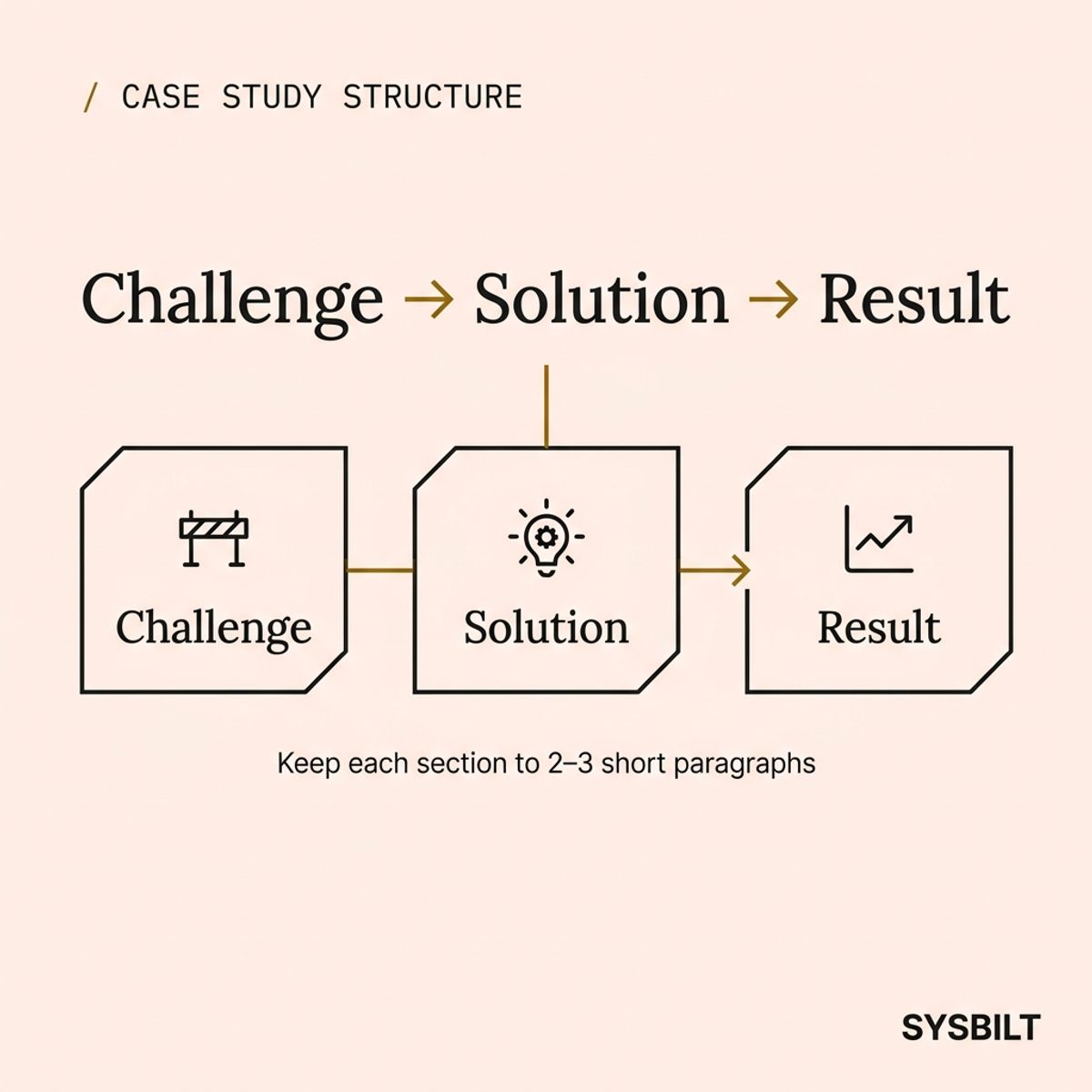
Keep it simple. Every effective case study follows the same three sections: Challenge, Solution, Result.
Challenge: What was the client dealing with before they came to you? Name the pain in two or three sentences. Be specific. "Revenue was growing but cash flow was unpredictable" hits harder than "they had business challenges."
Solution: What did you actually build or do? Don't list features. Describe the change, and focus on what shifted in how the client operates day to day. Keep this to two or three short paragraphs.
Result: Lead with a number. "Quoting time dropped from three days to four hours" or "lead response time went from 48 hours to under 10 minutes." If you can't measure it, describe the operational change. Include a direct client quote here, because the reader trusts the client's words more than yours.
Most visitors won't read every word. They'll scan the headings, read the result, and decide whether to contact you. Structure for scanning, not for storytelling.
How to Format the Case Study Page for Your Website
This is where most guides stop. They tell you what to write but not how the page should look. The formatting of your case study page matters just as much as the words on it.
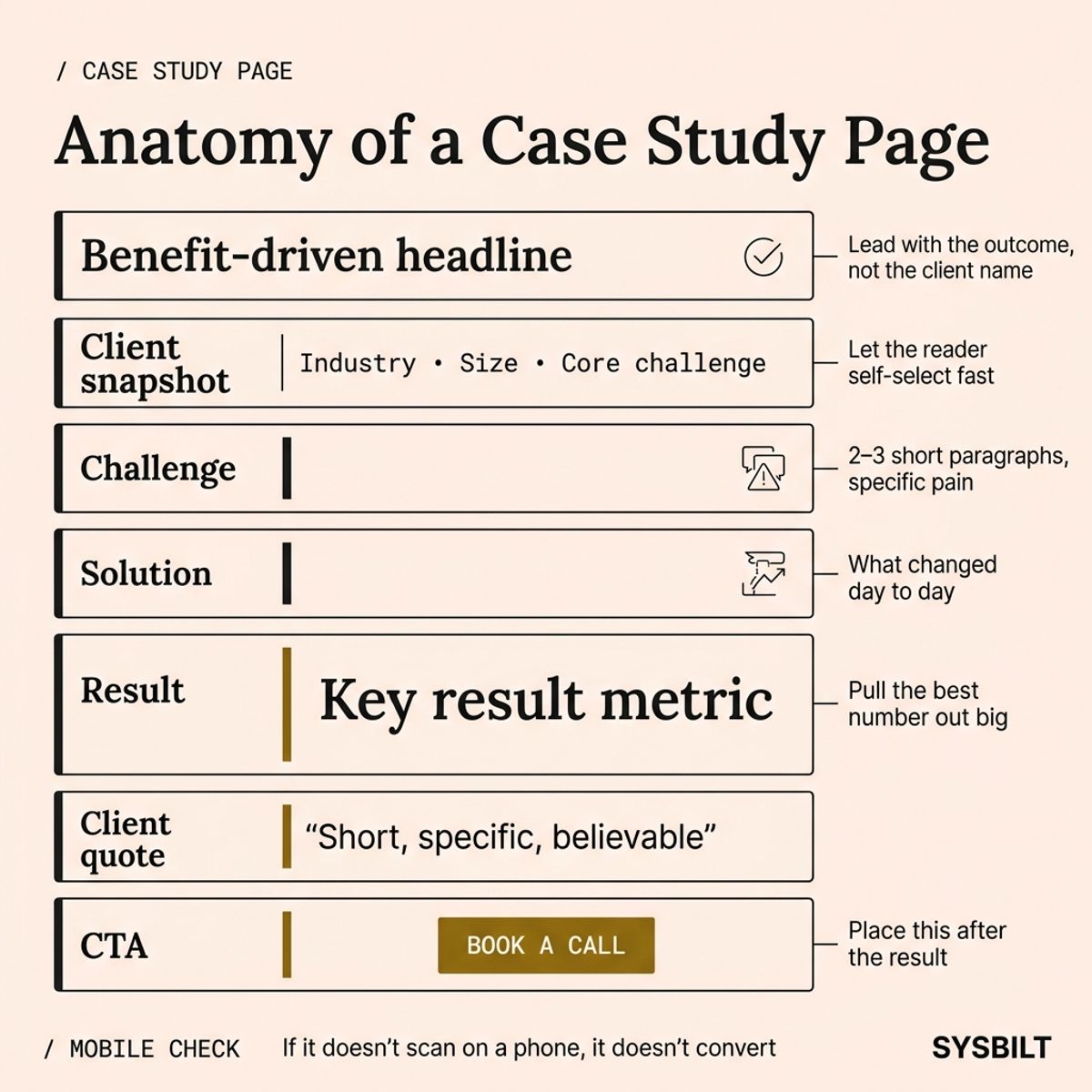
Start with a benefit-driven headline. Don't call it "ABC Plumbing Case Study." Call it "How ABC Plumbing Cut Quoting Time by 80%." The headline should tell the prospect what result they could expect, not just who the client was.
Add a client snapshot at the top. One line covering industry, business size, and the core challenge. This lets the reader self-select instantly: "Is this business like mine?"
Use clear section headings. Label your Challenge, Solution, and Result sections with visible headings. Don't bury them in running prose. The reader who scans should be able to get the full story from headings alone.
Pull your key metric out large. The single most impressive number from the result section should be displayed as a bold callout on the page. Think "80% faster quoting" or "$47,000 saved in year one." This is the number that stops the scroll.
Place your CTA after the result. Not at the top, not in the sidebar. After the result. The reader has just seen proof that you deliver, and that's when you ask them to book a call.
Format the URL cleanly. Use /proof/client-name or /case-studies/client-name. Keep it short, readable, and consistent across all your case studies.
Test on mobile. More than half your visitors will read this on a phone. If your pull quote runs off the screen or your images stack badly, the page loses credibility before they finish reading.
How to Get the Story Without Wasting a Day
The biggest bottleneck isn't the writing. It's getting the information out of the client. Most businesses skip case studies entirely because the extraction process feels too hard, but it doesn't have to be.
Ask these six questions right after you deliver the project, not six months later when the details have faded:
- What was the main problem before we started?
- What had you tried before that didn't work?
- What did we build or change for you?
- What's different now in your day-to-day operations?
- Can you share a specific number that improved?
- Can we use your name and business on our website?
That last question is the permission gate. Ask it early and casually, because most clients say yes when they're happy with the result, and they're happiest right after delivery.
Send these questions as a short form or voice note request. Don't schedule a 45-minute interview. You need five to ten minutes of their time, not a documentary.
Turn It Into a System
One case study is a project. A repeatable process that turns every completed job into a formatted case study is a content system.
Here's what that looks like in practice:
- Trigger: A project is marked complete in your CRM
- Extract: Your standard six questions go out automatically
- Format: Drop the answers into your case study template
- Publish: Add the page to your website under /proof or /case-studies
- Distribute: Link it from your relevant service page, include it in your next email, and share it on social
You don't need a content team to run this. You need a template, a trigger, and a habit. Once the process exists, every project becomes a piece of marketing that keeps working long after the job is done.
The businesses that win on trust aren't the ones with the fanciest websites. They're the ones that consistently show what they've done, in a format that's easy to scan, easy to believe, and easy to act on.

WRITTEN BY
Felipe Chaparro
Systems Architect and Founder of SYSBILT. Felipe engineers custom automation, AI workflows, and performance web architectures for scaling Australian service businesses.