
Still tracking leads in Excel? Here's how to replace spreadsheets with a CRM that fits your business, without losing a single lead in the switch.
In this article
You're running a real business, but your customer data lives in a spreadsheet that three people edit and nobody trusts. Leads slip through, follow-ups get forgotten, and you can't tell which jobs came from where. If you're ready to replace Excel spreadsheets with a CRM that fits your service business, this post covers what to look for, how to make the switch, and how to avoid the mistakes that sink most CRM projects.
The Real Cost of Running Your Business on Spreadsheets
Spreadsheets feel free. They're familiar, flexible, and they don't charge a monthly fee. But that "free" tool is quietly bleeding money from your business every week.
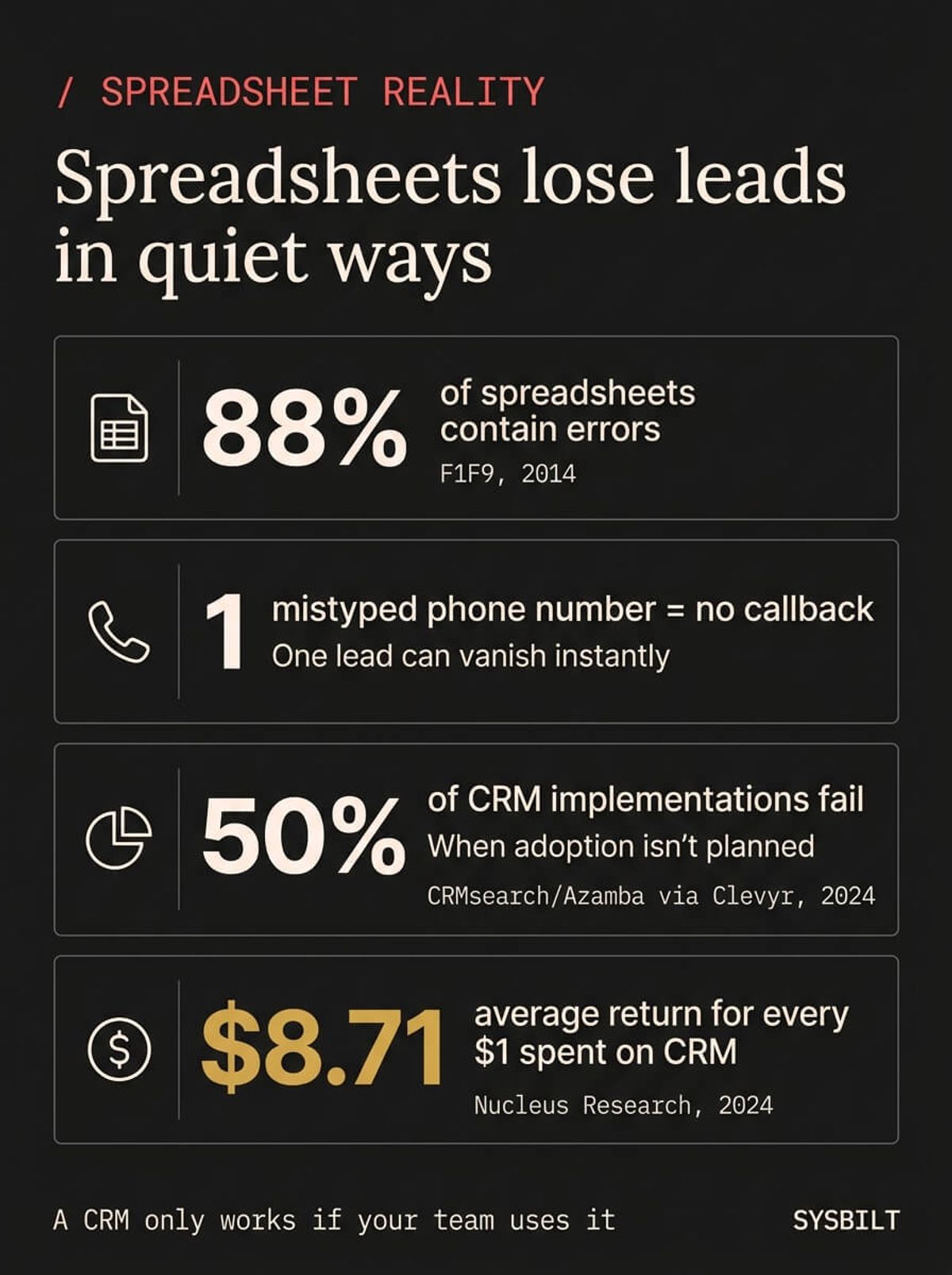
Research consistently shows that 88% of spreadsheets contain errors (F1F9, 2014). When your customer list, quote log, and pipeline tracker all live in Excel, those errors compound. A mistyped phone number costs you a callback, a deleted row erases a lead entirely, and a version saved over by a team member wipes out last week's pipeline.
For Australian businesses, the cost goes further than typos. Data quality issues cost Australian firms nearly A$500,000 annually (Iron Mountain, 2025), and while that figure reflects larger organisations, the pattern scales down. Even for a $1M–$3M service business, lost leads, duplicated effort, and missed follow-ups quietly add up to tens of thousands of dollars a year.
"People shop and learn in a whole new way compared to just a few years ago, so marketers need to adapt or risk extinction."
Your customers have changed how they buy. If your system for tracking them hasn't kept pace, you're not saving money. You're losing it.
What a CRM Actually Does (That a Spreadsheet Cannot)
A CRM isn't a fancier spreadsheet. It's a system that remembers every conversation, follows up automatically, and shows you where every lead sits in your pipeline without anyone updating a cell manually.
For a service business, that means:
- Automatic follow-ups. A lead fills out your website form at 9 PM. The CRM sends an acknowledgement immediately and schedules a follow-up task for the morning
- One source of truth. Every call, email, quote, and note sits on the contact record. When a team member picks up the phone, they see the full history without asking the customer to repeat themselves
- Pipeline visibility. You can see how many quotes are sitting unanswered, which leads went cold this week, and where your revenue is actually coming from
- Accountability. You know who followed up and who didn't
A service business uses a CRM differently to an online store. You're not tracking thousands of anonymous transactions. You're tracking 20 to 50 active conversations with real people who expect a personal response. The CRM becomes your team's shared memory, so when a client calls back three weeks later, whoever picks up the phone can continue the conversation without starting from scratch.
The difference isn't about features. It's about what happens to your leads when you're too busy to check a spreadsheet.
How to Know You've Outgrown Your Spreadsheet
You don't need a consultant to diagnose this. These are the signs that show up first:
- A job went to a competitor because nobody followed up. The lead came in, someone wrote it on a sticky note or added it to the bottom of the sheet, and it sat there until the customer called someone else
- More than one version of the customer list exists. One on your laptop, one on your admin's desktop, one in Google Sheets, and none of them match
- "How many active quotes do we have?" takes more than 10 seconds to answer. If that question requires digging through tabs and filters, your system isn't working
- Your team keeps asking you for information that should be available to everyone. You've become the human search engine for your own business
- Sunday nights are spent updating the spreadsheet. That's not dedication. That's a system failure wearing a disguise
If two or more of those sound familiar, you haven't outgrown Excel because your business got complicated. You've outgrown it because your business grew, and the tool didn't grow with it.
How to Switch Without Losing a Single Lead
This is the part that stops most business owners from making the move. The fear isn't about the software, it's about the gap between the old system and the new one where leads could fall through.
Here's how to close that gap:
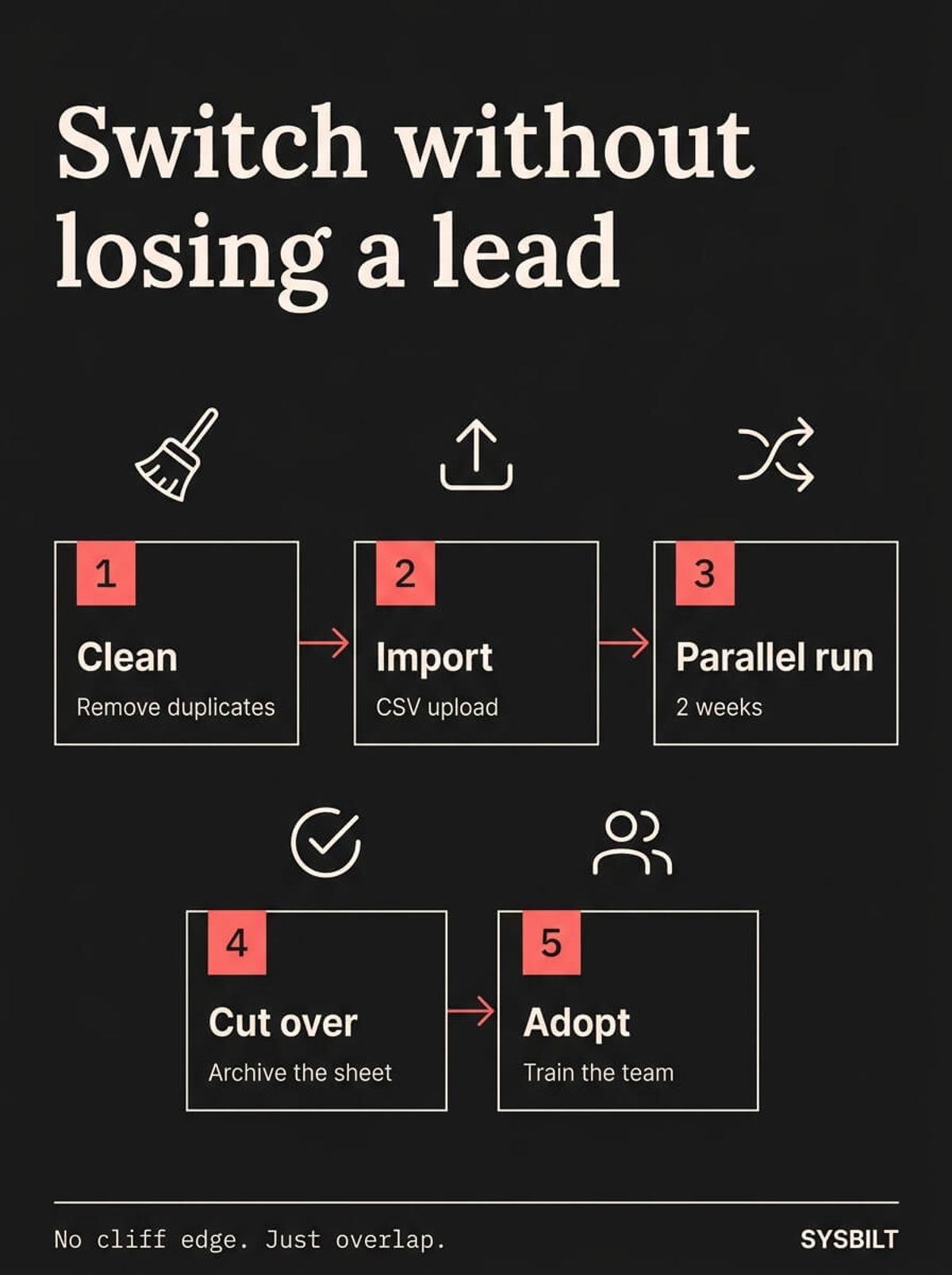
- 01Clean your data first. Export your spreadsheet, remove duplicates, fix obvious errors, and standardise your column names. This takes a few hours and saves weeks of frustration later
- 02Import into the CRM as a single batch. Most modern CRMs accept a CSV upload. Map your columns to the CRM fields and bring everything in at once
- 03Run both systems in parallel for two weeks. Enter new leads into the CRM and keep the spreadsheet as a backup. This gives your team time to build the habit without the pressure of losing anything
- 04Cut over after two weeks. Once the team is comfortable and every new lead is going into the CRM, archive the spreadsheet. Don't delete it, just stop using it as the live system
During the parallel period, watch for three things. First, make sure every new lead is going into the CRM, not just the spreadsheet. Second, check that your team is logging notes and updates in the CRM after calls, not in their own notebooks. Third, compare the two systems at the end of each week to confirm nothing slipped through. If anything is missing from the CRM, fix the habit now while the spreadsheet backup is still active.
After two weeks, you'll have enough confidence to archive the spreadsheet permanently. The transition doesn't have to be a cliff edge. Run it as an overlap, and the risk drops to almost zero.
See how SYSBILT builds CRM systems that service businesses actually use →
Why Most CRM Setups Fail (and How to Avoid It)
Here's the stat nobody in the CRM industry wants to talk about: around 50% of CRM implementations fail within two to three years (Clevyr, 2024). That's not a technology problem. It's a fit problem.
The three most common mistakes:
- Picking a CRM built for enterprise sales teams. If the setup process requires a dedicated admin and three months of configuration, it wasn't designed for a 10-person service business. You need something your team can learn in a week and use on day one
- No training or adoption plan. Handing your team a login and hoping for the best doesn't work. The businesses that succeed with CRM build short training sessions into the first two weeks and assign someone to answer questions as they come up
- Automating a broken process. If your follow-up workflow doesn't exist yet, no tool will fix that. Define the process first, then let the CRM run it
When the CRM fits the business, the results speak clearly. One Melbourne service business improved its quote win rate from 32% to 48% after implementing a CRM, with revenue up 35% and no additional marketing spend (Data-Insite, 2026). Across the broader market, businesses using CRM report 47% higher customer retention rates (DemandSage, 2026), and for every dollar spent on CRM, the average return is $8.71 (Nucleus Research, 2024).
The right CRM for a 10-person service business looks nothing like the right CRM for a 500-person sales floor. You need short setup time, a clean interface your team can learn without a three-day workshop, and enough flexibility to match your actual workflow. If it takes longer to set up than it saves you in the first month, it's the wrong tool.
A CRM that matches your business size and workflow isn't an expense. It's one of the highest-returning investments you can make.

WRITTEN BY
Felipe Chaparro
Systems Architect and Founder of SYSBILT. Felipe engineers custom automation, AI workflows, and performance web architectures for scaling Australian service businesses.