
If your team keeps answering the same questions all day, build an AI assistant and knowledge base that removes interruptions without losing control.
In this article
If your team keeps answering the same questions every day, the problem is not your staff. The problem is that the business has no trusted answer system.
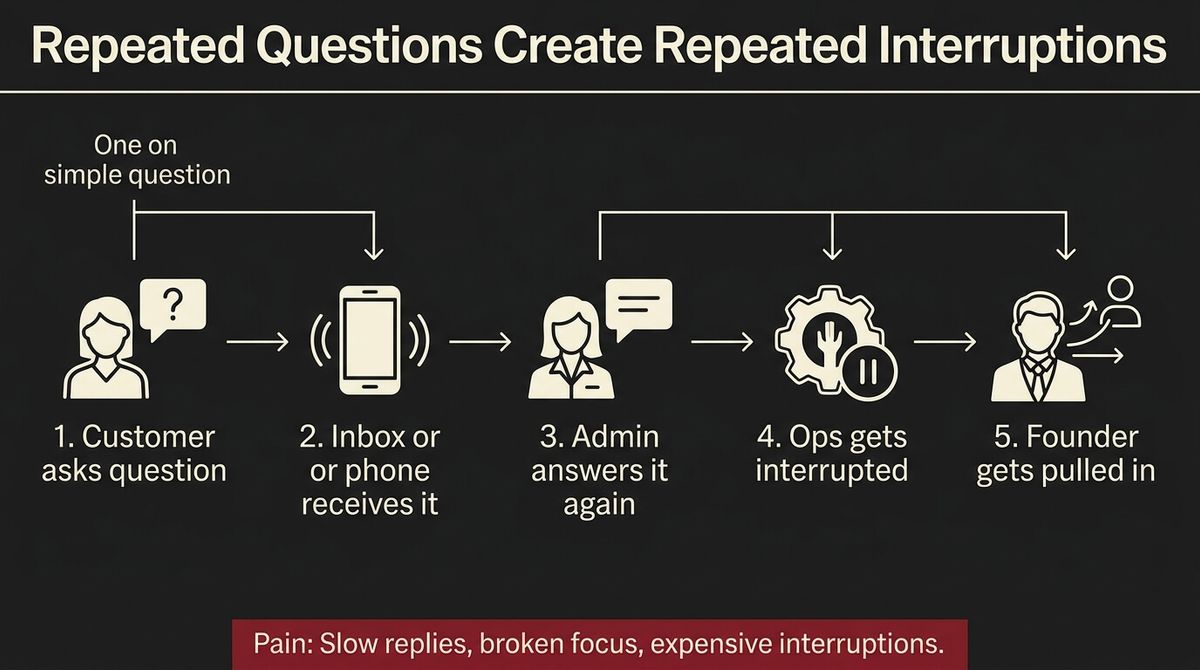
One person answers the question in the inbox. Another answers it on the phone. Someone else answers it in a follow-up email. Then the founder gets pulled in because the answer was slightly different this time. That is how a growing service business loses hours without noticing.
This post breaks down how to stop that pattern, what to build instead, and where an AI assistant actually fits without turning your customer experience into a mess.
The interruption tax nobody measures
Most business owners notice payroll, ad spend, and software costs. They rarely measure interruption cost.
But that cost is real. Australian workers lose around 600 hours a year to workplace distractions and lost focus, according to Economist Impact research covered by AHRI. And a University of Queensland-led study found that unnecessary interruptions increase stress and compromise performance.
That matters because repeated questions do not just waste a few minutes. They break concentration, slow quoting, delay follow-up, and push higher-value work into after-hours catch-up.
In a scaling business, the damage spreads fast:
- admin staff become copy-and-paste machines
- ops staff get dragged out of delivery work
- founders become the final fallback for basic answers
- customers still wait longer than they should
What looks like a communication issue is usually a systems issue.
Why FAQ pages and shared inboxes do not fix it
Most teams try to solve this with a bigger FAQ page, a shared inbox, or a “just check the docs first” instruction.
That usually fails for one simple reason: the answer might exist, but it is not available in the moment the question gets asked.
Customers do not want to dig through a menu tree. Staff do not want to search five folders, two old emails, and a random PDF just to confirm whether you service a location, how quickly you can respond, or what happens after someone enquires.
A static FAQ page can help, but on its own it does not change the workflow. The question still lands on a human. The human still needs to decide whether the answer is current. And if the answer feels even slightly uncertain, the question gets escalated anyway.
That is why the real goal is not to “document more.” The goal is to make the right answer available instantly, consistently, and with clear boundaries.
What actually works is an answer system
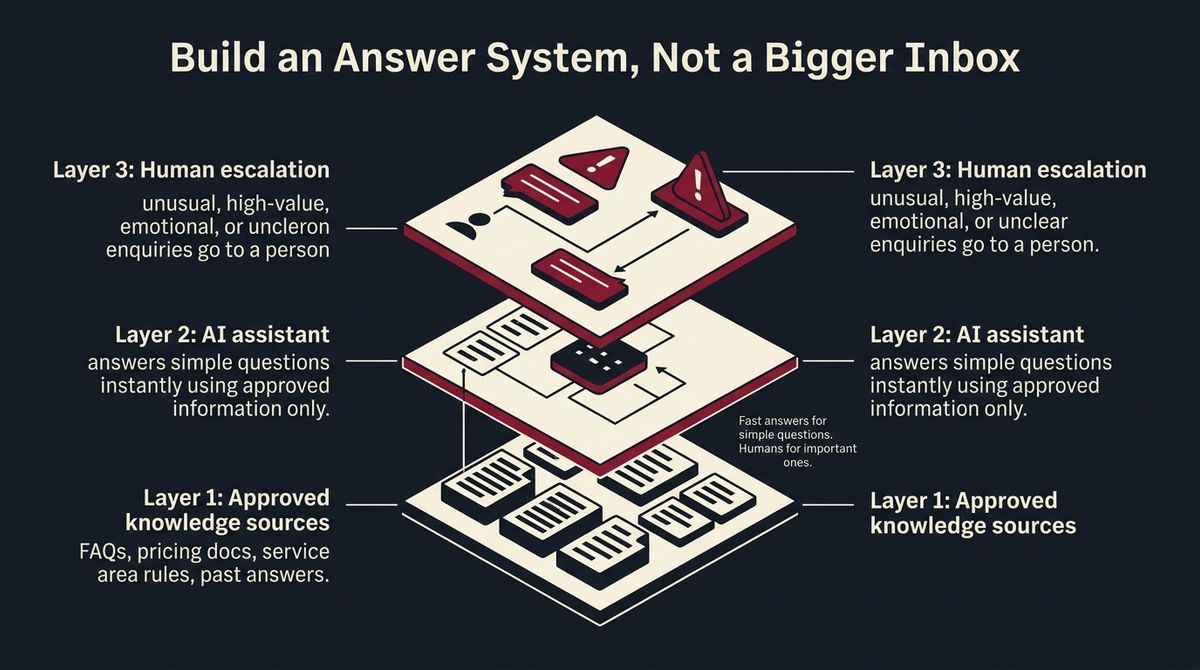
The fix is a three-part answer system.
First, you need one approved source of truth. That means service rules, pricing boundaries, service areas, common objections, and process answers live in a clean knowledge base instead of floating around in people’s heads.
Second, you need an AI assistant that can use that approved information to answer simple questions immediately. It should not improvise. It should not guess. It should work from the material you have approved.
Third, you need a human handoff for anything that is unusual, commercially important, emotional, or unclear.
That is the point most competitor content misses. The win is not replacing people. The win is protecting people from repetitive interruptions so they can spend their time on work that actually needs judgment.
If you are already seeing this problem in your inbox, How to Use AI to Answer Customer Emails Without Sounding Like a Robot is the natural next read.
The three layers to build first
01Build the knowledge layer
Start with the questions your team answers every week.
- What areas do we service?
- What kinds of jobs do we take on?
- What is the usual response time?
- What happens after someone submits an enquiry?
- What should we say when a job is not a fit?
Write the answers once, clearly and in plain language. Keep them current. Remove duplicate versions.
This is where a proper knowledge base matters more than a random folder full of documents. If your team cannot trust the source, they will keep asking a human anyway.
02Add the AI answer layer
Once the source is clean, the AI assistant sits in front of it.
Its job is simple:
- answer routine questions instantly
- use only approved information
- keep tone consistent
- capture context before handing off when needed
This is where many businesses get distracted by shiny chatbot demos. The important part is not the widget. The important part is the control layer behind it.
The assistant should know what it is allowed to answer, what it should never answer, and when it must escalate.
[VISUAL 3 HERE — Caption: The system that stops the same questions hitting your team every day]
03Design the handoff layer
A good AI assistant does not try to win every conversation.
It should escalate when:
- the question affects pricing or scope in a non-standard way
- the person is frustrated or high stakes
- the answer is unclear or missing
- the opportunity looks commercially important
That way the AI handles the repetitive front line, and your team handles the moments that actually matter.
What this looks like in a real service business
Imagine the same five questions keep landing every day.
- Do you service my area?
- How quickly can someone get back to me?
- Do you handle commercial work?
- What happens after I submit a form?
- Can you give me a ballpark before a call?
Without a system, those questions bounce between inboxes, staff, and the founder.
With a system, the AI assistant gives a fast first answer from your approved knowledge base, captures the right context, and only hands the conversation to a human if the enquiry needs judgment.
That changes more than response speed. It changes the feel of the business. Customers get consistency. Staff get their focus back. Founders stop acting like a search engine with a calendar.
If the bigger goal is scaling without adding more interruption-heavy admin, How to Scale Without Hiring More Staff connects the dots more broadly.
How this fits into a business that scales
An AI assistant is not a standalone trick. It works best as part of a system.
Your website captures the question. Your knowledge base holds the approved answers. Your AI assistant handles the repetitive front line. Your team steps in only when the conversation actually deserves a person.
That is how you stop your staff answering the same questions every day without sacrificing quality or control.
And if your current documents are scattered between old folders and random tools, Notion vs Google Drive for Your Company Knowledge Base is the right place to tighten the foundation first.
If the repetitive front line should sit on an assistant instead of your staff, that's the AI assistants work.
That is exactly what we build inside SYSBILT’s AI Assistants system. If this sounds like your business, book a call and we will show you where an AI assistant can take the pressure off first.
See how we fix this
See the exact system we build to fix this
Show me where an AI assistant could take the pressure off
WRITTEN BY
Felipe Chaparro
Systems Architect and Founder of SYSBILT. Felipe engineers custom automation, AI workflows, and performance web architectures for scaling Australian service businesses.