Your automation is about to get smarter and riskier, learn what MCP servers business automation means and how to pilot it safely.
In this article
If you're already automating parts of your business, you've probably hit the same ceiling: the tools can move data, but they can't think. You still get dragged back in for every exception, every follow-up, every weird edge case.
MCP servers business automation is the next layer people are talking about, and it matters because it changes how AI assistants connect to the systems you already run on, like your CRM, inbox, docs, and finance tools.
In this post, we’ll keep it operator-level. What MCP servers are, what they change, what can go wrong, and how to pilot them safely without turning your internal systems into a security incident.
What an MCP server is in plain English
MCP stands for Model Context Protocol. It was introduced by Anthropic in November 2024 as an open standard for secure, two-way connections between data sources and AI-powered tools (Anthropic, 2024).
Here’s the practical version.
An MCP server is a standard way to let an AI assistant use a tool or data source, without every app building a custom integration from scratch.
Instead of saying:
- This AI assistant can read HubSpot because we built a custom HubSpot integration
- That other assistant can read Xero because we built a different integration
You get a consistent interface, so the assistant can:
- Read information it needs
- Take actions you allow
- Log what it did
- Use the same connection pattern across tools
People describe it as “USB-C for AI”. That’s close. For a growing business, the real win is simpler:
- One standard way to connect assistants to your systems, so you can reuse access and governance instead of rebuilding it every time.
What MCP changes for business automation in 2026
Most automation in most businesses today is deterministic.
- If X happens, do Y
- If the form is submitted, create the deal
- If the invoice is overdue, send the email
That’s still the right approach for a lot of work.
MCP matters because it pushes automation in a different direction.
Instead of building 50 separate workflows, you can give an assistant capability and let it decide what to do next.
For a Scaler, that’s valuable when the pain is not “we do nothing”, it’s “we do the same coordination work 100 times a week.”
Here are the kinds of outcomes MCP makes more realistic:
- Fewer interruptions: the assistant can fetch context before asking you a question
- Faster turnaround: the assistant can draft responses, updates, and follow-ups with the right data pulled in
- Less admin glue: less copy-paste between tools, fewer one-off integrations per assistant
This is not about replacing your team. It’s about removing the little handoffs that keep you as the permanent bottleneck.
MCP vs Make.com, Zapier, and n8n
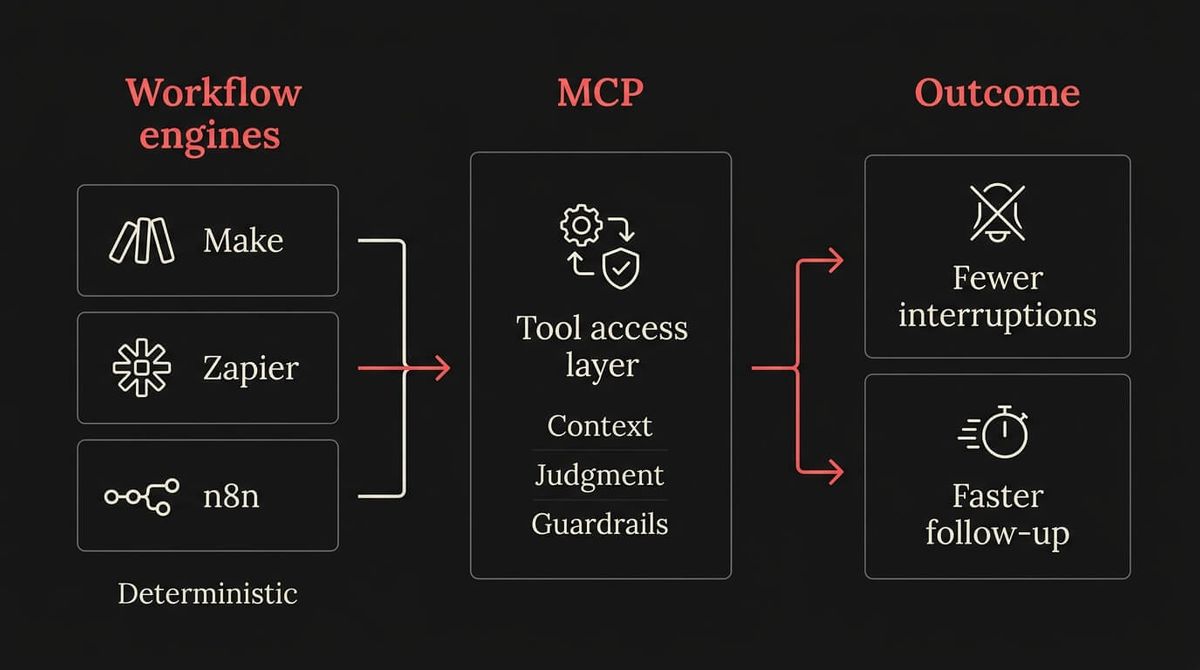
A lot of the early MCP hype makes it sound like a new automation platform.
It’s not.
Here’s the clean comparison.
Make.com, Zapier, and n8n are workflow engines
They’re great when:
- The process is repeatable
- The trigger is clear
- The action is specific
- You want the same result every time
They’re also easier to govern because you can read the workflow and understand what it will do.
MCP is a tool access standard for AI assistants
MCP is more like “how an assistant talks to tools.”
It’s useful when:
- The assistant needs to choose the right tool for the moment
- The assistant needs context across multiple systems
- The request is messy or human, like an email thread or a customer question
The pragmatic truth is that they work together.
- Use Make.com for the core deterministic workflows that should never be left to interpretation
- Use MCP for assistant-style work where the assistant needs to read, reason, and then choose an action under constraints
If you’ve already invested in Make.com flows, MCP does not replace that work. It can sit on top, and reduce the manual handling around it.
The real risks, and why you can’t ignore them
If MCP becomes the standard way assistants access tools, it also becomes the standard way attackers try to get in.
Two data points from recent writing make the risk concrete.
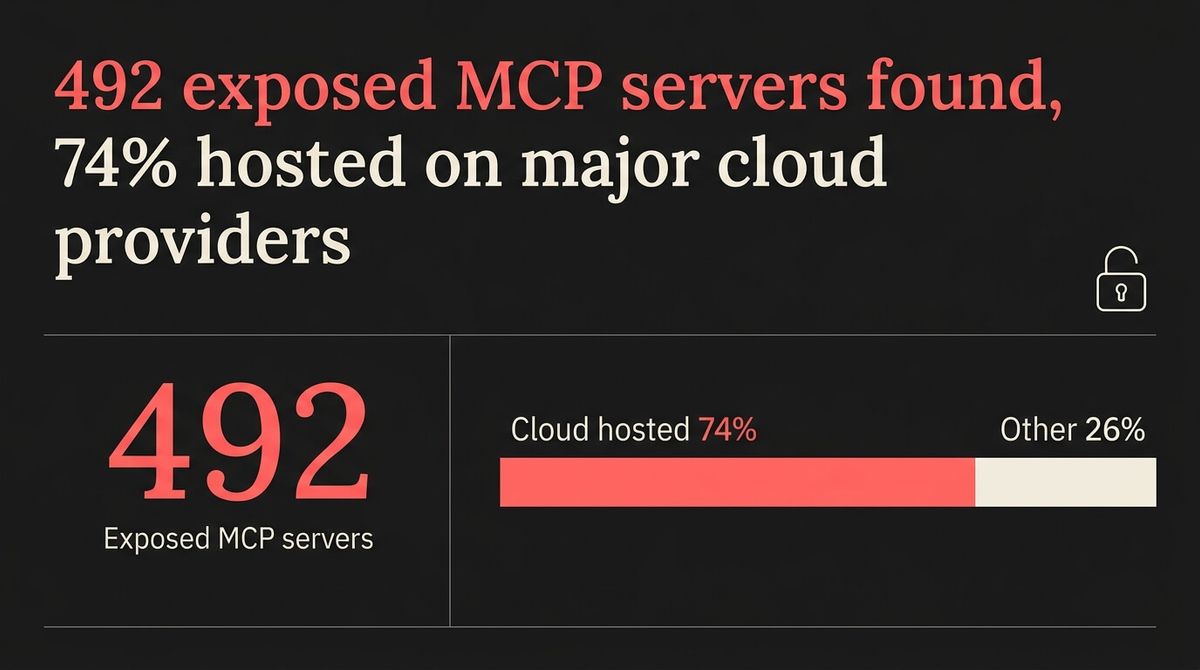
Trend Micro reported: “We found 492 MCP servers with no client authentication or traffic encryption.” (Trend Micro, 2025)
They also found: “Approximately 74% of the uncovered exposed MCP servers are hosted on major cloud providers.” (Trend Micro, 2025)
That is not a theoretical problem. That is “someone put the keys to a system on the internet.”
There are also the AI-specific risks that don’t show up in normal integration projects.
Red Hat’s security write-up points out a key problem with AI tool use: “even if a user doesn’t intend a specific action, the LLM might decide it’s the appropriate one.” (Red Hat, 2025)
For a business operator, this is the takeaway:
- If an assistant can take actions, you need to design for the fact it can misunderstand intent
- If an assistant can read data, you need to assume it can be tricked into exposing it
- If an MCP server is exposed, you need to treat it like a production system breach, not an app setting
A safe way to pilot MCP in a growing Australian business
You do not need to ignore MCP. You do need to pilot it like you would pilot anything that touches customer data, invoices, and internal IP.
Google Cloud notes that local MCP servers commonly use stdio, while remote servers commonly use SSE for transport (Google Cloud, 2025).
That gives you a practical starting point.
Start with a read-only pilot
Pick one workflow where read access creates leverage, but write access creates risk.
Good pilots:
- Summarise a customer email thread and pull the matching CRM record
- Draft a follow-up email using the last quote and last meeting notes
- Create an internal task list based on what changed in a pipeline stage
Avoid early pilots that:
- Send money
- Change customer records at scale
- Cancel subscriptions
- Email a whole list
Treat write actions as privileged
If you want the assistant to take actions, use guardrails:
- Approval steps for anything that sends an email externally
- Approval steps for anything that changes deal stage, pricing, or terms
- Tight scopes and short-lived credentials
- Logging that a non-technical person can review
Design the access model before you build anything
This is where most “quick pilots” blow up.
Before you connect anything, decide:
- What systems the assistant can see
- What it can change
- What it can never touch
- Who reviews the logs
- How you kill it fast if it goes sideways
Internal pillar CTA
If you want help designing a safe pilot, we build business automation systems that keep the benefits and strip out the chaos. Start with Automation.
The part everyone misses
MCP is not a magic button. It’s plumbing.
The businesses that win with it won’t be the ones who chase the newest tool. They’ll be the ones who design a clean integration layer, set rules around it, and then let assistants do the small work that keeps pulling the founder back into the day.
"Open technologies like the Model Context Protocol are the bridges that connect AI to real-world applications, ensuring innovation is accessible, transparent, and rooted in collaboration."
If this sounds like your business, book a call and we'll walk you through how this applies to your situation.

WRITTEN BY
Felipe Chaparro
Systems Architect and Founder of SYSBILT. Felipe engineers custom automation, AI workflows, and performance web architectures for scaling Australian service businesses.