What AI Can Actually Do for a Business Your Size
The 2026 Guide to Using AI Assistants That Handle Real Work, Not Just Answer Questions
For Australian businesses who know AI could help but are not sure where to start or what to trust
Why AI Assistants Are No Longer Optional for Growing Businesses
Every growing business hits the same wall. Revenue is up, the team is busy, but the owner is still involved in too many decisions, too many questions, and too many tasks that do not need a human brain. The bottleneck is not talent or effort. It is the sheer volume of repetitive thinking that accumulates as the business scales.
AI assistants are the practical answer to that problem. Not the theoretical, futuristic version of AI. The version that exists right now, that works inside the tools you already use, and that can take real work off your team's plate today.
Search for an AI agency in Sydney, or an AI consultant, and this is the work. We set up AI assistants that answer the phone, handle enquiries, and use your own documents. The rest of this guide is how that work is done properly.
Three things have changed that make this the moment to act.
In 2024, most businesses were experimenting with AI by asking ChatGPT to write emails or brainstorm marketing ideas. In 2026, the businesses pulling ahead are deploying AI inside their actual workflows. An AI assistant that lives in your CRM and drafts follow-up emails based on the conversation history. An AI that reads incoming enquiries and routes them to the right person based on what the customer is asking about. An AI that answers common questions from your team using your own internal documentation. The shift is from "AI as a toy" to "AI as a team member with a defined role."
Building a useful AI assistant used to require a developer, a custom codebase, and months of work. Today, platforms like OpenAI's API, Anthropic's Claude, and integrated AI features in tools like HubSpot, Notion, and Make allow you to build and deploy AI assistants without writing code. The barrier has dropped from "hire a developer" to "define what you want it to do and connect it to your data."
AI adoption in growing Australian companies has shifted from early-adopter territory to mainstream. Businesses that deploy AI assistants for customer-facing responses, internal knowledge retrieval, and data processing are operating with a structural advantage. They respond faster, handle more volume without adding headcount, and free their best people to do the work that actually requires human judgement. Every month you wait is a month your competitors get further ahead.
This guide covers how to identify the right use cases for AI in your business, how to set up AI assistants that do real work, and how to avoid the common mistakes that waste time and money.
How we do it
We start every AI project with a use-case audit. We map the tasks where your team spends time on repetitive thinking, answering the same questions, processing the same types of information, or making the same routine decisions. A recent client's customer service team was spending four hours a day answering the same 15 questions. We built an AI assistant that handles those questions automatically using the client's own knowledge base. The team got four hours back every day without changing anything about the customer experience.
Before You Build an AI Assistant
The most common mistake with AI is starting with the technology instead of the problem. "We should use AI" is not a strategy. "Our team spends three hours a day answering the same questions and we want to reduce that to zero" is a strategy. The technology is just the tool that delivers it.
Before you build anything, you need to answer three questions.
AI assistants are most effective when they have a clearly defined job. The narrower the scope, the better the performance. An AI assistant that answers customer questions about your services using your own documentation will perform well. An AI assistant that is supposed to "help with everything" will perform poorly at everything.
Good use cases for AI assistants in growing businesses:
- Customer-facing Q&A: Answering common questions about services, pricing structure, availability, and process. The AI draws from your documentation, not from general knowledge.
- Internal knowledge retrieval: Helping your team find information in SOPs, policies, product specs, or training materials without searching through folders or asking colleagues.
- Internal knowledge retrieval: Helping your team find information in SOPs, policies, product specs, or training materials without searching through folders or asking colleagues.
- Document processing: Extracting key data from invoices, quotes, applications, or forms and entering it into your CRM or project management tool.
- Draft generation: Writing first drafts of follow-up emails, proposals, reports, or responses based on templates and context from the CRM.
Bad use cases (for now):
- Meeting summaries and action items: Transcribing meetings and extracting the key decisions, action items, and deadlines.
- Anything requiring legal, medical, or financial advice: AI can assist with research and drafting, but final decisions in regulated domains must involve a qualified human.
- High-stakes customer interactions: Sensitive complaints, complex negotiations, or situations where empathy and judgement are critical. AI can draft, but a human should send.
- Tasks where accuracy must be perfect: AI is good, but it is not infallible. If a single error has serious consequences, build a human review step into the workflow.
How we do it
We run a use-case scoring session with the client's team. Every candidate task is scored on three axes: volume (how often does it happen), complexity (how much judgement is required), and risk (what happens if the AI gets it wrong). High-volume, low-complexity, low-risk tasks go first. The AI proves its value on easy wins before handling anything sensitive.
An AI assistant is only as good as the information it can draw from. If you want it to answer customer questions about your services, it needs your service documentation. If you want it to triage emails, it needs access to your inbox. If you want it to draft follow-ups, it needs access to the CRM conversation history.
This is where most AI projects stall. The data exists, but it is scattered across documents, inboxes, spreadsheets, and people's heads. Before you can build a useful AI assistant, you often need to consolidate and structure the information it will use.
Practical steps:
- Identify the knowledge sources. Where does the information the AI needs currently live? Documentation, FAQs, SOPs, CRM records, email threads, shared drives?
- Consolidate and clean. If the information is outdated, contradictory, or spread across 15 documents, the AI will produce outdated, contradictory, or inconsistent answers. Clean the source material first.
- Define boundaries. What should the AI know, and what should it explicitly not know? If your AI assistant handles customer questions, it should not have access to internal financial data or employee records.
How we do it
We audit the client's knowledge base before building anything. We identify gaps, consolidate scattered documentation, and create a structured source that the AI can draw from reliably. A recent client had their service information spread across a website, a PDF brochure, a Google Doc, and the owner's memory. We consolidated it into one structured knowledge base. The AI assistant now answers questions more accurately than most of the human team could.
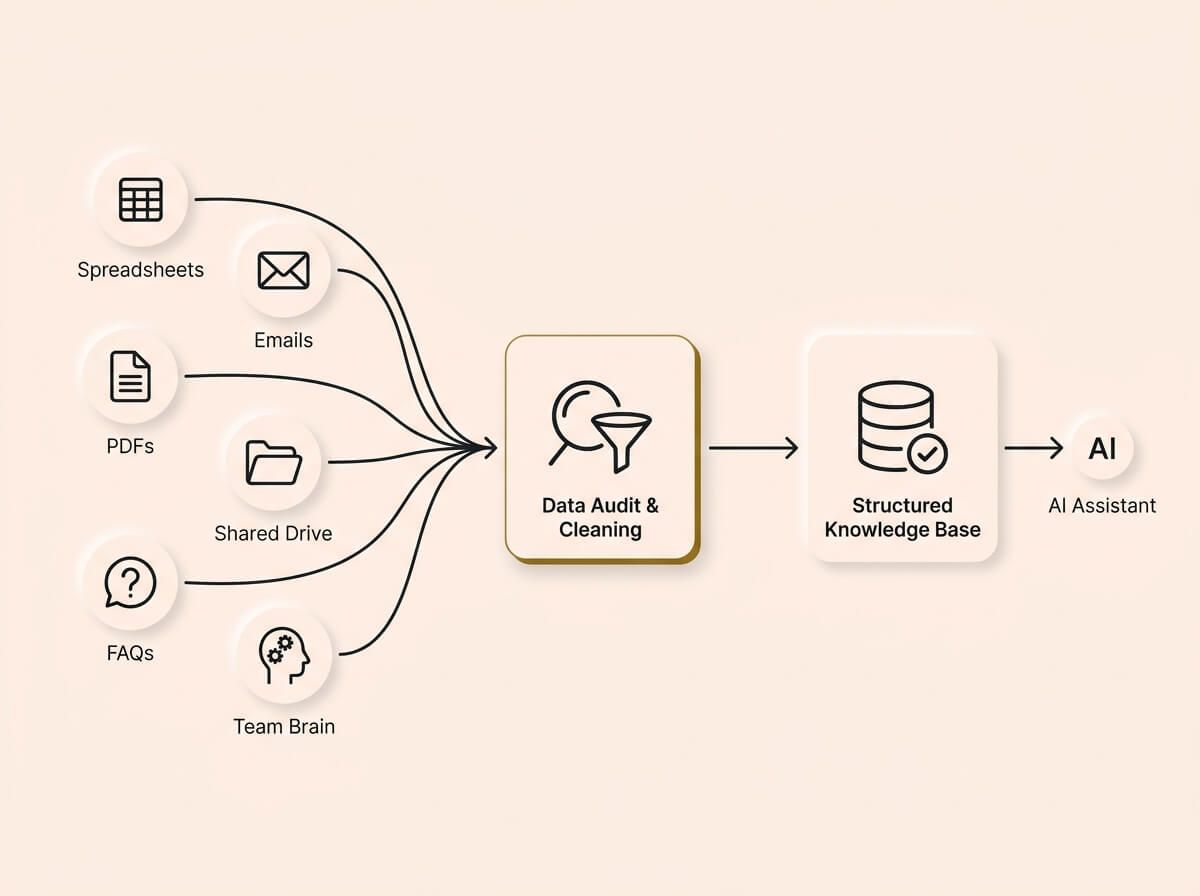
Your AI assistant is only as good as the information it can draw from. Most projects stall because data is scattered, not structured. Identifying knowledge sources, cleaning source material, and consolidating chaos into one structured knowledge base is essential before you build, ensuring your assistant answers reliably and accurately.
An AI assistant that works in isolation is a gadget. An AI assistant that is connected to your CRM, your automation layer, and your communication tools is a team member. The value multiplies when the AI is embedded in the workflow, not sitting beside it.
Think about the handoff points:
- What triggers the AI? A new message arrives, a form is submitted, a team member asks a question, a scheduled report is due.
- What does the AI produce? A draft response, a classified record, a data entry, a summary, a notification.
- Where does the output go? Back to the customer, into the CRM, onto a task board, into a report, to a human for review.
- When does a human take over? Define the escalation rules. If the AI is not confident in its answer, if the question is outside its scope, or if the customer asks to speak to a person, the handoff must be smooth and immediate.
If you have already set up lead tracking (the focus of our CRM guide) and automation workflows (the focus of our Automation guide), the AI assistant layer sits on top and adds intelligence to the system that is already running.
If you have already set up lead tracking and automation workflows, the AI assistant layer sits on top and adds intelligence to the system that is already running.
How we do it
We map the AI assistant into the client's existing workflow before building it. We define every trigger, every output, and every escalation path. The AI is not a standalone tool. It is wired into the CRM, the automation platform, and the communication channels so it operates as part of the system, not next to it.
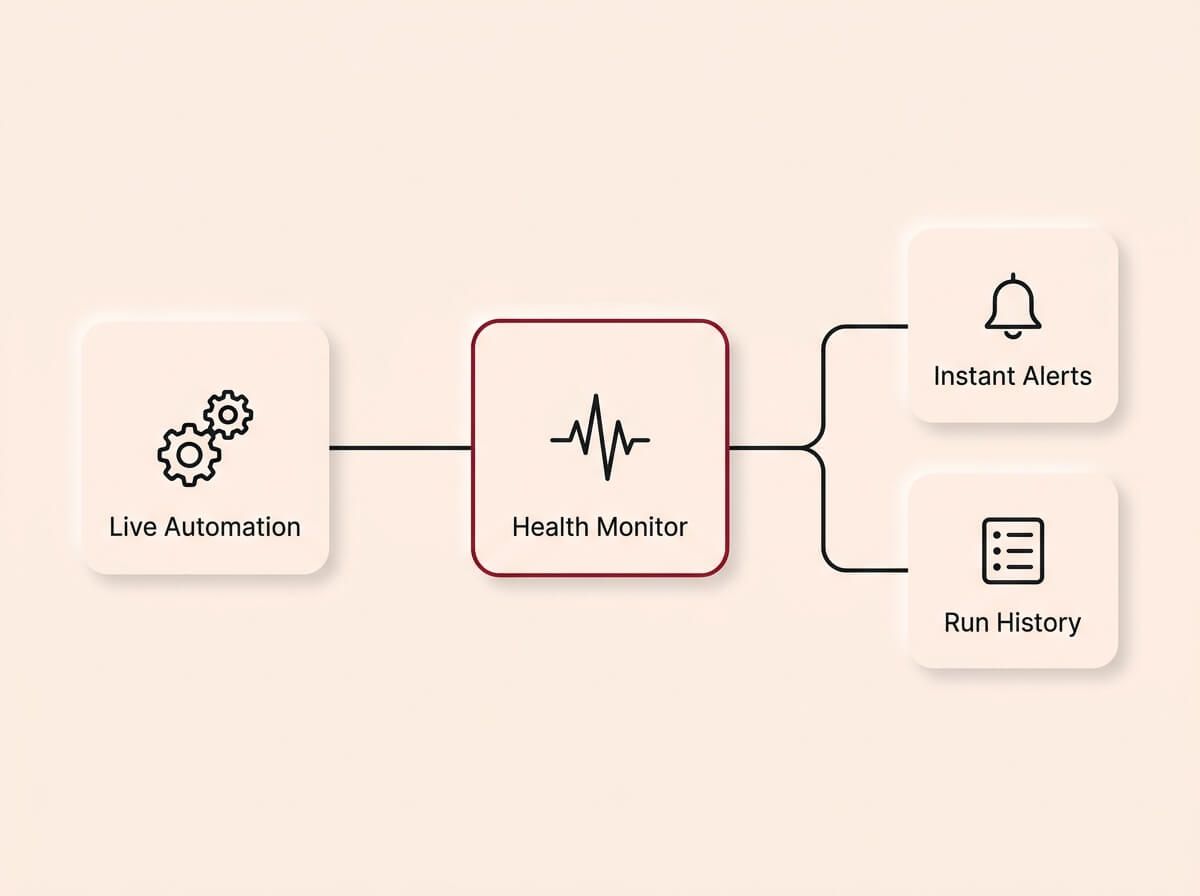
Automations are not set-and-forget tools. Treating automation as true infrastructure requires building instant failure alerts into every workflow and actively monitoring run history, ensuring any issues are caught and resolved before they impact your business.
Designing Your AI Assistant
Designing an AI assistant is not about configuring a chatbot. It is about defining a role, a knowledge boundary, a communication style, and a set of rules that determine how it behaves in every situation it encounters.
Define the role clearly
Every AI assistant should have a job description, the same way a team member would. What is its name? What does it do? What does it not do? What tone does it use? What happens when it does not know the answer?
A well-defined role prevents the AI from overstepping, making up answers, or confusing the user. "You are a customer support assistant for [business name]. You answer questions about our services using the knowledge base provided. If you are not sure about an answer, say so and offer to connect the customer with a team member. You never discuss pricing specifics. You always direct pricing questions to a discovery call."
The more specific the role definition, the more reliable the assistant.
Set the knowledge boundary
AI assistants work best when they know exactly what they know and what they do not know. This is controlled by the data you give them access to and the instructions you provide about what to do when a question falls outside that data.
The biggest risk with AI assistants is hallucination, generating confident-sounding answers that are factually wrong. The primary defence against hallucination is a well-structured knowledge base and clear instructions to say "I don't know" rather than guess.
Design the conversation flow
For customer-facing AI assistants, the conversation flow matters as much as the accuracy. Think about:
- Opening message: What does the AI say when a customer starts a conversation? It should set expectations. "Hi, I'm the [business name] assistant. I can answer questions about our services and help you book a call. What can I help with?"
- Clarification: What does the AI do when the question is ambiguous? It should ask a follow-up, not guess.
- Escalation: What does the AI do when it cannot help? It should hand off smoothly. "That's a great question, but it's outside what I can help with. Let me connect you with the team." This should trigger a notification to a real person.
- Closing: How does the conversation end? The AI should confirm next steps and offer a clear path forward.
Design for internal assistants differently
Internal AI assistants (for your team, not your customers) have different requirements. They need access to internal documentation, SOPs, and process guides. They need to be fast and direct, with less conversational polish. And they need to handle follow-up questions well, because team members will ask increasingly specific questions as they learn to trust the assistant.
The most valuable internal AI assistant is the one that replaces the experience of asking the most knowledgeable person in the business a question. If the senior person leaves and the knowledge leaves with them, the AI ensures it stays.
How we do it
We write a full role definition, knowledge boundary, and conversation flow for every AI assistant before we build it. The client reviews and approves the design before any technology is configured. This step takes one to two sessions and it determines whether the assistant actually works or just frustrates people.
Building and Deploying the Assistant
This is the technical work. Connecting the AI to the knowledge base, configuring the behaviour, testing with real scenarios, and deploying it into the live workflow.
Choose the right model
Not every AI task needs the most powerful model. For straightforward Q&A from a knowledge base, a smaller, faster model is often better. For complex document processing or nuanced email triage, a more capable model is worth the additional cost.
The key trade-offs:
- Speed vs capability: Faster models are cheaper and respond quicker, but they handle complex reasoning less well.
- Cost per interaction: AI models charge per token (roughly per word) processed. High-volume use cases need cost-efficient models. Low-volume, high-complexity tasks can justify premium models.
- Privacy and data handling: Some models process data on external servers. If your data is sensitive, check where it goes and whether the provider uses it for training.
Connect to the knowledge base
The most common approach for business AI assistants is retrieval-augmented generation (RAG). The AI searches your knowledge base for relevant information, then generates a response using that information as context. This keeps the AI grounded in your actual data and dramatically reduces hallucination.
The quality of the RAG setup depends on how well the knowledge base is structured. Short, clear, well-organised documents produce better results than long, unstructured files. If your documentation is messy, the AI's answers will be messy.
Test with real scenarios
Before deploying, test the AI assistant with real questions from real customers or team members. Not hypothetical questions. Not edge cases you invented. The actual questions that come in every day.
Check for:
- Accuracy: Does it answer correctly using the knowledge base?
- Hallucination: Does it make up information when it does not have the answer?
- Escalation: Does it hand off correctly when the question is outside its scope?
- Tone: Does it match your brand voice?
- Speed: Does it respond fast enough for the use case?
Run at least 50 real-world test scenarios before going live. Fix every failure pattern before deployment.
Deploy gradually
Do not launch the AI assistant to all customers or all team members on day one. Start with a subset. Monitor the interactions. Review the answers. Fix issues as they appear. Then expand gradually as confidence builds.
For customer-facing assistants, consider running it alongside a human for the first two weeks. The AI drafts the response, and a human reviews and sends it. This builds trust in the system and catches errors before they reach the customer.
How we do it
We test every AI assistant with at least 50 real-world scenarios before deployment. We run customer-facing assistants in "draft mode" for the first two weeks, where the AI generates responses but a human reviews and approves them before they are sent. Once accuracy is consistently above 95%, we switch to live mode with monitoring.
Platforms and Tools
The AI landscape changes fast, but the core building blocks for business AI assistants are stable. Here is an honest breakdown of the current options.
OpenAI (GPT models)
The most widely used AI models for business applications. Strong at conversation, document processing, and general reasoning. Available through API for custom builds or embedded in tools like HubSpot, Notion, and Make. The trade-off is that data is processed on OpenAI's servers, which matters for sensitive information.
Anthropic (Claude models)
Strong at long-document processing, nuanced reasoning, and following complex instructions. Often preferred for internal assistants that need to work with detailed SOPs or policy documents. Available through API and increasingly embedded in business tools.
Google (Gemini models)
Strong at multimodal tasks, meaning it can process text, images, and documents together. Competitive pricing with a generous free tier that makes it practical for testing and low-volume use cases. Increasingly embedded in Google Workspace, which matters if your business already runs on Gmail, Google Drive, or Google Docs. A strong option for businesses that want AI integrated into the tools they already use daily.
Embedded AI in existing tools
HubSpot, Notion, Intercom, Zendesk, and many other business platforms now include built-in AI features. These are often the fastest path to a working AI assistant because they are already connected to your data. The trade-off is less customisation and control compared to a custom build.
Custom builds vs platform features
For most growing businesses, starting with embedded AI features in tools you already use is the fastest path to value. Custom-built AI assistants (using APIs and automation platforms) offer more power and flexibility but require more setup time and ongoing maintenance.
Start with the embedded option. If it does not meet your needs after 30 days, then evaluate a custom build with a clear understanding of what the embedded version could not do.
Cost considerations
AI models charge per usage, and the costs are more accessible than most business owners expect. Most AI assistants for a growing company cost between $50 and $500 per month in API fees depending on volume and model choice. A customer-facing assistant handling a few hundred conversations a month on a cost-efficient model sits at the lower end. An assistant processing thousands of complex document extractions per month on a premium model sits at the higher end. Before committing, estimate your monthly volume, check the per-token pricing for your chosen model, and factor in the cost of any automation platform fees for connecting the AI to your workflows. Run the numbers at your current volume and at three times that volume so you know where the pricing tiers shift.
How we do it
We match the model to the task. For customer Q&A, we typically use a fast, cost-efficient model with RAG. For complex document processing, we use a more capable model. We always start with a cost estimate based on the client's actual volume so there are no surprises when the first invoice arrives.
Accuracy, Safety, and Trust
AI assistants that give wrong answers are worse than no AI at all. They erode customer trust, create confusion internally, and generate cleanup work that costs more than the manual process the AI was supposed to replace. Getting accuracy right is not optional.
Reducing hallucination
Hallucination is when the AI generates information that sounds correct but is not. The primary defences:
- RAG (retrieval-augmented generation): Ground the AI in your actual data, not its general training.
- Clear instructions: Tell the AI to say "I don't know" or escalate when the answer is not in the knowledge base.
- Temperature settings: Lower the randomness parameter so the AI sticks closer to the source material.
- Source citations: Configure the AI to reference which document it used to generate the answer. This makes verification easy.
Human review loops
For any AI output that goes to a customer or is used in a business decision, build a human review step into the workflow. This can be as simple as a team member approving the AI's draft before it is sent, or as structured as a quality dashboard that flags low-confidence responses for manual review.
The goal is not to review every response forever. It is to review enough in the early phase to build confidence, then shift to spot-checking as accuracy stabilises.
Data privacy and customer consent
If your AI assistant interacts with customers, they should know they are talking to an AI. Transparency builds trust. A simple disclosure at the start of the conversation is enough: "You're chatting with our AI assistant. It can answer questions about our services and connect you with the team."
The same data privacy rules that apply to your CRM apply to your AI assistant. Only collect data you need. Store it securely. Do not use customer conversations to train external models without consent. Check your AI provider's data processing policy and make sure it aligns with your obligations under the Australian Privacy Principles.
How we do it
We configure every customer-facing AI assistant with a disclosure message, hallucination guardrails, and a human escalation path. We set up a monitoring dashboard that tracks accuracy rates, escalation frequency, and customer satisfaction scores. The client can see exactly how the AI is performing and intervene when needed.
What Happens After Deployment
Deploying the AI assistant is the beginning, not the end. The real value comes from monitoring performance, expanding capabilities, and connecting the assistant to the rest of the business system.
Track every interaction. Look for patterns in the questions the AI cannot answer, the responses that get escalated, and the conversations that end without a resolution. These patterns tell you where the knowledge base has gaps and where the AI's instructions need refinement.
The first 30 days after deployment are the most important. This is when you discover the edge cases that testing did not catch and when you fine-tune the assistant based on real-world usage.
How we do it
We run a 30-day optimisation sprint after every deployment. We review conversation logs, identify failure patterns, update the knowledge base, and refine the AI's instructions. Most assistants improve significantly in the first month as real-world data reveals what the initial testing missed.
Once the AI is performing well on its initial use case, you can expand its role. An assistant that started by answering customer questions can be extended to handle appointment booking, quote requests, or post-service feedback collection. An internal assistant can be expanded from HR policy questions to onboarding workflows, project documentation, and reporting.
Expand one capability at a time. Test each expansion the same way you tested the original deployment.
How we do it
We plan the expansion roadmap during the initial build, even though we only deploy the first use case at launch. This means each expansion is designed to slot into the existing architecture without rebuilding.
The AI assistant becomes most valuable when it is connected to the CRM, the automation layer, and the reporting dashboards. A customer question that the AI answers should update the contact record in the CRM. An escalation should trigger a task in the project management tool. A pattern of repeated questions should surface in the reporting dashboard so you know what content to add to your website or documentation.
If you have already set up CRM and automation, the AI assistant is the intelligence layer that makes the system smarter over time.
How we do it
We wire every AI assistant into the client's CRM and automation platform. Customer interactions update the contact timeline. Escalations create tasks. Performance data feeds into the reporting dashboard. The AI is not a standalone tool. It is part of the connected system.
Why Now, Not Later
The gap between businesses using AI assistants and those that are not is compounding faster than any technology shift in the last decade.
Every week your team spends answering the same questions, triaging the same emails, and processing the same documents manually is a week where a competitor's AI is doing that work in seconds. The cost is not just the hours lost. It is the slower response times, the inconsistent quality, the missed opportunities when your best people are stuck doing work that does not need a human brain.
* AI assistant technology is mature enough for production use today. The businesses deploying now are building a data advantage that latecomers will struggle to close, because every interaction teaches the AI something new, and that accumulated intelligence does not exist until you start. The longer you wait, the further behind you fall. * The cost of AI has dropped dramatically. What cost thousands per month in API fees two years ago now costs hundreds. The economics work for growing businesses, not just enterprises. * Your team's capacity is finite. AI does not replace your team. It removes the repetitive thinking that prevents them from doing their best work. The sooner you deploy, the sooner your best people get their time back.
The cost of building an AI assistant properly is a fraction of the cost of the hours it saves. The longer you wait, the larger the gap becomes between your team's capacity and what the business demands of them.
How we do it
We build AI assistants that are designed to learn and improve over time. The assistant deployed today is the simplest version it will ever be. Every conversation makes it smarter, every knowledge base update makes it more accurate, and every workflow connection makes it more valuable.
How We Build It
You can take everything in this guide and do it yourself. We have written it specifically so that you can. But if you want a team to do it for you, here is exactly how we work. No surprises.
Step 1: Use-case audit. We map the tasks where AI can add the most value, score them by volume, complexity, and risk, and prioritise the first deployment.
Step 2: Knowledge base build. We consolidate and structure the information the AI needs. We clean outdated content, fill gaps, and create a source that the AI can draw from reliably.
Step 3: Design and configure. We define the AI's role, knowledge boundary, conversation flow, and escalation rules. We configure the model, connect it to the knowledge base, and wire it into the CRM and automation platform.
Step 4: Test and deploy. We test with at least 50 real-world scenarios. For customer-facing assistants, we run in draft mode for two weeks with human review before switching to live.
Step 5: Optimise and expand. We run a 30-day optimisation sprint, refine the knowledge base, update the instructions, and plan the next expansion. The client receives a system that improves over time.
That is the process. Start to finish. Everything we described in this guide, delivered.
AI Assistant Diagnostic Checklist
Run your current operations against these checks. If you fail more than three, your business has AI opportunities that are costing you time and money every week.
Use-case identification
- Can you list the top five questions your team answers repeatedly every week?
- Do you know how many hours per week your team spends on repetitive thinking tasks (triage, classification, drafting, data lookup)?
- Have you identified which customer-facing interactions could be handled by an AI assistant?
- Have you identified which internal knowledge retrieval tasks could be handled by an AI assistant?
Knowledge readiness
- Is your service documentation consolidated in one place (not scattered across documents, inboxes, and people's heads)?
- Is your FAQ or knowledge base up to date and accurate?
- Could a new team member find the answer to a common customer question without asking a colleague?
- Are your SOPs and process documents structured and current?
Infrastructure
- Do your core business tools (CRM, automation platform, communication channels) support AI integrations?
- Have you evaluated which AI platform or model fits your primary use case?
- Is your automation layer connected so AI outputs can trigger downstream actions (CRM updates, task creation, notifications)?
- Do you have a process for reviewing and approving AI-generated outputs before they reach customers?
Trust and safety
- Do you have a policy for disclosing AI use to customers?
- Have you checked your AI provider's data processing and privacy policy?
- Is there a human escalation path for every customer-facing AI interaction?
- Are you tracking AI accuracy rates and customer satisfaction for AI-handled interactions?
Scaling readiness
- Have you estimated the cost of your AI assistant at current and projected interaction volumes?
- Is the AI assistant designed to connect to other business systems (CRM, automation, reporting)?
- Do you have a plan for expanding the AI's scope after the initial deployment proves itself?
- Is there a scheduled review cadence for updating the knowledge base and refining the AI's instructions?
Knowledge maintenance
- Is there a process for updating the AI's knowledge base when services, pricing, or policies change?
- Do you track which questions the AI cannot answer so you know where to add content?
Count your failures. If you scored under 15 out of 22, your business is spending human time on work that AI could handle.
Ready to fix this?
Book a call and we will walk you through how this applies to your business. We will give you an honest read on whether it is worth doing right now, and if so, exactly where to start.
BOOK A CALLWe do not upsell. We do not surprise you with hidden costs. We tell you what you need, what it costs, and how long it takes. If it is not worth doing, we will tell you that too.