The Tasks Your Business Should Never Do Manually
The 2026 Guide to Automating the Repetitive Work That Slows Your Business Down, Costs You Money, and Burns Out Your Team
For Australian businesses who know they are spending too much time on work that should run itself
Why Manual Processes Are Now a Competitive Disadvantage
Every business has tasks that get done the same way, every time, by a person who could be doing something more valuable. Sending a confirmation email after a booking. Copying data from one system to another. Chasing an invoice that is overdue. Notifying the team when a new lead comes in. These tasks are not hard. They are just repetitive. And in 2026, doing them manually is no longer just inefficient. It is a competitive disadvantage. Three things have changed that make the old approach unsustainable.
Two years ago, meaningful automation required developers and enterprise budgets. Today, platforms like Make, Zapier, and n8n offer visual workflow builders that connect hundreds of applications without writing code. AI layers on top can read emails, extract data, categorise enquiries, and draft responses. The tools that were once reserved for large companies are now accessible to any business willing to set them up.
Two years ago, automation was something businesses added on top of their existing processes to save a bit of time. Today, the businesses pulling ahead are treating automation as a foundational layer, the same way they treat accounting software or internet access. It is not a nice-to-have optimisation. It is the connective tissue between tools, teams, and customers. When a lead comes in through the website, the CRM creates the contact, the follow-up fires, the team gets notified, and the reporting updates, all without a human touching it. Businesses that still rely on manual handoffs between these steps are not just slower. They are structurally disadvantaged against competitors whose operations run as a connected system.
Most business owners underestimate how much time their team spends on repetitive admin. It is rarely one large block of time. It is five minutes here, ten minutes there, scattered across the day. But when you add it up across a week, a month, a year, the total is staggering. A team member spending 90 minutes a day on tasks that could be automated is losing over 350 hours a year. That is nearly nine working weeks of capacity that the business is paying for but not getting value from.
This guide covers how to identify the tasks worth automating, how to design workflows that run reliably, and how to connect your existing tools so the repetitive work handles itself.
How we do it
We start every automation project with a process audit. We map the repetitive tasks across the business, estimate the time cost, and rank them by impact. A recent client's admin team was spending 12 hours a week on data entry between their CRM, invoicing system, and project management tool. We automated the data flow between all three. The 12 hours dropped to zero.
Before You Automate Anything
The most common mistake in automation is automating a broken process. If the manual process is unclear, inconsistent, or has steps that change depending on who does them, automating it will not fix it. It will make the mess faster. Before you touch any automation tool, you need to do three things.
1. Map the process as it actually happens
Not as it is supposed to happen. Not as it is documented in a manual nobody reads. As it actually happens, today, with all the workarounds, exceptions, and shortcuts your team has built over time.
For each process you want to automate, answer these questions:
- What triggers it? (A form submission, a time of day, a status change, a manual action)
- What are the steps, in order?
- Who is responsible for each step?
- What information moves between steps, and where does it live?
- What happens when something goes wrong? Is there an exception path?
If you cannot answer these questions clearly, the process is not ready to automate. It needs to be simplified and documented first.
How we do it
We run structured process mapping sessions with the people who actually do the work, not just the managers who think they know how it works. We document every step, every decision point, and every exception. The map becomes the blueprint for the automation.
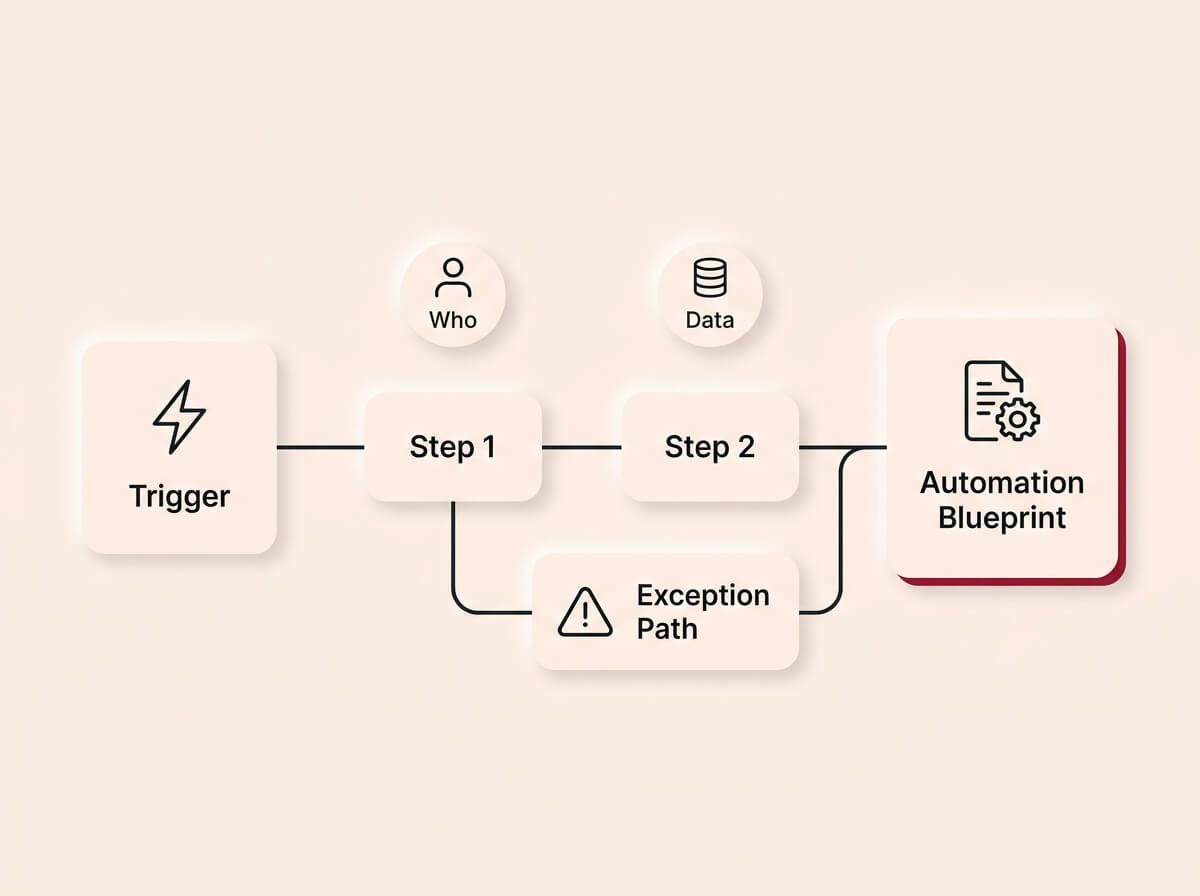
You cannot automate a process you do not fully understand. Before building anything, you must map the actual workflow as it happens today. This includes the triggers, responsible parties, data locations, and the messy exception paths, turning reality into a clear automation blueprint.
2. Identify what should be automated and what should not
Not every task should be automated. Some tasks require human judgement, relationship management, or creative thinking that no automation can replicate. The goal is to automate the predictable, repeatable, rule-based work so your team can focus on the work that actually needs a human.
Good candidates for automation:
- Data transfer between systems: Copying information from one tool to another (CRM to invoicing, form to spreadsheet, email to project management).
- Notifications and reminders: Alerting the right person when something needs attention (new lead, overdue task, approaching deadline).
- Status updates and routing: Moving a record to the next stage when a condition is met (payment received, form submitted, approval given).
- Templated communications: Sending confirmation emails, appointment reminders, follow-up sequences, and review requests.
- Reporting and data aggregation: Pulling numbers from multiple sources into a single dashboard or report.
Bad candidates for automation:
- Anything that requires interpreting nuance: Complex customer complaints, sensitive negotiations, or situations where context matters more than speed.
- Processes that change frequently: If the rules change every week, the automation will break every week. Stabilise the process first.
- One-off tasks: If it happens once a quarter, the time to build the automation is not worth the time saved.
How we do it
We score every candidate process on three criteria: frequency (how often does it happen), time cost (how long does it take each time), and error risk (how often does the manual version go wrong). The highest-scoring processes get automated first. We do not try to automate everything at once.
3. Fix the process before you automate it
If the manual process has unnecessary steps, unclear decision points, or workarounds that only one person understands, clean it up first. Automation amplifies whatever you feed it. If you feed it a messy process, you get a fast mess.
This often means reducing the number of steps, standardising the inputs (so the automation always receives data in the same format), and defining clear rules for exceptions (what happens when the data is incomplete, the customer cancels, or a step fails).
How we do it
We redesign the process before we build the automation. In most cases, the streamlined manual process is already faster than the original, before any technology is added. The automation then takes the improved process and makes it hands-free.
Designing Your Automations
Automation design is about translating a human process into a set of triggers, conditions, and actions that a system can execute reliably every time.
Triggers, conditions, and actions
Every automation has three parts:
- Trigger: The event that starts the workflow. A form is submitted. An email arrives. A date is reached. A status changes. The trigger must be specific and unambiguous.
- Conditions: The rules that determine what happens next. If the lead source is the website, send email A. If the lead source is a referral, send email B. If the deal value is above a threshold, notify the owner. Conditions create branching logic.
- Conditions: The rules that determine what happens next. If the lead source is the website, send email A. If the lead source is a referral, send email B. If the deal value is above a threshold, notify the owner. Conditions create branching logic.
The most reliable automations are simple. One trigger, one or two conditions, and a clear set of actions. The temptation is to build complex workflows with dozens of branches. Resist it. Complex automations are harder to test, harder to debug, and harder for the next person to understand.
Designing for failure
Every automation will eventually encounter something unexpected. A required field is empty. An API is down. A customer submits data in a format the system does not expect. The question is not whether it will fail, but what happens when it does.
Build error handling into every automation:
- What happens if a step fails? Does the workflow stop, retry, or skip to the next step?
- Who gets notified? Someone needs to know when an automation breaks. A silent failure is worse than no automation at all.
- Is there a fallback? If the automated email cannot send, does the team get a task to send it manually?
The difference between a reliable automation and a fragile one is almost always the error handling, not the happy path.
Documentation
Every automation should be documented with three things: what it does (in plain language), what triggers it, and what to check if it stops working. This documentation should live somewhere the team can find it, not in the head of the person who built it.
If the person who built the automation leaves the business and nobody else knows how it works, you have not automated a task. You have created a dependency on a person who is no longer there.
How we do it
We document every automation we build with a plain-language summary, a trigger-condition-action map, and a troubleshooting guide. The client receives this as part of the handover. If something breaks at 2am, the team can diagnose it without calling us.
Building the Workflows
This is the hands-on work. Connecting tools, configuring triggers, testing the logic, and making sure the automation behaves the same way on the hundredth run as it does on the first.
Start with the highest-impact, lowest-complexity workflow
Do not start with the most complex process in the business. Start with the one that saves the most time with the fewest moving parts. A common first automation for service businesses is the new-lead response: form submitted → contact created in CRM → confirmation email sent → team notified. Four steps, one trigger, immediate value.
Once that is running reliably, move to the next one. Build confidence in the system before tackling the complex workflows.
Connect your tools properly
Most automations work by connecting two or more tools through an integration platform. The quality of the connection matters. A direct API integration is more reliable than a screen-scraping workaround. A native integration built into the platform is more stable than a third-party connector.
Before you build, check:
- Do the tools you need to connect have official integrations with each other, or with your automation platform?
- What data can be sent between them? (Some integrations are read-only, some are limited to specific fields.)
- What are the rate limits? (How many actions can the automation perform per minute, per hour, per day?)
- What happens to the automation if one of the tools updates its software?
Test with real data
Never test an automation with fake data and assume it will work with real data. Real data has edge cases: empty fields, unexpected characters, duplicate entries, and formats that do not match what the system expects. Test with real records from your actual business before you turn anything on.
Test the failure paths too. What happens when a required field is blank? What happens when the CRM is temporarily unreachable? What happens when two leads submit the same form at the same time? If you do not test these scenarios, your customers will test them for you.
Secure the connections
Automations often handle sensitive data: customer contact details, financial information, and login credentials for connected tools. Every connection between tools uses an API key or authentication token that grants access to that system's data. These credentials need to be treated with the same care as passwords.
Practical steps: restrict access to your automation platform so only the people who need to build or edit workflows can log in. Never store API keys or credentials in plain text, whether in documentation, shared notes, or spreadsheets. Use the built-in credential storage that your automation platform provides. Review which team members have access to the platform at least quarterly, especially after someone leaves the business.
How we do it
We build every automation in a staging environment first, test it with real data from the client's systems, and run it in parallel with the manual process for at least one week before switching over. The client sees the automation working alongside their existing workflow so they can verify the output before the manual version is retired.
Tools and Platforms
The automation platform you choose determines what you can connect, how complex your workflows can be, and how much it costs as you scale. Here is an honest breakdown of the main options.
Make (formerly Integromat)
The most powerful visual automation builder for small and mid-sized businesses. It supports complex branching logic, data transformation, and hundreds of integrations. The visual interface makes it possible to build sophisticated workflows without code. The trade-off is a steeper learning curve than simpler tools.
Zapier
The most popular automation platform for simple, linear workflows. If you need to connect two tools with a straightforward trigger-action pattern, Zapier is fast to set up. The limitation is that complex branching and data manipulation require workarounds or higher-tier plans.
n8n
An open-source alternative that gives you full control over the infrastructure. Good for businesses with technical staff who want to self-host and avoid per-task pricing. The trade-off is that setup and maintenance require more technical knowledge.
Native integrations
Many tools have built-in automations that do not require an external platform. HubSpot's workflows, Xero's automated invoicing rules, and Google Workspace's Apps Script can handle simple automations within their own ecosystem. These are often the most reliable option for single-tool workflows because there is no middleware to break.
AI-powered automation layers
AI is now embedded in most automation platforms. Make and Zapier both offer AI steps that can read unstructured data (like emails or PDFs), categorise inputs, draft responses, and make decisions based on patterns. These are not theoretical features. They are production-ready and they reduce the amount of structured data entry required to make an automation work. If your automation involves processing information that arrives in inconsistent formats, AI steps can handle the translation.
Watch the cost curve
Most automation platforms use usage-based pricing. A workflow that runs a hundred times a month may cost very little, but the same workflow running ten thousand times a month can push you into a significantly higher pricing tier. Before you commit to a platform, check what happens to your bill as volume grows. Look at per-operation costs, not just the monthly subscription headline. Factor in the number of steps per workflow, not just the number of workflows, because most platforms count each step as a separate operation.
How to choose
Ask yourself: How many tools do I need to connect? How complex are the workflows? Do I have technical staff to manage the system? What does the pricing look like at my current volume and at three times that volume? For most small service businesses, Make offers the best balance of power and usability. For simple two-tool connections, Zapier is faster to set up.
How we do it
We build primarily on Make because it handles complex, multi-step workflows with branching logic and error handling better than any other visual platform. For clients who need AI processing (reading emails, extracting data from documents, categorising enquiries), we layer AI steps directly into the Make workflows. The client gets one platform that handles both structured and unstructured automation.
Error Handling and Monitoring
Automation without monitoring is a liability. A workflow that fails silently can cause more damage than no automation at all, because the team assumes the work is being done when it is not.
Build alerts into every workflow
Every automation should notify someone when it fails. This can be as simple as a Slack message or an email that says "the new-lead automation failed for [contact name] at [time]. Here is the error." The notification should include enough detail for someone to fix the problem or complete the task manually.
Monitor run history
Most automation platforms keep a log of every run: what triggered it, what steps executed, what data was passed, and whether it succeeded or failed. Check this log regularly, especially in the first few weeks after launching a new workflow. Patterns in the failures will tell you what needs to be fixed.
Set up a maintenance cadence
Automations are not set-and-forget. The tools they connect get updated. APIs change. Business processes evolve. Schedule a monthly review of your active automations to check for failures, review performance, and update any workflows that no longer match how the business operates.
The businesses that treat automation as infrastructure, not a one-time project, are the ones that get compounding value from it.
How we do it
We build failure alerts into every automation as standard. Every workflow notifies a designated person when something breaks. We also set up a monitoring dashboard that shows run success rates, failure counts, and processing times across all active automations. The client can see the health of their automation system at a glance.
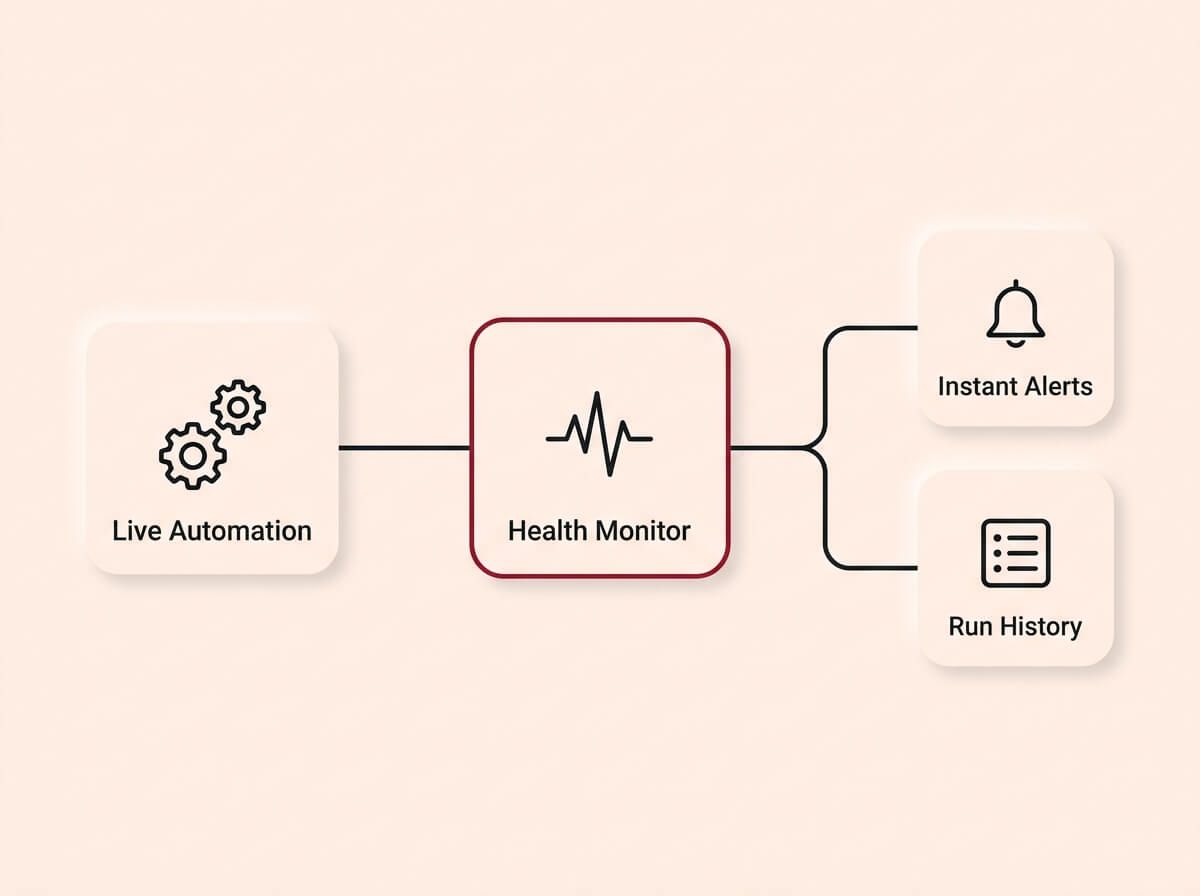
Automations are not set-and-forget tools. Treating automation as true infrastructure requires building instant failure alerts into every workflow and actively monitoring run history, ensuring any issues are caught and resolved before they impact your business.
What Happens After the First Automations Are Live
The first round of automations saves time and removes friction. But the real value of automation compounds over time as you connect more systems and layer more intelligence on top.
1. Connect automations to each other
Individual automations are useful. Connected automations are transformative. When the new-lead automation feeds into the CRM, and the CRM triggers a follow-up sequence, and the follow-up sequence triggers a task for the sales team, and a closed deal triggers an invoice and a project setup, you have a system. Not a collection of shortcuts, but a connected operational layer that runs the business.
If you have already set up lead tracking, the automation layer is what connects it to everything else. And when you eventually build reporting dashboards, the data that feeds them comes from the automations running underneath. Each pillar in the system becomes more valuable when the others are connected to it.
This does not happen on day one. It builds over months as each new automation plugs into the ones before it.
How we do it
We design the first automations with the full system in mind, even if we only build the first layer initially. Each automation is built to accept inputs from and send outputs to other workflows. When the client is ready to expand, the new automations slot into the existing architecture without rebuilding what is already there.
2. Add AI to existing workflows
Once the basic automations are running, AI can be layered on top to handle the tasks that were too unstructured to automate before. An AI step can read an incoming email, determine whether it is a new enquiry, a support request, or spam, and route it to the right workflow. It can extract key data from a PDF quote and populate a CRM record. It can draft a personalised follow-up based on what the customer asked about.
These are not futuristic possibilities. They are live in production for businesses today.
How we do it
We add AI layers to client automations once the foundational workflows are stable. The most common AI additions are email classification, data extraction from documents, and draft responses for review. Each one removes another manual touchpoint without sacrificing accuracy.
3. Measure and optimise
Automation gives you data that manual processes never could. You can see exactly how long each step takes, where bottlenecks occur, and which workflows are saving the most time. Use this data to identify the next process worth automating and to optimise the workflows you have already built.
The goal is not to automate everything. It is to automate the right things, measure the impact, and keep improving.
How we do it
We build time-tracking into every automation so the client can see exactly how many hours the system is saving per week. We review the data quarterly and recommend the next round of automations based on where the biggest time costs remain.
Why Now, Not Later
The cost of manual processes is not static. It compounds in ways that are easy to ignore and expensive to reverse.
Every month you continue doing work manually that could be automated, you are paying for capacity you are not using. Your team is spending hours on data entry, copy-pasting, chasing follow-ups, and updating records that a system could handle in seconds. That time does not come back, and the opportunity cost grows as the business grows. A five-person team wasting 90 minutes a day on automatable tasks is losing nearly 45 working weeks of capacity per year across the business.
* If your competitors are already automating their lead response, follow-up, and admin workflows, every manual step in your process is a speed disadvantage they do not have. * AI-powered automation is now accessible to any business, not just enterprises. The window where early adopters have a significant advantage is open now, but it is closing as more businesses catch up. * Every new hire you add to a business with manual processes inherits the inefficiency. The cost scales linearly with headcount. Automation scales once. * The longer a manual process runs, the more institutional knowledge gets embedded in workarounds and habits that become harder to untangle. Automating a clean process is straightforward. Automating a process with five years of accumulated shortcuts is a project.
The cost of automating properly is a fraction of the cost of continuing to do the work manually. The longer you wait, the more expensive the transition becomes and the more capacity you lose in the meantime.
How we do it
We build for the next three to five years, not the next quarter. Every automation we deliver is designed to scale with the business, connect to future systems, and accept AI layers as they become relevant. The client gets infrastructure, not a band-aid.
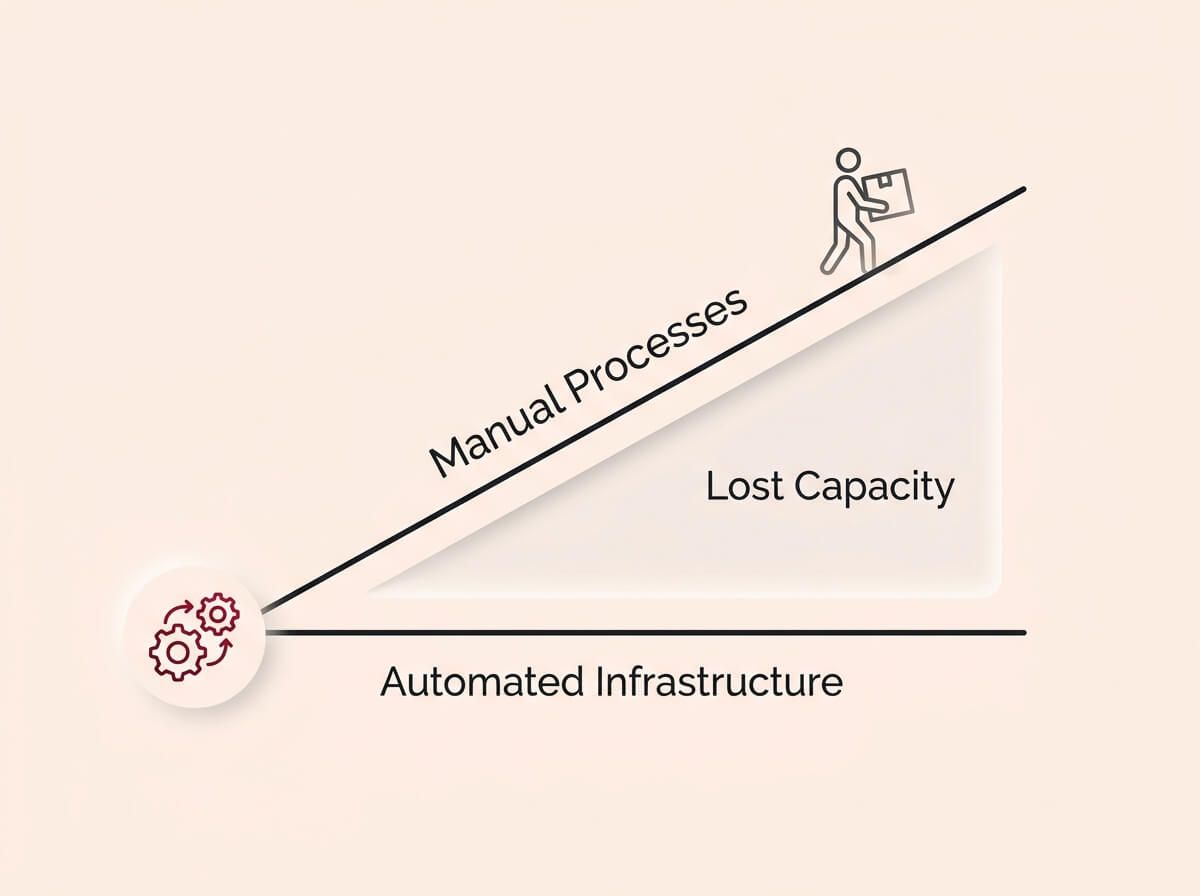
The cost of manual processes is not static, it scales linearly with your headcount. While automated infrastructure scales once, relying on manual data entry means every new hire inherits the same inefficiency, quietly draining dozens of working weeks from your team's capacity every year.
How We Build It
You can take everything in this guide and do it yourself. We have written it specifically so that you can. But if you want a team to do it for you, here is exactly how we work. No surprises.
Step 1: Process audit. We map the repetitive tasks across the business, estimate the time cost of each one, and rank them by automation potential. We talk to the people who actually do the work, not just the people who manage it.
Step 2: Process redesign. We simplify and standardise the target processes before building anything. Unnecessary steps get removed. Decision points get clarified. Exception paths get defined.
Step 3: Automation build. We build the workflows on Make, connect the tools, configure triggers and conditions, and build error handling into every step. We test with real data from the client's systems.
Step 4: Parallel run. We run the automation alongside the manual process for at least one week. The team verifies the output before the manual version is retired.
Step 5: Monitoring and handover. We set up failure alerts, a monitoring dashboard, and documentation for every workflow. The client receives a system that runs without us, with clear instructions for what to check and how to troubleshoot.
That is the process. Start to finish. Everything we described in this guide, delivered.
Automation Diagnostic Checklist
Run your current operations against these checks. If you fail more than three, your business is spending money on work that should run itself.
Process visibility
- Are your core business processes documented (not just understood by one person)?
- Can you estimate how many hours per week your team spends on repetitive admin tasks?
- Do you know which tasks are performed the same way every time with no variation?
- Have you identified the top five time-consuming repetitive tasks in the business?
Current automation
- Are new leads automatically captured in a central system when they come in?
- Do customers receive an instant confirmation when they submit a form or make a booking?
- Are follow-up reminders triggered automatically, or does someone have to remember?
- Is data transferred between your tools automatically (CRM, invoicing, project management), or does someone copy and paste it?
- Are overdue invoices flagged or chased automatically?
Error handling
- Do you get notified when an automated workflow fails?
- Is there a fallback process for when an automation breaks?
- Do you review automation run logs at least monthly?
- Is every automation documented so someone other than the builder can troubleshoot it?
Scaling readiness
- Could your current processes handle 50% more volume without adding staff?
- Are your automations designed to connect to each other, or are they isolated shortcuts?
- Have you evaluated where AI could handle unstructured tasks (email sorting, data extraction, response drafting)?
- Is there a scheduled review cadence for updating and optimising active automations?
Tool infrastructure
- Are your core business tools connected through a central automation platform?
- Do your tools have reliable APIs or native integrations available?
- Is your automation platform capable of handling your current and projected workflow volume?
- Are user permissions and access controls configured on your automation platform?
Count your failures. If you scored under 15 out of 22, your business is paying for manual work that a system could handle.
Ready to fix this?
Book a call and we will walk you through how this applies to your business. We will give you an honest read on whether it is worth doing right now, and if so, exactly where to start.
BOOK A CALLWe do not upsell. We do not surprise you with hidden costs. We tell you what you need, what it costs, and how long it takes. If it is not worth doing, we will tell you that too.