How to See What Is Actually Working in Your Business
The 2026 Guide to Building Dashboards That Show the Numbers That Matter, Updated in Real Time, Without Stitching Together Spreadsheets
For Australian businesses who have the revenue but cannot see where it comes from, where it goes, or what is actually working
Why Most Business Owners Are Flying Blind
The business is real. The revenue is there. But when someone asks "which part of the business is actually making money" or "which marketing channel is generating the best leads" or "are we on track this month," the answer requires a spreadsheet, a phone call to the accountant, or a gut feeling. This is not a small-business problem. It is a data visibility problem, and it gets worse as the business grows. More revenue, more clients, more tools, more data, but less clarity about what any of it means.
Three things have changed that make this the moment to fix it.
Two years ago, meaningful business intelligence required a data analyst, a dedicated BI tool, and a six-figure budget. In 2026, platforms like Looker Studio, Power BI, and embedded analytics in tools like HubSpot and Xero offer real-time dashboards that connect to your existing systems without writing code. AI layers can now identify trends, flag anomalies, and generate natural-language summaries of your data automatically. The tools that were once reserved for large companies with data teams are now available to any business willing to set them up.
Your website generates traffic data. Your CRM generates lead and pipeline data. Your accounting software generates financial data. Your project management tool generates operational data. Your marketing platforms generate campaign data. Each tool has its own dashboard, its own metrics, and its own way of presenting information. None of them talk to each other by default. The result is that the business owner checks five different platforms every morning, compares numbers that do not quite match, and still cannot answer the basic question: what is working?
When you find out that a marketing channel stopped converting three months ago, you have already wasted three months of budget. When you discover that a service line is unprofitable, you have already undercharged for dozens of jobs. When you realise that cash flow is tighter than expected, the pressure is already urgent. The rearview mirror is the most expensive lens in business. Every week you operate without real-time visibility is a week where problems grow silently and opportunities pass unseen.
This guide covers how to build a reporting system that connects your data sources, shows you the numbers that matter, and updates in real time so you can make decisions based on what is happening now, not what happened last month. It stands on its own, but if you have already set up lead tracking, automation, or AI tools, the dashboard connects everything into one view.
How we do it
We audit the client's data landscape before building anything. A recent client was logging into seven different platforms every morning and spending 45 minutes assembling a picture of how the business was tracking. We connected the data sources, built one dashboard, and the 45-minute morning routine became a 30-second check on their phone. The numbers were more accurate than the manual version had ever been.
Before You Build a Dashboard
The most common mistake in business reporting is building a dashboard that shows data nobody acts on. Vanity metrics, irrelevant charts, and pretty visualisations that do not connect to decisions. Before you build anything, you need to answer three questions that determine whether the dashboard will be useful or decorative.
1. What decisions does this dashboard need to support?
Every chart, number, and metric on a dashboard should help someone make a decision or take an action. If it does not, it is noise.
Start with the decisions, not the data:
- "Should we increase or decrease marketing spend this month?" requires data on lead volume by channel, cost per lead, and conversion rate.
- "Are we going to hit our revenue target this quarter?" requires pipeline value by stage, close rate, and average deal size.
- "Which services are actually profitable?" requires revenue and cost data broken down by service line.
- "Is the team keeping up with demand?" requires operational data on capacity, delivery timelines, and backlog.
If you cannot name the decision a metric supports, do not put it on the dashboard. More data does not mean more clarity. It means more noise.
How we do it
We start every dashboard project with a decision audit. We ask the business owner: what questions do you need answered every week? What decisions would be better if you had real-time data? The answers determine what goes on the dashboard. We deliberately leave out metrics that do not connect to a decision, even if the data is available.
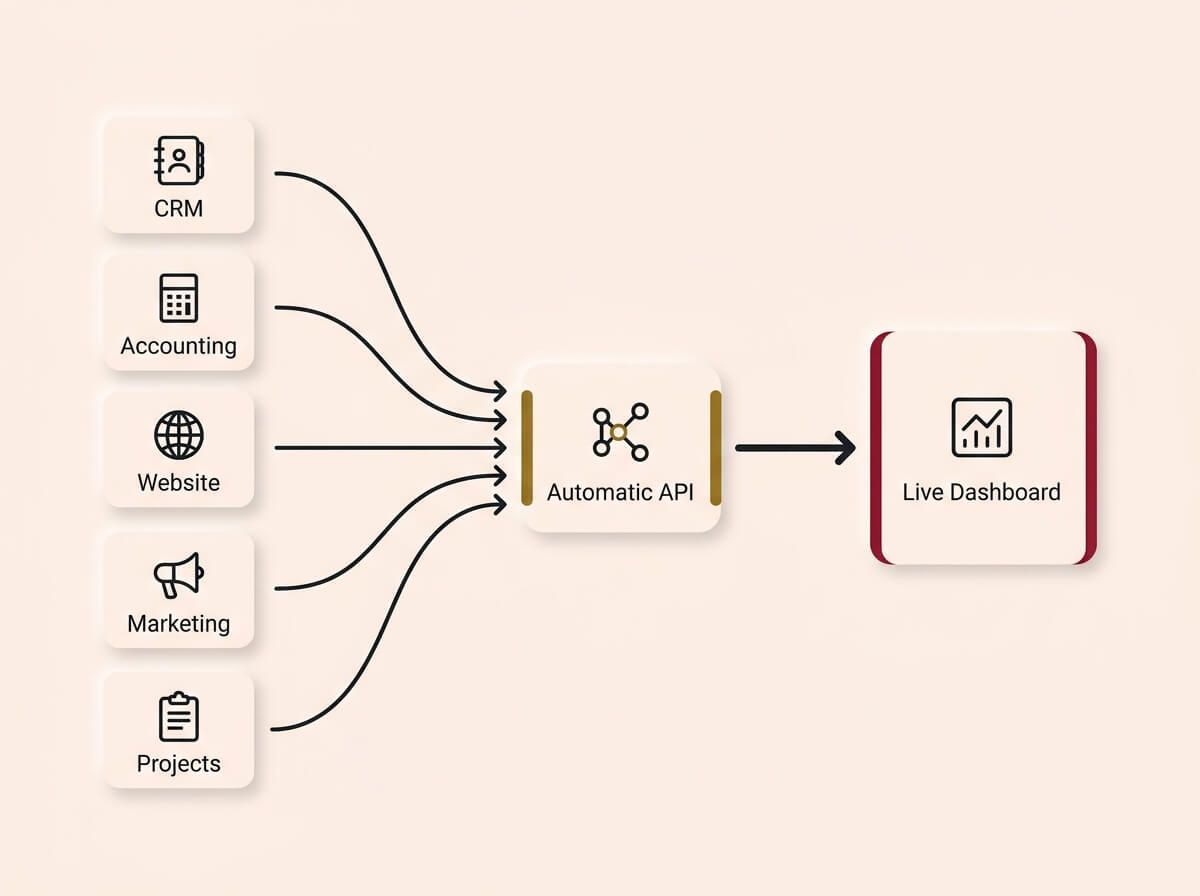
More data does not equal more clarity. A dashboard should only display metrics that directly answer a business question or drive a specific action; everything else is just noise filtered out during the decision audit.
2. Where does the data live?
A dashboard is only as good as the data that feeds it. Before you can visualise anything, you need to know where each data point comes from, how reliable it is, and whether it can be accessed automatically.
Common data sources for small business dashboards:
- CRM (HubSpot, Zoho, etc.): Lead volume, pipeline value, deal stages, conversion rates, response times.
- Accounting software (Xero, MYOB, QuickBooks): Revenue, expenses, profit margins, cash flow, accounts receivable.
- Website analytics (Google Analytics, Search Console): Traffic, source attribution, conversion events, page performance.
- Marketing platforms (Google Ads, Meta Ads, email tools): Campaign spend, impressions, clicks, cost per acquisition.
- Project management (Asana, Monday, Notion): Task completion, project timelines, team utilisation.
The critical question for each source is: can the data be pulled automatically, or does someone have to export it manually? Manual data feeds break the moment someone is too busy to do the export. Automatic connections are the only sustainable approach.
How we do it
We map every data source the client uses and test the API connections before committing to a dashboard design. If a tool does not support automatic data export, we either find a workaround (automation platform, scheduled export, middleware) or we flag it as a limitation. The client knows exactly what will be live data and what will require manual updates.
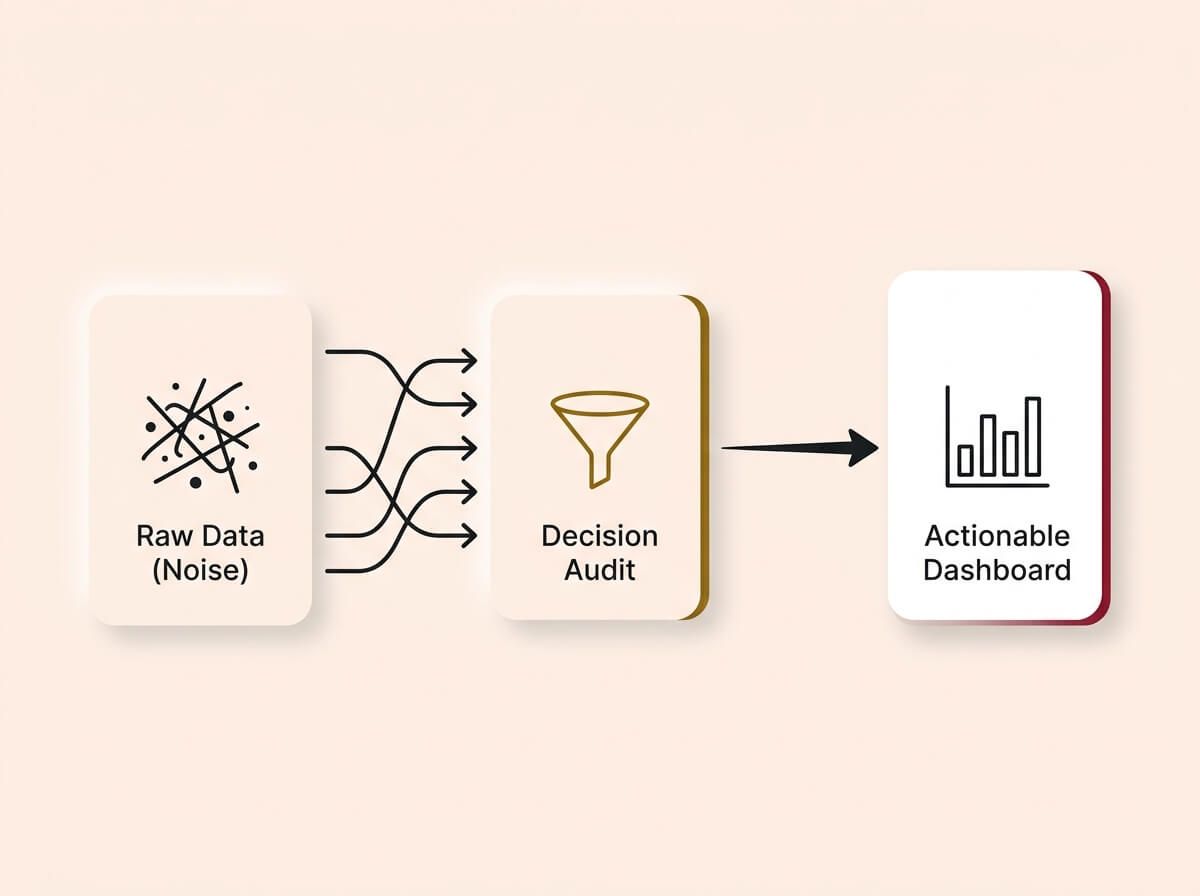
A dashboard is only as reliable as its connections. To be sustainable, data from your CRM, accounting software, and marketing platforms must flow automatically into the dashboard via APIs, eliminating the friction and lag of manual exports.
3. Who is going to read this dashboard, and who should not?
Different people need different views. The business owner needs a high-level summary: are we on track, where are the problems, what needs attention. The sales manager needs pipeline detail: which deals are stuck, which are closing, where is the bottleneck. The marketing lead needs channel performance: which campaigns are working, where should we spend more, what should we cut.
Not everyone should see everything. Dashboards often display sensitive financial data, pipeline values, profit margins, and customer information. The sales team does not need to see the P&L. The marketing lead does not need to see individual deal values. Set access controls on each view so people see what they need to do their job and nothing more. This is especially important if the dashboard is accessible on mobile, where screens are visible to anyone nearby.
A single dashboard that tries to serve everyone serves nobody. Build views for each audience:
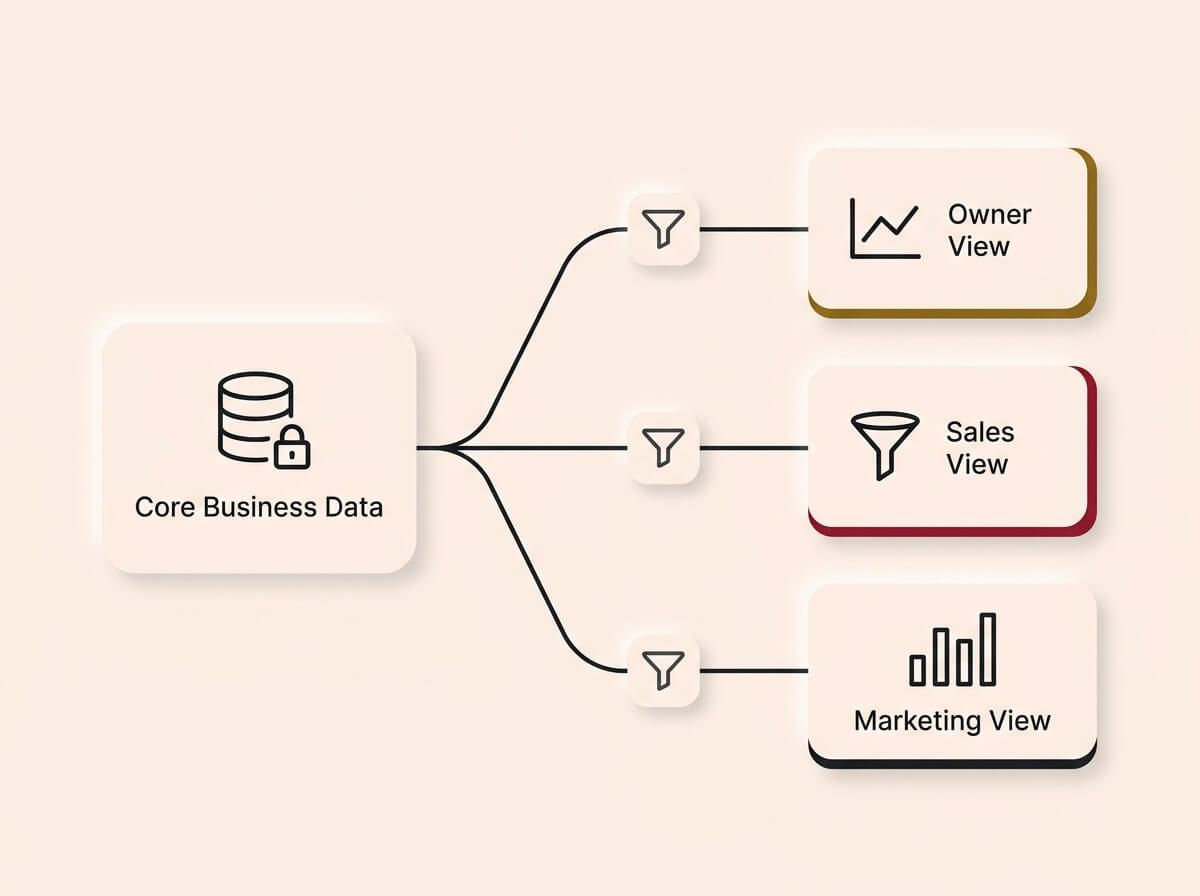
- Executive summary: The five to seven numbers that tell the owner whether the business is healthy. Revenue, pipeline, cash flow, lead volume, conversion rate, and one or two operational metrics.
- Department views: Detailed dashboards for sales, marketing, operations, and finance. Each view shows the metrics that department needs to do their job.
- Alerts and exceptions: Automated notifications when a metric crosses a threshold. Revenue drops below target. Response time exceeds the SLA. Cash flow falls below the safety margin.
How we do it
We build a tiered dashboard system for every client. The executive summary is the first screen, designed to be readable in 30 seconds on a phone. Department views sit behind it for the people who need the detail. Alerts trigger automatically so the business owner does not have to check the dashboard to know when something needs attention.
Choosing Your Key Metrics
The hardest part of dashboard design is not building it. It is deciding what to leave out. Every business generates hundreds of data points. Putting them all on a dashboard creates confusion, not clarity. The goal is to identify the five to ten metrics that genuinely drive decisions.
The metrics that matter for most growing businesses
Revenue and financial health
- Monthly revenue (actual vs target): The most fundamental metric. Are you on track?
- Cash flow forecast: Not just how much money is in the account today, but what the next 30, 60, and 90 days look like based on outstanding invoices and committed expenses.
- Profit margin by service line: Which services are making money and which are subsidised by the profitable ones?
Sales and pipeline:
- Lead volume by source: How many enquiries came in this week, and where did they come from?
- Conversion rate (lead to customer): What percentage of leads become paying customers?
- Pipeline value by stage: How much revenue is in each stage of the sales process?
- Average time to close: How long does it take from first contact to signed deal?
Marketing performance:
- Cost per lead by channel: How much does it cost to generate one enquiry from each marketing channel?
- Return on ad spend: For every dollar spent on advertising, how much revenue is generated?
Operations:
- Average response time to new leads: How quickly does the team respond to enquiries?
- Project delivery vs deadline: Are projects being delivered on time?
Not every business needs every metric. Start with the ones that connect to the decisions you identified in step one. Add more later as the system matures.
Vanity metrics vs actionable metrics
A vanity metric is a number that looks impressive but does not help you make a decision. Website visitors, social media followers, and email open rates are vanity metrics unless they are connected to a downstream action (traffic that converts, followers that enquire, emails that generate clicks to a booking page).
The test is simple: if this number went up by 20%, would you do anything differently? If the answer is no, it does not belong on the dashboard.
How we do it
We cap the executive dashboard at seven metrics. If it does not fit on one screen without scrolling, it has too much. We use the "would you act on this" test for every metric before it earns a place. The result is a dashboard the owner actually checks daily, rather than a comprehensive report that nobody opens.
Designing the Dashboard
Dashboard design is not about making charts look good. It is about making information easy to read, easy to interpret, and easy to act on. Every visual choice affects whether someone understands the data at a glance or has to study it for five minutes.
Layout principles
- Most important metrics at the top left. That is where the eye goes first. Put your headline numbers there: revenue, pipeline, cash flow.
- One metric per card. Each visual element should communicate one thing clearly. A card that tries to show revenue, growth rate, and target comparison in one small box communicates nothing well.
- Consistent time ranges. If one chart shows the last 30 days and the next shows the last 90 days, comparisons become confusing. Default to a consistent time range across the dashboard, with the ability to filter if needed.
- Colour means something. Green means on track, red means needs attention, grey means neutral. Do not use colour for decoration. Use it as a signal.
Chart types and when to use them
- Number cards: For single KPIs where the current value is what matters (revenue this month, leads this week, cash in bank). The simplest and most readable format.
- Line charts: For trends over time (monthly revenue, weekly lead volume). Shows direction and momentum.
- Bar charts: For comparisons (revenue by service, leads by channel). Shows relative size.
- Pie or donut charts: Use sparingly. They are hard to read accurately when there are more than four segments. A bar chart is almost always a better choice.
- Tables: For detailed data that needs to be scanned (deal list, overdue invoices, project status). Tables are the most information-dense format.
Mobile matters
The business owner will check this dashboard on their phone more often than on their desktop. Design for mobile first. This means larger text, fewer elements per row, and vertical scrolling rather than horizontal layouts. If the executive summary does not work on a phone screen, it will not get checked.
How we do it
We design every dashboard mobile-first. The executive summary fits on one phone screen with no scrolling. We use number cards for headline KPIs, line charts for trends, and bar charts for comparisons. We avoid pie charts unless the client specifically requests them. Every colour on the dashboard means something. Nothing is decorative.
Platforms and Tools
The dashboard platform determines what data you can connect, how the dashboards look, and how much flexibility you have. Here is an honest breakdown of the main options.
Google Looker Studio (formerly Data Studio)
Free, flexible, and well-connected to Google's ecosystem (Analytics, Ads, Search Console, Sheets). Supports custom data connectors for CRMs, accounting tools, and other platforms. The trade-off is that complex dashboards require technical skill to build, and the interface is not intuitive for first-time users. Strong for marketing and website performance dashboards.
Microsoft Power BI
Powerful data modelling and visualisation. Strong for businesses already in the Microsoft ecosystem (Excel, Dynamics, SharePoint). The free tier is limited. The paid tier is competitive for the capability it offers. The trade-off is a steeper learning curve and more setup time than simpler tools.
Embedded analytics in existing tools
HubSpot, Xero, and many other business platforms include built-in reporting dashboards. These are often the fastest path to a useful dashboard because the data is already there. The limitation is that they only show data from that one tool. A HubSpot dashboard shows CRM data but not financial data. A Xero dashboard shows financial data but not pipeline data. For a unified view, you need a dedicated dashboard platform or a custom build.
Custom-built dashboards
For businesses that need a single dashboard pulling data from five or more sources with custom calculations and specific visual requirements, a custom-built solution offers the most control. This can be built with tools like Retool, Grafana, or a custom web application. The trade-off is higher initial cost and the need for ongoing maintenance.
AI-powered analytics layers
AI is now embedded in most dashboard platforms. Looker Studio, Power BI, and standalone tools like ThoughtSpot offer natural-language querying ("show me revenue by service for the last quarter"), automated anomaly detection, and AI-generated summaries. These features are practical for business owners who want insights without learning to read complex charts. If your dashboard platform supports AI features, turn them on. They make the data more accessible to non-technical users.
Cost considerations
Looker Studio is free. Power BI starts at around $15 per user per month. Embedded analytics in tools you already pay for are included. Custom builds range from a one-time setup fee to ongoing development costs depending on complexity. Data connector fees (for pulling data from CRMs, accounting tools, etc.) typically range from $20 to $100 per month depending on the number of sources and the connector platform. A functional dashboard system for most growing businesses costs between $50 and $300 per month in tools, far less than the cost of the decisions it improves.
How we do it
We default to Looker Studio for most clients because it is free, flexible, and connects to the tools Australian businesses actually use. For clients who need financial dashboards with real-time accounting data, we build a hybrid using Looker Studio for marketing and sales metrics and the accounting platform's native reporting for financials. We always estimate the total monthly cost before building so there are no surprises.
Connecting Your Data Sources
The technical work of dashboard building is mostly about connections. Getting the data from where it lives into the dashboard platform reliably, accurately, and automatically.
Direct integrations
Most dashboard platforms have built-in connectors for common tools. Looker Studio connects natively to Google Analytics, Google Ads, Google Sheets, and BigQuery. Power BI connects natively to Microsoft tools. Check whether your dashboard platform has a direct integration for each data source before looking for alternatives.
Third-party connectors
For data sources without native integrations, third-party connector platforms (Supermetrics, Fivetran, Stitch, or Airbyte) bridge the gap. These tools pull data from your CRM, accounting software, marketing platforms, and other sources into the dashboard platform. They typically charge per source per month.
Automation platform as middleware
If you already have an automation platform, it can serve as the data pipeline. A Make or Zapier workflow can extract data from a source, transform it, and push it into a Google Sheet or database that the dashboard reads. This is often the most flexible approach for small businesses because it uses infrastructure you already have.
Data freshness
How often does the dashboard need to update? Real-time is ideal but not always necessary or affordable. For most growing businesses, the right cadence is:
- Financial data: Daily or weekly (depends on accounting software sync frequency).
- Sales and pipeline data: Real-time or hourly (CRM data changes frequently).
- Marketing data: Daily (campaign metrics do not need minute-by-minute updates).
- Operational data: Real-time if possible (project status and task completion should reflect current state).
Set expectations with the team about data freshness. If the dashboard updates daily, do not use it to make decisions that require minute-by-minute accuracy.
Data Quality and Trust
A dashboard is only as trustworthy as the data it displays. If the team does not trust the numbers, they will not use the dashboard. And if they do not use the dashboard, every problem it was built to solve persists.
The upstream problem
Dashboard data quality is not a dashboard problem. It is an upstream problem. If the CRM data is incomplete (because the team does not update it consistently), the pipeline dashboard is unreliable. If the accounting data is not reconciled, the financial dashboard is misleading. If marketing attribution is not set up correctly, the channel performance dashboard is guessing.
This is where training and adoption directly affects reporting quality. Clean dashboards require clean data, and clean data requires consistent team behaviour.
Data validation
Before trusting a dashboard, validate the data:
- Cross-reference with known numbers. Does the revenue figure on the dashboard match the bank statement? Does the lead count match what the team manually counted last week?
- Check for gaps. Are there days or weeks with zero data? That usually means a connection failed, not that nothing happened.
- Look for outliers. A sudden spike or drop in any metric should be investigated. It is either a real event worth understanding or a data error worth fixing.
Building trust gradually
Do not launch a dashboard and expect the team to trust it immediately. Run the dashboard alongside the existing reporting process for two to four weeks. Compare the numbers. Fix discrepancies. Once the dashboard consistently matches or improves on the manual reports, retire the manual process.
The goal is that the dashboard becomes the single source of truth that everyone in the business references. That trust is earned through accuracy, not declared by announcement.
How we do it
We run every dashboard in parallel with the client's existing reporting for at least two weeks. We compare the numbers, investigate discrepancies, and fix data issues before the dashboard goes live as the primary source. The client does not switch until they trust the numbers.
What Happens After the Dashboard Is Live
A live dashboard is the beginning of data-driven decision-making, not the end of the project. The real value comes from how the business uses it and what gets built on top of it.
The most valuable feature of a live dashboard is not the charts. It is the alerts. Configure notifications that trigger when a metric crosses a threshold:
- Revenue falls below the weekly target.
- Lead volume drops by more than 20% compared to the previous week.
- Average response time exceeds the agreed SLA.
- Cash flow forecast drops below the safety margin.
Alerts turn the dashboard from something you check into something that checks on you. The business owner does not need to look at the dashboard to know when something needs attention. The dashboard tells them.
Sharing and distribution
Not everyone who needs to see the dashboard should need to log into the platform. Most dashboard tools support shareable links (view-only access via URL), scheduled email reports (a PDF or snapshot sent weekly or monthly), and embedded views (a live dashboard widget inside another tool like Notion or a company intranet).
These features are practical for sharing with business partners, investors, or team leads who need visibility without full platform access. Looker Studio and Power BI both support all three. Configure the sharing permissions carefully so sensitive views are only accessible to the right people.
How we do it
We configure automated alerts for every client dashboard. The alerts are sent via email or Slack depending on the client's preference. Each alert includes the metric, the threshold, the current value, and a link to the relevant dashboard view. The business owner gets the information they need to act without logging in.
Once you have enough historical data (typically three to six months), the dashboard can move from showing what happened to predicting what is likely to happen. Simple trend projections can forecast:
- Whether you will hit the revenue target this quarter based on current pipeline velocity.
- Whether cash flow will be tight in 60 days based on current receivables and committed expenses.
- Whether lead volume is trending up or down compared to the same period last year.
These are not complex AI predictions. They are basic trend extrapolations that any dashboard tool can calculate. But they shift the conversation from reactive ("what happened last month") to proactive ("what is likely to happen next month and what should we do about it").
A concrete example: the dashboard shows you are on track to close $180,000 this quarter based on current pipeline velocity, but cash flow will be tight in week eight because three large invoices are still outstanding. That combination of forward-looking revenue and forward-looking cash flow in one view is the difference between reacting to a problem and preventing one.
How we do it
We add predictive trend lines to client dashboards once there is enough data to make them meaningful. The client can see not just where they are, but where they are heading. This is the shift from rearview-mirror reporting to forward-looking intelligence.
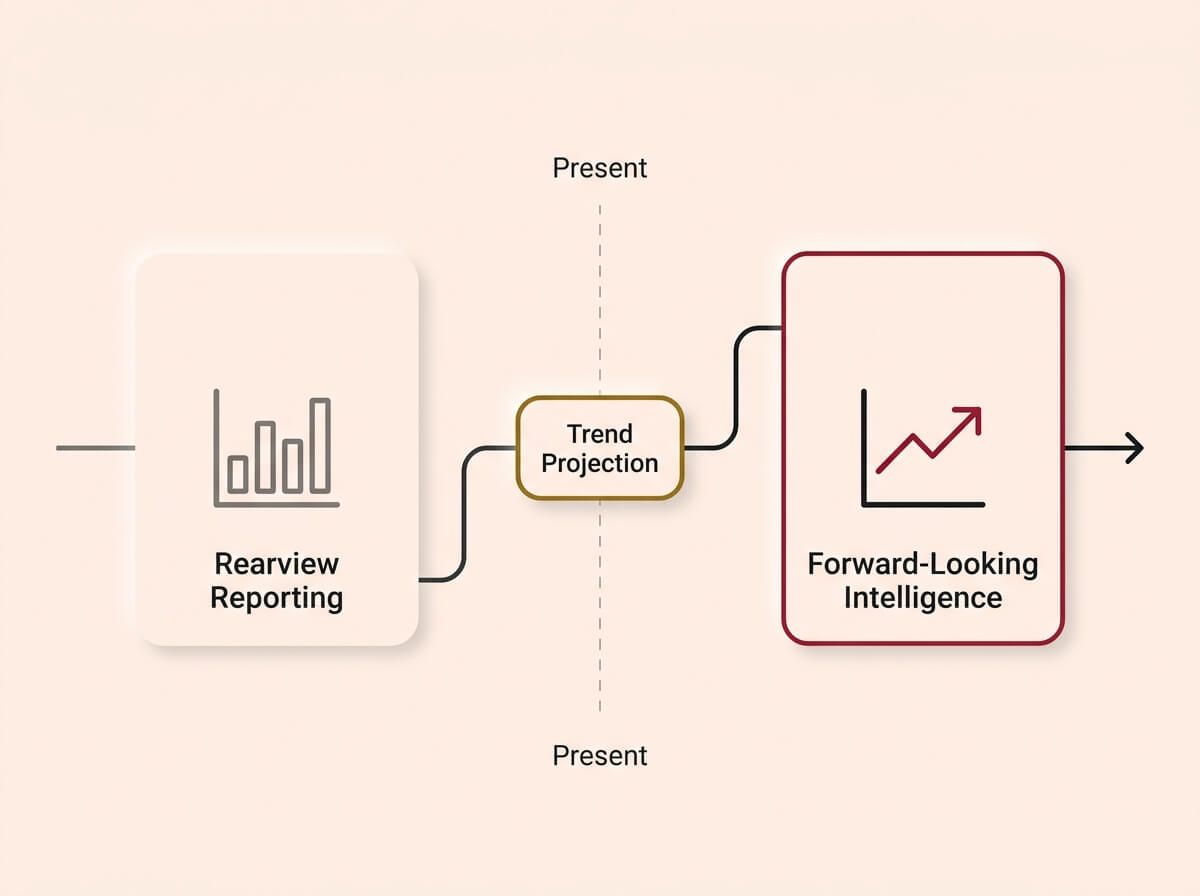
Shifting from reactive to proactive. Once sufficient historical data is gathered, dashboards evolve from simply reporting what happened last month (rearview reporting) to projecting what is likely to happen next month (forward-looking intelligence).
The dashboard becomes most powerful when it is connected to the CRM, the automation layer, and the AI tools that feed it data. A lead that comes in through the website is captured in the CRM, triggers a follow-up automation, and appears on the dashboard in real time. A deal that closes updates the pipeline, triggers an invoice, and adjusts the revenue forecast. The dashboard is not a separate tool. It is the visibility layer on top of the connected system.
If you have already built the other layers (CRM, automation, AI assistants, content, and training), the dashboard is what makes the entire system visible. It is the control tower that shows whether everything underneath is working.
How we do it
We build the dashboard as the final layer of the system, not the first. It sits on top of the CRM, the automations, and the AI tools. When the system underneath is running cleanly, the dashboard shows a business that is operating predictably. When something breaks, the dashboard shows where.
Why Now, Not Later
Every week without real-time visibility is a week where problems compound silently and opportunities pass unnoticed.
The cost of operating without a dashboard is not the missing charts. It is the decisions made on incomplete information, the marketing budget spent on channels that stopped converting months ago, the service lines that are quietly unprofitable, the cash flow surprises that force reactive decisions instead of planned ones. These costs are invisible because there is no system measuring them. That is the trap: you cannot see the cost of not seeing.
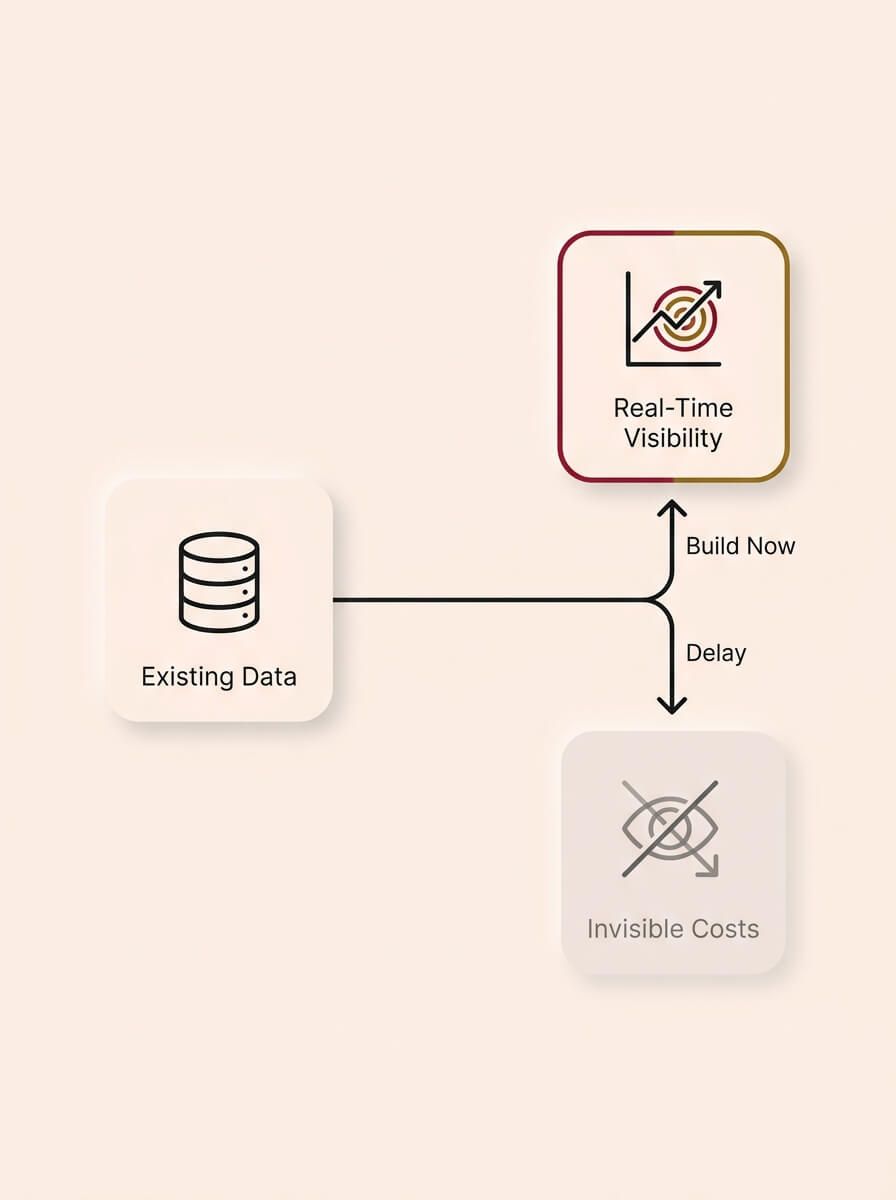
The trap of invisible costs. You already generate the data, but delaying the build means problems compound silently. Establishing real-time visibility now transforms existing data into an immediate, proactive advantage, replacing reactive guesswork with planned decisions.
* Your data sources already exist. Your CRM, your accounting software, your website analytics, and your marketing platforms are all generating data right now. The data is there. The visibility is not. Building the dashboard is not creating new data. It is making the data you already have useful. * AI-powered analytics are now accessible to any business. Natural-language queries, automated anomaly detection, and trend forecasting are built into the tools available today. The technology barrier has dropped from "hire a data analyst" to "connect your tools and configure the views." * The businesses that build dashboards now are making better decisions this quarter. Better marketing allocation, faster response to pipeline changes, earlier detection of cash flow risks, and clearer visibility on which parts of the business deserve more investment. Every quarter without this visibility is a quarter of suboptimal decisions. * If you are planning an exit, a valuation, or a significant investment, clean data and reliable reporting are not optional. Buyers and investors discount businesses that cannot show consistent, verifiable performance data. Building the dashboard now means the data history exists when you need it.
The cost of building a dashboard system is a fraction of the cost of the decisions it improves. The longer you wait, the more decisions you make with incomplete information.
How we do it
We build dashboards that pay for themselves within the first quarter. The combination of better marketing allocation, faster pipeline visibility, and earlier problem detection typically saves or generates more value in 90 days than the entire project costs. We track this and show the client the impact.
How We Build It
You can take everything in this guide and do it yourself. We have written it specifically so that you can. But if you want a team to do it for you, here is exactly how we work. No surprises.
Step 1: Decision and data audit. We identify the decisions the dashboard needs to support, map every data source, and test the API connections. We document what is available, what is reliable, and what has gaps.
Step 2: Metric selection and dashboard design. We select the key metrics, design the layout (mobile-first), and choose the right chart type for each data point. The client approves the design before we build.
Step 3: Data connection and validation. We connect every data source, configure the refresh schedules, and validate the data against known numbers. We run the dashboard in parallel with existing reporting for at least two weeks.
Step 4: Alerts and automation. We configure automated alerts for threshold breaches, set up exception reporting, and connect the dashboard to the client's notification channels (email, Slack, or mobile push).
Step 5: Handover and optimisation. We train the client on how to read the dashboard, how to investigate anomalies, and how to request changes. We review the dashboard monthly for the first quarter and adjust based on what the client learns from using it.
That is the process. Start to finish. Everything we described in this guide, delivered.
Dashboard Diagnostic Checklist
Run your current reporting and visibility against these checks. If you fail more than three, you are making decisions with incomplete information.
Data sources
- Are your core data sources (CRM, accounting, analytics, marketing) connected to a central reporting system?
- Does data flow automatically, or does someone export and upload it manually?
- Do you know how fresh the data is in your reports (real-time, daily, weekly)?
- Have you validated your dashboard data against known numbers (bank statements, manual counts)?
Metrics and decisions
- Can you name the five to seven metrics that drive the most important business decisions?
- Does every metric on your dashboard connect to a specific decision or action?
- Have you removed vanity metrics that look impressive but do not inform decisions?
- Do you know your cost per lead by channel?
- Do you know your conversion rate from lead to customer?
- Can you see profit margin by service line?
Dashboard design
- Can the business owner check the executive summary in under 30 seconds on a phone?
- Are department-level views available for sales, marketing, and operations?
- Is colour used as a signal (green/red/grey), not decoration?
- Are time ranges consistent across the dashboard?
Alerts and action
- Are automated alerts configured for key threshold breaches (revenue, lead volume, response time, cash flow)?
- Does the team know what to do when an alert fires?
- Is there a regular cadence (weekly or monthly) for reviewing dashboard data as a team?
Trust and maintenance
- Does the team trust the dashboard numbers enough to use them for decisions?
- Is there a process for investigating and fixing data discrepancies when they appear?
- Is the dashboard reviewed and updated when business processes or tools change?
- Is the dashboard connected to the CRM and automation layer so data flows end-to-end?
Count your failures. If you scored under 15 out of 22, you are making important decisions without the data you need.
Ready to fix this?
Book a call and we will walk you through how this applies to your business. We will give you an honest read on whether it is worth doing right now, and if so, exactly where to start.
BOOK A CALLWe do not upsell. We do not surprise you with hidden costs. We tell you what you need, what it costs, and how long it takes. If it is not worth doing, we will tell you that too.