How to Stop Losing Leads You Already Earned
The 2026 Guide to Tracking Every Enquiry, Following Up on Time, and Building a Pipeline That Runs Without You
For Australian businesses who know leads are slipping through the cracks
Why Most Businesses Lose Leads They Already Paid For
Getting leads is not the problem for most small businesses. Losing them is. The marketing works. The phone rings. The contact form gets filled out. But somewhere between the enquiry arriving and someone following up, things fall apart. The lead goes cold. The job goes to a competitor. And the business owner never even knows it happened. Three things have changed in the last two years that make the old way of managing leads unsustainable.
Modern CRMs can score leads automatically, predict which deals are likely to close, and fill in contact data without anyone typing a word. Businesses using these tools are making faster, better-informed decisions about where to spend their time. Businesses still working from a spreadsheet or a shared inbox are not just behind. They are competing against a system that does not forget, does not sleep, and does not miss a follow-up.
Research from Harvard Business Review found that businesses who respond to a lead within five minutes are 100 times more likely to make contact than those who wait 30 minutes. Five minutes. Most small businesses take hours, sometimes days, to respond to a website enquiry. By then, the prospect has already spoken to someone else. Lead tracking has shifted from a "nice to have" to a direct cost of not having.
When a business does five jobs a week, a shared inbox works. When it does twenty, things start to slip. When it does fifty, leads are lost every day and nobody can prove it because there is no record of what came in, who handled it, or what happened next. The lack of visibility is the most expensive problem most business owners cannot see. And unlike a website rebuild, the cost of a missing CRM is invisible until you measure it.
This guide covers how to build a lead tracking system that captures every enquiry, assigns it to the right person, and follows up automatically, so nothing falls through the cracks whether you are in a meeting, on a job, or asleep.
How we do it
We audit the full lead journey before recommending any tool. A recent client had 40% of their website enquiries landing in a shared Gmail inbox with no tagging, no assignment, and no follow-up process. We mapped every entry point, connected them to a CRM, and automated the first response. Their lead-to-appointment rate doubled in six weeks without increasing their ad spend.
Before You Pick a CRM
This is where most businesses go wrong. They start by choosing a tool, then try to make their process fit the tool. It should be the other way around. The decisions you make before you touch any software determine whether the CRM actually gets used or becomes another subscription nobody logs into.
Before you can track leads, you need to know where they come from. Most businesses have more entry points than they realise.
- Website forms: Contact forms, quote request forms, booking widgets. Each one is a lead source.
- Phone calls: Missed calls, voicemails, after-hours calls. If these are not logged somewhere, they do not exist in your pipeline.
- Email: Direct emails to your business address. These are the easiest to lose because they sit in the same inbox as everything else.
- Social media: Direct messages on Instagram, Facebook, LinkedIn. These are enquiries that never make it into any tracking system unless you deliberately capture them.
- Referrals and word of mouth: Someone says "call my mate Dave." If Dave calls and nobody logs it, that referral might as well not have happened.
- Walk-ins and phone enquiries: If your business has a physical location or a reception team, verbal enquiries need a capture process too.
The goal is simple: every enquiry, regardless of where it comes from, must land in one system. If it does not exist in the system, it does not get followed up.
How we do it
We run a lead source audit as the first step of every CRM project. We map every entry point, including the ones the client has forgotten about, and document how each one currently gets handled. Most clients discover at least two lead sources that have no capture process at all.
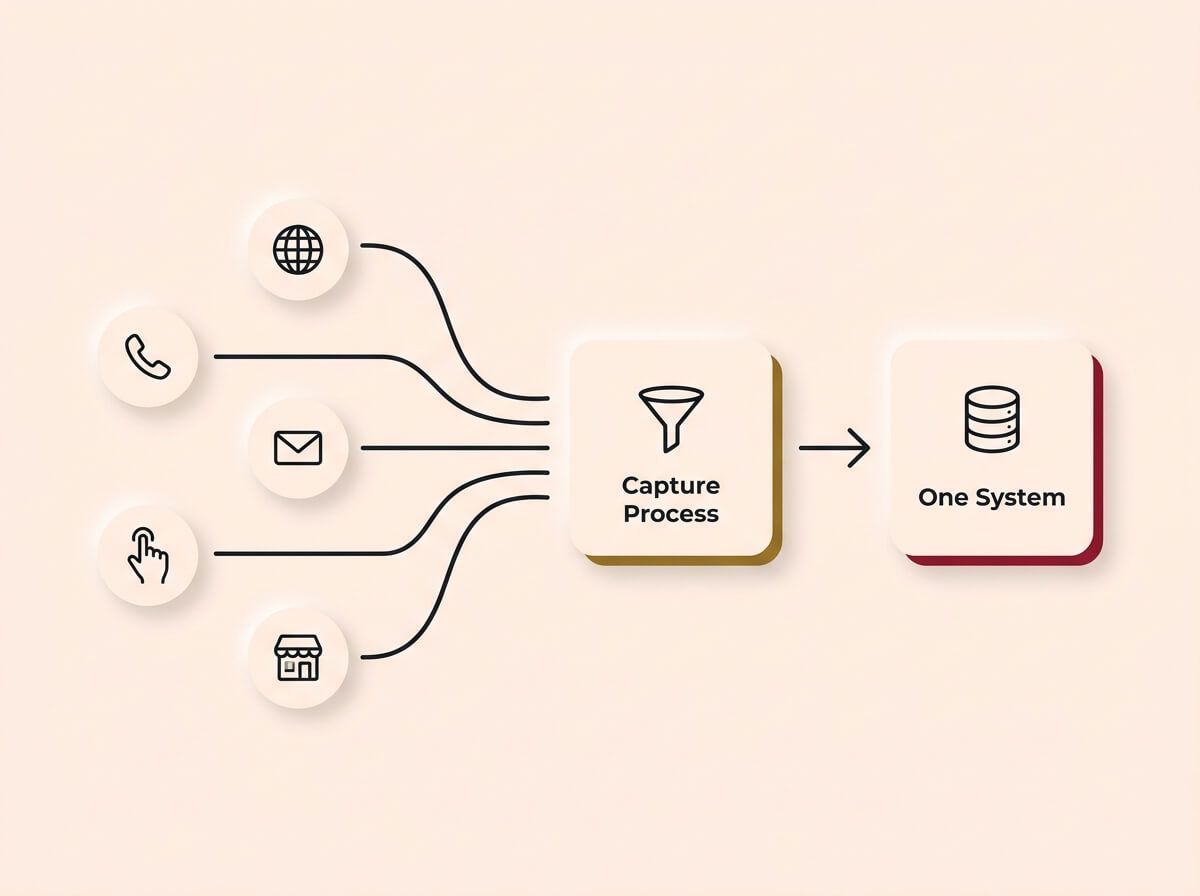
If it isn't captured, it doesn't exist. A reliable system requires mapping every entry point, from web forms to word of mouth, and ensuring they all funnel into a single, centralised database.
A pipeline is just a set of stages that a lead moves through, from first contact to closed (won or lost). The stages need to reflect how your business actually works, not how a CRM template thinks it should work.
For most service businesses, the stages look something like this:
- New enquiry: The lead has come in but nobody has responded yet.
- Contacted: Someone on your team has made first contact.
- Qualified: You have confirmed the lead is a real opportunity, not a time-waster or a wrong number.
- Quote sent: You have sent a proposal, estimate, or quote.
- Won: The customer has accepted and the job is booked.
- Lost: The deal did not close. Record the reason.
The most common mistake is having too many stages. If your team has to think about which stage a lead belongs in, they will stop updating it. Keep it simple. Six stages or fewer for most businesses.
How we do it
We design pipelines based on how the team actually works, not on CRM best-practice templates. We sit with the people who handle leads and walk through real scenarios. The result is a pipeline that takes less than 10 seconds to update per lead, which is the threshold where adoption stops being a problem.
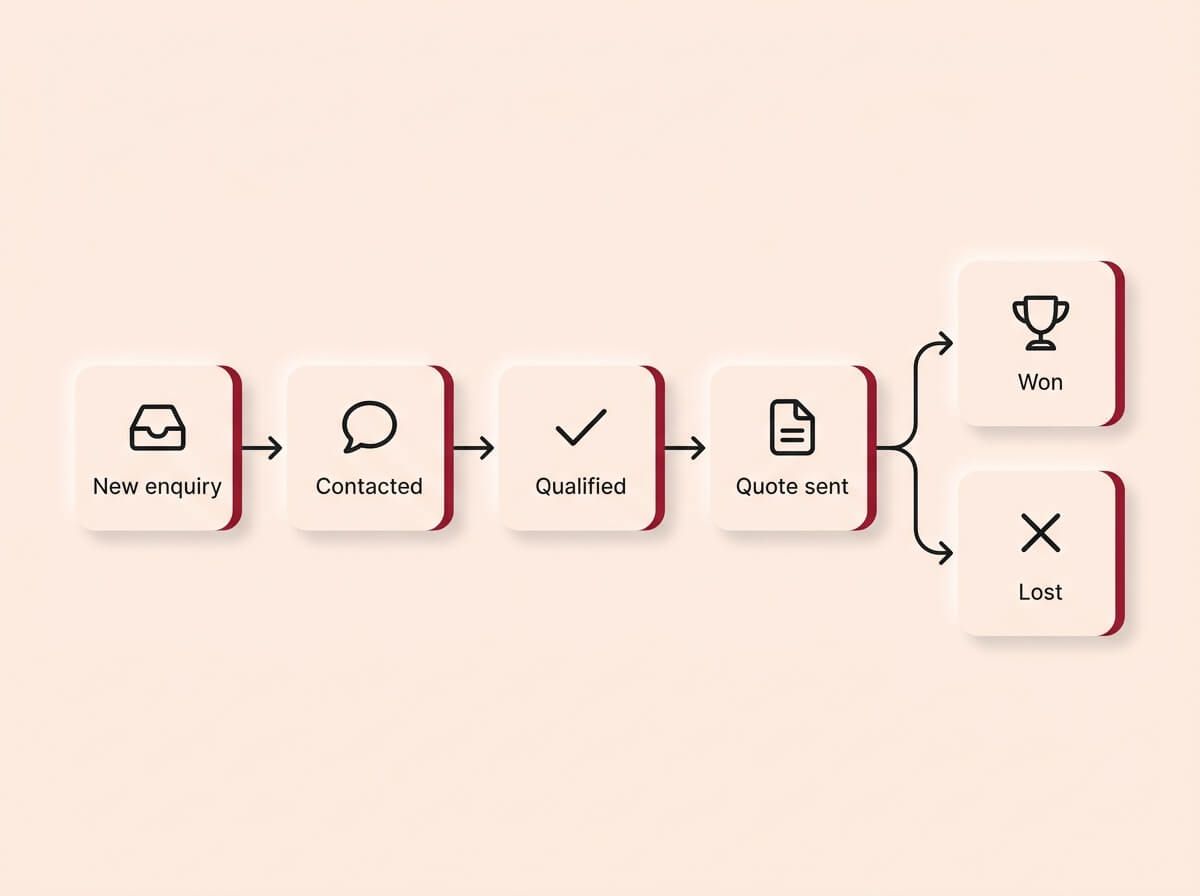
Keep it simple. A pipeline must reflect how your business actually operates. By limiting the flow to six stages or fewer, from new enquiry to a won or lost deal, you ensure the system is fast enough that your team will actually use it.
Every field you add to a contact record is a field someone has to fill in. The more fields, the less likely anyone will use the system consistently.
Start with the minimum:
- Name
- Phone number
- Lead source (where did they come from)
- What they are enquiring about
- Pipeline stage
Everything else can be added later once the team is using the system. The biggest threat to CRM adoption is not the wrong tool. It is asking the team to fill in 15 fields when they have a customer on the phone.
How we do it
We start every CRM with six fields or fewer. We add more only when there is a proven need. A recent client's previous CRM had 22 required fields on the contact form. Nobody used it. We rebuilt it with six fields and 90% of leads were being logged within the first week.
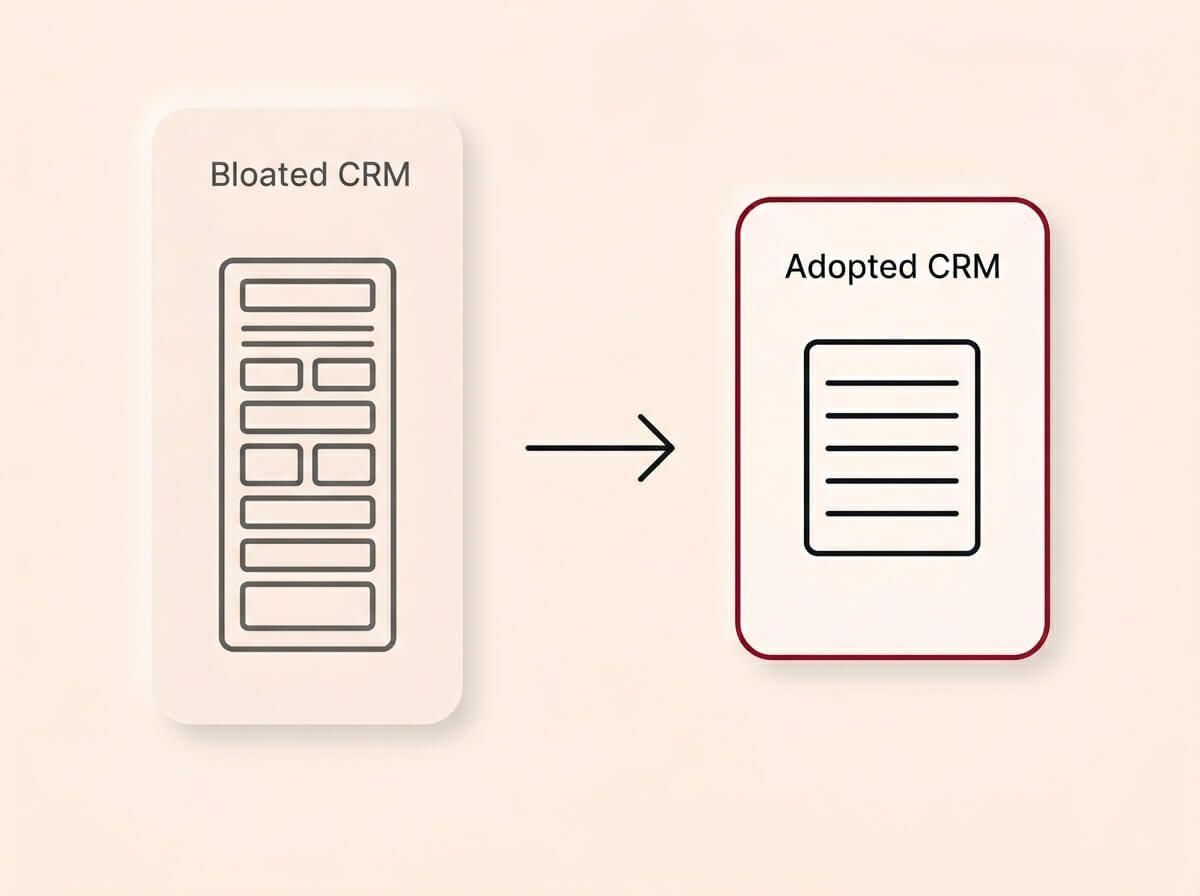
The biggest threat to CRM adoption is not the wrong tool. It is asking your team to fill in 15 fields while they have a customer on the phone. Start with the absolute minimum of six fields and only add more when there is a proven business need.
Designing Your Pipeline
The pipeline is the core of the CRM. It is the visual representation of where every lead sits and what needs to happen next. Getting this right is the difference between a CRM that runs the business and a CRM that collects dust.
Pipeline structure
Your pipeline should answer three questions at a glance:
- How many active leads do we have right now?
- Where is each lead in the process?
- What is the next action for each lead?
Most CRM platforms display the pipeline as a board with columns (like a Kanban board). Each column is a stage. Each card is a lead. You drag the card from one stage to the next as the deal progresses.
The critical design decision is what triggers a stage change. "Contacted" does not mean someone thought about calling. It means they actually spoke to the lead or sent a message. "Quote sent" means the quote has been delivered and confirmed. If the definitions are vague, the pipeline becomes unreliable.
Multiple pipelines
If your business has genuinely different sales processes for different services, you may need more than one pipeline. A building company that does renovations and new builds has two different sales cycles. Forcing them into one pipeline creates confusion.
But be careful. Most businesses need one pipeline, not three. Adding pipelines adds complexity. If you are not sure, start with one and split later if the data shows you need it.
Deal values and forecasting
If you attach a dollar value to each deal, the pipeline becomes a revenue forecast. You can see at a glance: we have $120,000 in active quotes, $45,000 in qualified leads, and $200,000 in closed deals this month. This is how you stop guessing about cash flow and start planning with real numbers.
The accuracy of the forecast depends entirely on the accuracy of the data. If the team does not update stages and values, the forecast is fiction.
How we do it
We build every pipeline with clear stage definitions, documented trigger actions, and deal values from day one. We also build a simple dashboard that shows pipeline value by stage, so the business owner can see their revenue forecast without opening the CRM. The data updates automatically as the team moves deals through the pipeline.
Setting Up the CRM
This is the hands-on work. Configuring the tool, importing existing contacts, connecting lead sources, and making sure the system actually matches the process you designed in the previous steps.
Contact import and cleanup
Most businesses have contacts scattered across spreadsheets, email inboxes, phone contacts, and old systems. Before you import anything into the new CRM, clean the data.
- Remove duplicates.
- Standardise formats (phone numbers, email addresses, company names).
- Tag contacts by source and status so you know what you are working with.
- Decide what to archive versus what to keep active.
Importing dirty data into a clean CRM is the fastest way to destroy trust in the system. If the team opens the CRM and sees 3,000 contacts with no context, they will not use it.
Connecting lead sources
Every lead source you mapped in the planning stage needs a technical connection to the CRM.
- Website forms: The form submission should create a new contact in the CRM automatically, tagged with the form name and page it came from.
- Phone calls: Call tracking software can log missed and answered calls directly into the CRM with the caller's number and the call duration.
- Email: Forwarding rules or direct integrations can capture inbound emails as new leads.
- Social media: Most CRMs have native integrations with Facebook and Instagram. LinkedIn requires a manual or third-party connection.
The goal is zero manual entry for new leads. If someone has to copy and paste a name and phone number from an email into the CRM, they will stop doing it within a week.
Automating the first response
The single most impactful automation you can set up is an instant first response. When a lead comes in, the CRM sends a confirmation within 60 seconds: "We have received your enquiry. Someone from our team will be in touch within [timeframe]."
This does three things. It confirms to the lead that their message was received. It buys you time to respond properly. And it puts you ahead of every competitor who takes hours to reply.
How we do it
We connect every lead source on launch day, not as a "phase two" afterthought. We set up automated first responses for every entry point, customised to the source. A website form gets one message. A missed call gets a text. A social media enquiry gets a DM. The business owner gets a notification for every new lead, and the lead gets a response before the kettle boils.
Tools and Platforms
There are dozens of CRM platforms on the market, and the differences between them matter less than most people think. The right CRM is the one your team will actually use. Here is an honest breakdown of the main options.
HubSpot (Free and Paid)
HubSpot's free tier is the strongest free CRM available. It handles contacts, deals, pipelines, email tracking, and basic automation. For most small service businesses, the free tier is enough to start. The paid tiers add marketing automation, sequences, and reporting. The risk is cost creep as you add features.
Zoho CRM
A solid mid-range option with strong customisation. Good for businesses that need more flexibility than HubSpot Free but do not want to pay HubSpot's premium pricing. The interface is less polished, and the learning curve is steeper.
Salesforce
Enterprise-grade. Powerful but complex. Unless you have a dedicated admin and a large sales team, Salesforce is overkill for most growing businesses and will create more problems than it solves.
Industry-specific CRMs
Some industries have purpose-built CRMs: ServiceM8 for trades, Cliniko for health, Jobber for field services. These can be excellent because they are designed for your workflow. The trade-off is limited flexibility and integration options compared to general-purpose platforms.
AI features in modern CRMs
Most major CRM platforms now include AI-powered features as standard. HubSpot, Zoho, and others offer automatic lead scoring, predictive deal forecasting, data enrichment, and smart suggestions for next actions. These features are not gimmicks. They reduce the amount of manual thinking required to prioritise your pipeline and they improve over time as more data flows through the system. If you are evaluating CRMs in 2026, AI capability should be on your checklist.
Mobile matters
Most small business owners are not sitting at a desk when a lead comes in. They are on a job, in a meeting, or driving between appointments. The CRM needs to work properly on a phone, with push notifications for new leads, a fast interface for updating stages, and the ability to call or text a lead directly from the contact record. If the mobile experience is clunky, the team will stop using it.
How to choose Ask yourself: How many people need to use this daily? How complex is our sales process? Do we need marketing automation or just lead tracking? Does it work well on mobile? The answers will narrow the field to two or three options. Then pick the one with the simplest interface.
How we do it
We default to HubSpot for most clients because the free tier covers the fundamentals and the upgrade path is clear. For clients with industry-specific needs, we evaluate the specialist option against HubSpot and recommend based on what the team will actually adopt. We test the mobile experience as part of every evaluation because that is where most of our clients actually use the CRM day to day.
Data Privacy and Compliance
If you are storing customer data, you have legal obligations. This is not optional and it is not something to figure out later.
In Australia, the Privacy Act and Australian Privacy Principles apply to businesses above a certain turnover threshold, but best practice is to comply regardless. The key rules for CRM usage: only collect data you genuinely need, store it securely with access controls, use it only for the purpose it was collected, and be able to delete it if a customer requests. If you send marketing emails from your CRM, the Spam Act requires an unsubscribe option, clear business identification, and consent before sending. Follow-up emails about active enquiries are fine. Adding contacts to a newsletter without consent is not.
The practical steps are straightforward: set up user permissions so only the right people see sensitive data, document your data retention policy, use the CRM's built-in consent tracking, and make sure your privacy policy reflects what the system actually collects.
How we do it
We configure user permissions, consent tracking, and data retention rules as part of every CRM setup. Privacy is built into the system from day one, not treated as a separate project.
What Happens After Setup
A CRM that is set up but not connected to the rest of the business is just a fancy contact list. The real value comes from what you build on top of it.
1. Automated follow-up sequences
Not every lead is ready to buy on the first contact. Some need a second touch. Some need three. The CRM should handle this automatically.
A simple follow-up sequence for a service business might look like this:
- Day 0: Instant confirmation (automated)
- Day 1: Personal follow-up call or email from the team
- Day 3: If no response, a second follow-up with additional information
- Day 7: Final check-in before the lead is marked cold
Without automation, this follow-up depends on someone remembering. With automation, it happens every time, for every lead, without fail.
How we do it
We build follow-up sequences directly into the CRM for every client. The sequences are customised to the business, not copied from a template. We test them with real leads before going live to make sure the timing, tone, and triggers are right.
2. Reporting and visibility
The CRM should tell you, at a glance:
- How many new leads came in this week, and from where?
- How many are being actively worked?
- How many quotes are outstanding?
- What is the conversion rate from enquiry to closed deal?
- What is the average time to first response?
If you cannot answer these questions without opening a spreadsheet or asking someone, the CRM is not configured properly. These reports should be automatic and always up to date.
How we do it
We build a reporting dashboard for every CRM client. It shows lead volume, pipeline value, conversion rates, and response times in real time. The business owner can check it from their phone in under 30 seconds. No spreadsheets, no asking the team for updates.
3. Connecting to other systems
The CRM should not live in isolation. At a minimum, it should be connected to:
- Your website: So form submissions and call tracking data flow in automatically.
- Your email: So conversations with leads are logged against their contact record.
- Your quoting or invoicing tool: So you can see which leads became paying customers and track revenue.
- Your calendar: So booked appointments appear on the contact timeline.
Each connection reduces manual work and increases the accuracy of the data. The more connected the CRM is, the more useful it becomes. For more on connecting your tools through automation, see our Automation guide.
How we do it
We connect the CRM to the client's website, email, quoting tool, and calendar before handover. The client receives a system where data flows between tools automatically. When a lead books a call through the website, the appointment appears in the calendar, the contact is created in the CRM, and the follow-up sequence starts, all without anyone touching a keyboard.
Why Now, Not Later
The cost of not having a lead tracking system is not static. It compounds every week. Every lead that slips through today is not just one lost job. It is one lost job plus every referral that job would have generated, plus the data you never collected about what is working in your marketing. Over twelve months, a business losing even three leads a week to poor follow-up is leaving hundreds of thousands of dollars on the table, and most of them have no idea because there is no system measuring it.
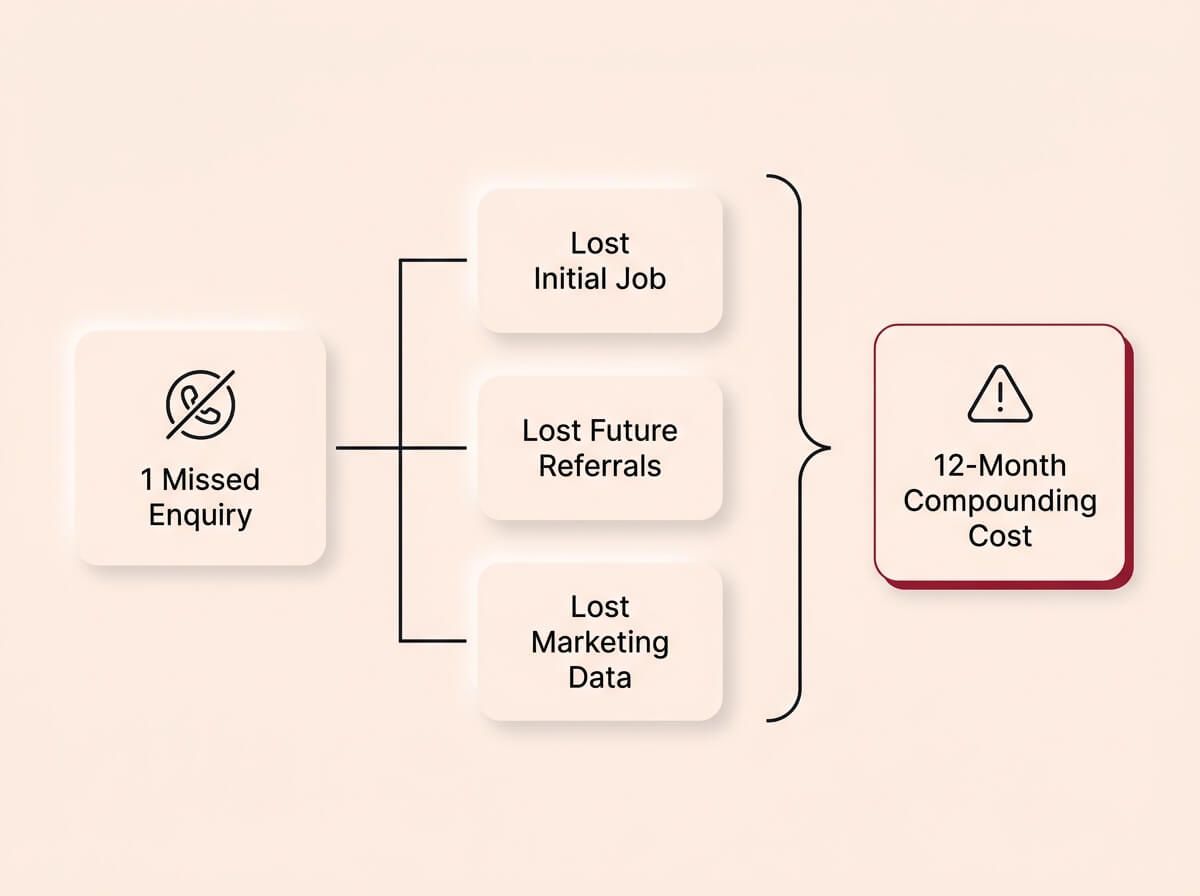
A missed enquiry is never just one lost job. Over twelve months, a single leak in your follow-up process compounds into lost referrals, repeat business, and critical marketing data that you can never recover.
* If you are spending money on ads, SEO, or content marketing, and you cannot prove which leads came from which channel, you are flying blind with your budget. * If your follow-up process depends on memory or manual checking, you are losing leads to competitors who respond faster. The response-time gap is getting wider as more businesses adopt automated first-response systems. * If your team is growing, every new person who handles enquiries without a system creates more inconsistency and more risk of leads falling through. * AI-powered CRMs are becoming the baseline, not the advantage. The longer you wait to adopt, the further behind you fall relative to competitors who already have lead scoring, automated follow-up, and pipeline forecasting running. * The leads you are losing today are not coming back. They have already called someone else.
The cost of setting up a CRM properly is a fraction of the cost of the leads you are already losing. The longer you wait, the wider the gap between what you spend on marketing and what you actually capture from it.
How we do it
We quantify the gap before we propose a solution. We look at the client's current lead volume, estimate the leakage based on their existing process, and show them the revenue impact. Most clients are surprised by the number. It is almost always larger than the cost of fixing it.
How We Build It
You can take everything in this guide and set it up yourself. We have written it specifically so that you can. But if you want a team to do it for you, here is exactly how we work. No surprises.
Step 1: Lead source audit. We map every entry point where enquiries come in, including the ones nobody is tracking. We document how each one is currently handled and where the gaps are.
Step 2: Pipeline design. We design the pipeline stages, fields, and workflows based on how your team actually works. We sit with the people who handle leads and walk through real scenarios.
Step 3: CRM setup and connection. We configure the CRM, import clean data, connect every lead source, and set up automated first responses. Every form, phone line, and social channel is wired in before launch.
Step 4: Follow-up sequences. We build automated follow-up sequences customised to your business. We test them with real leads before going live.
Step 5: Reporting and handover. We build a reporting dashboard, train the team on daily usage, and hand over a system that runs without us. The client gets documentation, a support window, and a system that works from day one.
That is the process. Start to finish. Everything we described in this guide, delivered.
CRM Diagnostic Checklist
Run your current lead tracking process against these checks. If you fail more than three, you are losing leads you have already paid for.
Lead capture
- Does every website form create a contact record in a central system automatically?
- Are missed phone calls logged with the caller's number and time?
- Are social media enquiries captured in the same system as website leads?
- Is there a process for logging walk-in and verbal enquiries?
- Does every lead get tagged with where it came from (source tracking)?
Follow-up
- Does every new lead get a response within 5 minutes (automated or manual)?
- Is there a defined follow-up sequence for leads that do not respond to the first contact?
- Can you prove how many follow-ups were sent for each lead?
- Is follow-up consistent regardless of who on the team handles the lead?
Pipeline and visibility
- Can you see how many active leads you have right now without asking anyone?
- Do you know your conversion rate from enquiry to closed deal?
- Do you know your average time to first response?
- Can you see pipeline value by stage (what is in quotes, what is qualified, what is new)?
- Do you know which lead source generates the most revenue, not just the most leads?
Data and compliance
- Are user permissions set so only the right people can see sensitive contact data?
- Do you have a documented data retention policy?
- Are marketing emails only sent to contacts who have given consent?
- Can you delete a customer's data if they request it?
Integration
- Is your CRM connected to your website forms?
- Is your CRM connected to your email?
- Is your CRM connected to your quoting or invoicing tool?
- Is your CRM connected to your calendar?
Count your failures. If you scored under 15 out of 22, your lead tracking process is costing you money that you cannot see.
Ready to fix this?
Book a call and we will walk you through how this applies to your business. We will give you an honest read on whether it is worth doing right now, and if so, exactly where to start.
BOOK A CALLWe do not upsell. We do not surprise you with hidden costs. We tell you what you need, what it costs, and how long it takes. If it is not worth doing, we will tell you that too.