How to Get Your Team to Actually Use the Tools You Pay For
The 2026 Guide to Training, Adoption, and Enablement That Turns Software Subscriptions into Business Results
For Australian businesses who have invested in tools and systems but are not getting the value they expected
Why Most Business Tools Fail After Purchase
The tools are not the problem. The adoption is.
Most growing businesses have invested in software: a CRM, a project management tool, an accounting platform, maybe an automation system or an AI assistant. The sales demo looked great. The features matched the need. The subscription was signed. And then, slowly, quietly, the tool stopped being used properly. Half the team logs in. The other half works around it. The data is incomplete because people skip fields. The reports are unreliable because the inputs are inconsistent. The business is paying for a system that nobody trusts.
This is not a technology failure. It is a training and adoption failure. And three things have changed that make solving it both more urgent and more achievable than ever.
The average small business now uses between 10 and 20 software applications. Five years ago it was half that. Each new tool adds complexity, requires learning, and creates another system the team is expected to use correctly. But most businesses add tools without adding training. The assumption is that the tool is intuitive enough, or that people will figure it out. They do not. They find workarounds, use the tool partially, or stop using it entirely. The result is a stack of subscriptions generating a fraction of their potential value.
AI assistants, automated workflows, and intelligent CRM features only work if the team feeds them clean data and follows the defined processes. An AI that scores leads based on CRM data is useless if half the team does not update the CRM. An automation that triggers follow-ups based on pipeline stages breaks if the stages are not maintained. The more intelligent your tools become, the more dependent they are on consistent human behaviour, which means the cost of poor adoption is now higher than it has ever been.
When a tool is not adopted properly, the cost is not just the subscription fee. It is the time the team spends on workarounds. It is the leads that fall through because the CRM is not updated. It is the decisions made on incomplete data because the reports cannot be trusted. It is the frustration that builds when the owner asks "why is nobody using the system" and the team says "because it does not work for how we actually do things." The tool works. The bridge between the tool and the team does not.
This guide covers how to build a training and adoption system that makes your tools stick, your data clean, and your team capable of using the systems you have invested in.
How we do it
We audit tool adoption before recommending any new training. A recent client was paying for six software subscriptions totalling over $2,000 per month. Only two were being used properly. Two were being used partially with workarounds. Two had not been logged into in months. We built a training programme for the tools that mattered and cancelled the ones that did not. The monthly software bill dropped by 40% and the tools that remained actually worked.
Before You Train Anyone
The most common mistake in tool adoption is jumping straight to training. "The team does not use the CRM, so let us run a training session." This almost never works because it treats the symptom (the team is not using the tool) without diagnosing the cause (why they are not using it).
Before you schedule any training, you need to answer three questions.
Most adoption failures are not training problems. They are configuration problems. The CRM has too many required fields. The project management tool uses a workflow that does not match the real process. The automation triggers at the wrong time or sends the wrong message. The tool was set up based on a best-practice template or a sales demo, not on how the business actually operates.
If the tool does not match the workflow, no amount of training will fix it. The team will always find it easier to work around the tool than to fight against a process that does not fit.
Before training, audit the tool configuration:
- Does the workflow in the tool match the actual workflow the team follows?
- Are there unnecessary fields or steps that create friction?
- Are the automations and notifications helpful or annoying?
- Are the automations and notifications helpful or annoying?
How we do it
We audit the tool configuration before we design any training. We sit with the team and watch how they actually use (or avoid) the tool. In almost every case, the first fix is not training. It is simplifying the tool setup so it matches the real workflow. Once the friction is removed, adoption improves before any formal training begins.
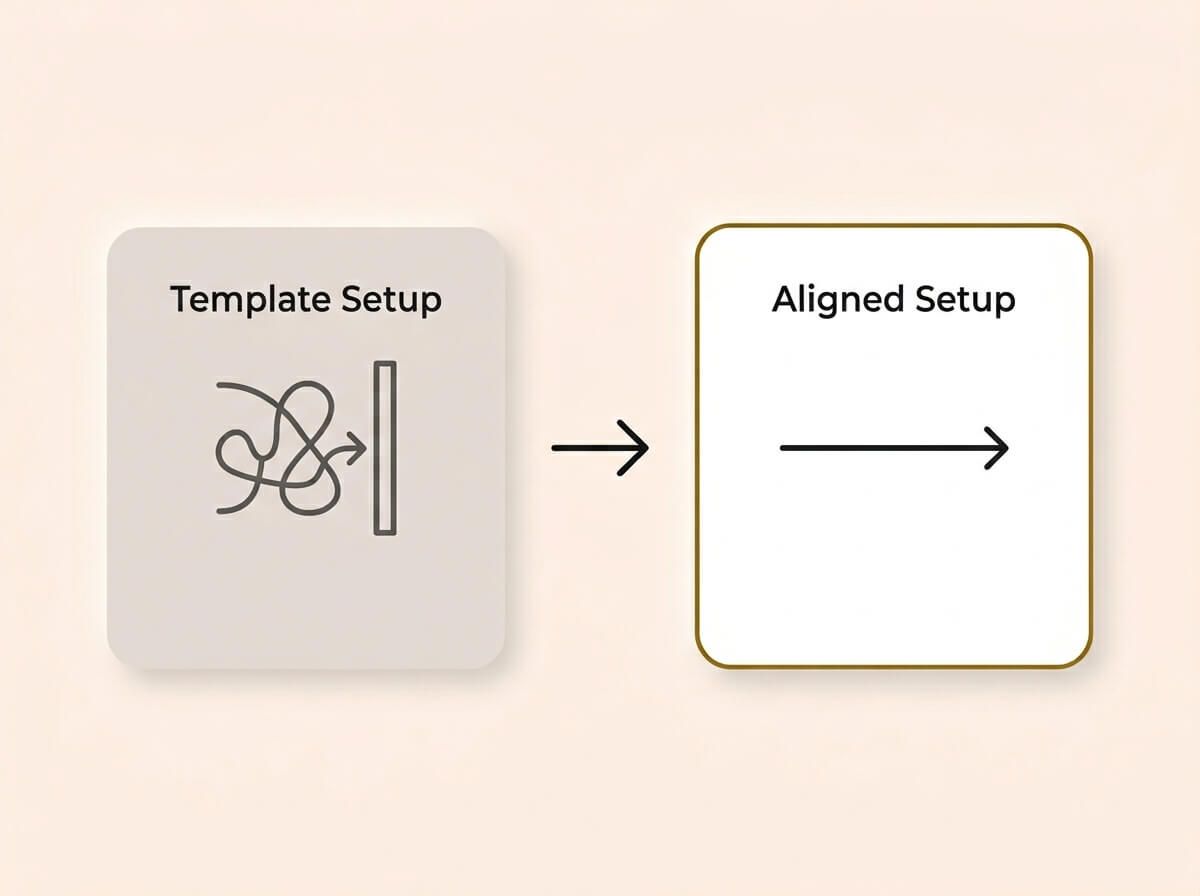
Most adoption failures are configuration problems, not training problems. If a tool is set up based on a rigid template rather than how your business actually operates, your team will always find it easier to work around the system than to fight against it. Remove the friction first, then train.
Not everyone on the team needs the same level of knowledge. The person entering leads into the CRM needs to know how to create a contact, fill in the right fields, and move a deal through the pipeline. They do not need to know how to build a report or configure an automation. The manager who reads the reports needs to know how to interpret the dashboard and spot problems. They do not need to know how to create a contact.
Training that teaches everyone everything wastes time and overwhelms people with information they will never use. Map the team into roles and define what each role needs to know:
- Daily users: The team members who interact with the tool every day. They need task-level training: how to do the specific things their job requires.
- Managers and reviewers: The people who read outputs, review data, and make decisions based on the tool. They need dashboard and reporting training.
- Administrators: The one or two people who configure the tool, add users, and troubleshoot problems. They need system-level training.
How we do it
We map every team member to a role before designing any training content. Each role gets a training track with only the information they need. A receptionist learning the CRM gets a 15-minute walkthrough of contact entry and call logging. The business owner gets a 10-minute walkthrough of the dashboard and pipeline report. Nobody wastes time learning features they will never use.
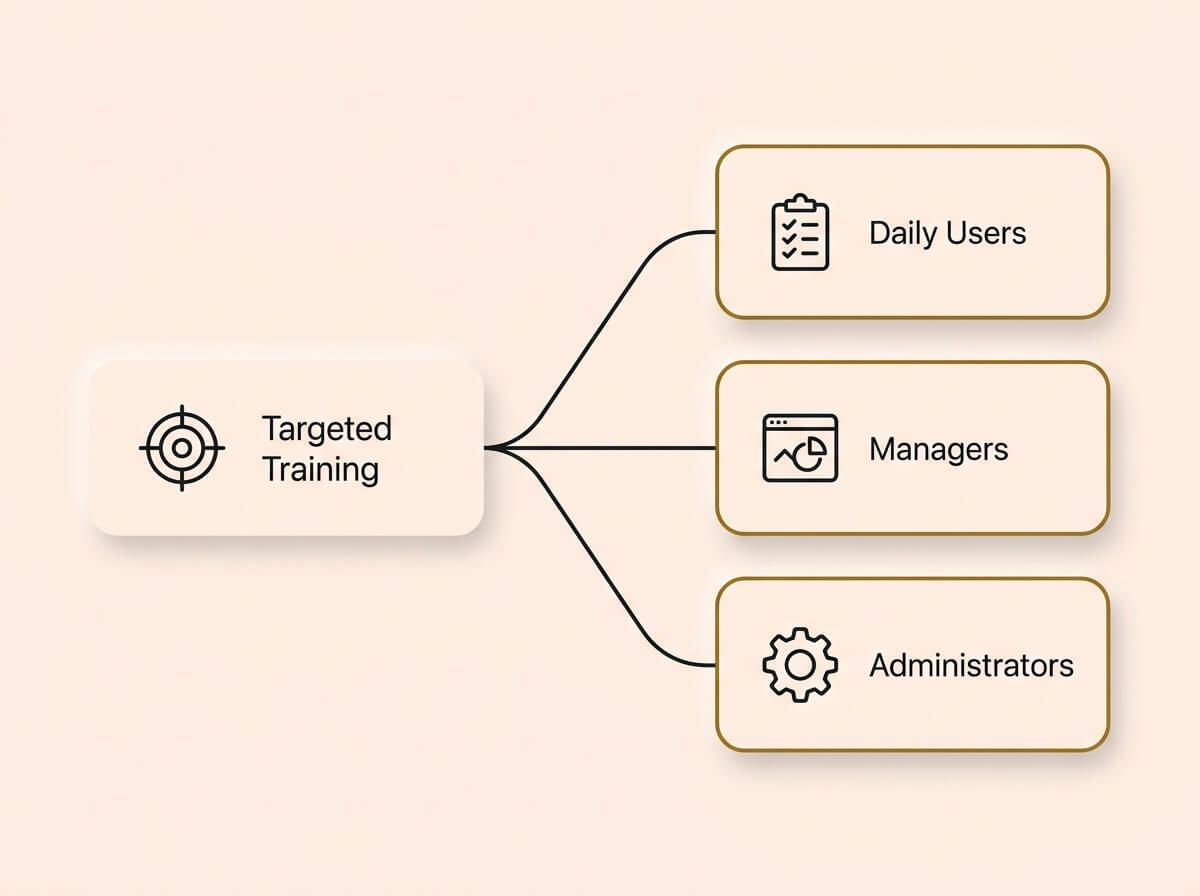
Training that teaches everyone everything wastes time and overwhelms your team. By mapping specific roles to tailored training tracks, from daily task users to system administrators, you ensure nobody wastes time learning features they will never use.
If you cannot define what "adopted" means, you cannot measure whether the training worked. Before you start, set clear, measurable adoption targets:
- What percentage of leads should be entered into the CRM within 24 hours?
- How many days per week should the pipeline be updated?
- What is the maximum acceptable number of incomplete records?
- How quickly should the team respond to automated task assignments?
These targets give you something to measure against after training. Without them, you are guessing whether the training worked, and guessing usually means declaring victory and moving on while the same problems continue.
How we do it
We set adoption targets with the client before training starts. We measure against those targets at 30 and 60 days after training. If a target is not being hit, we investigate whether it is a training gap, a configuration issue, or a process problem, and we fix the specific cause rather than re-running the same training.
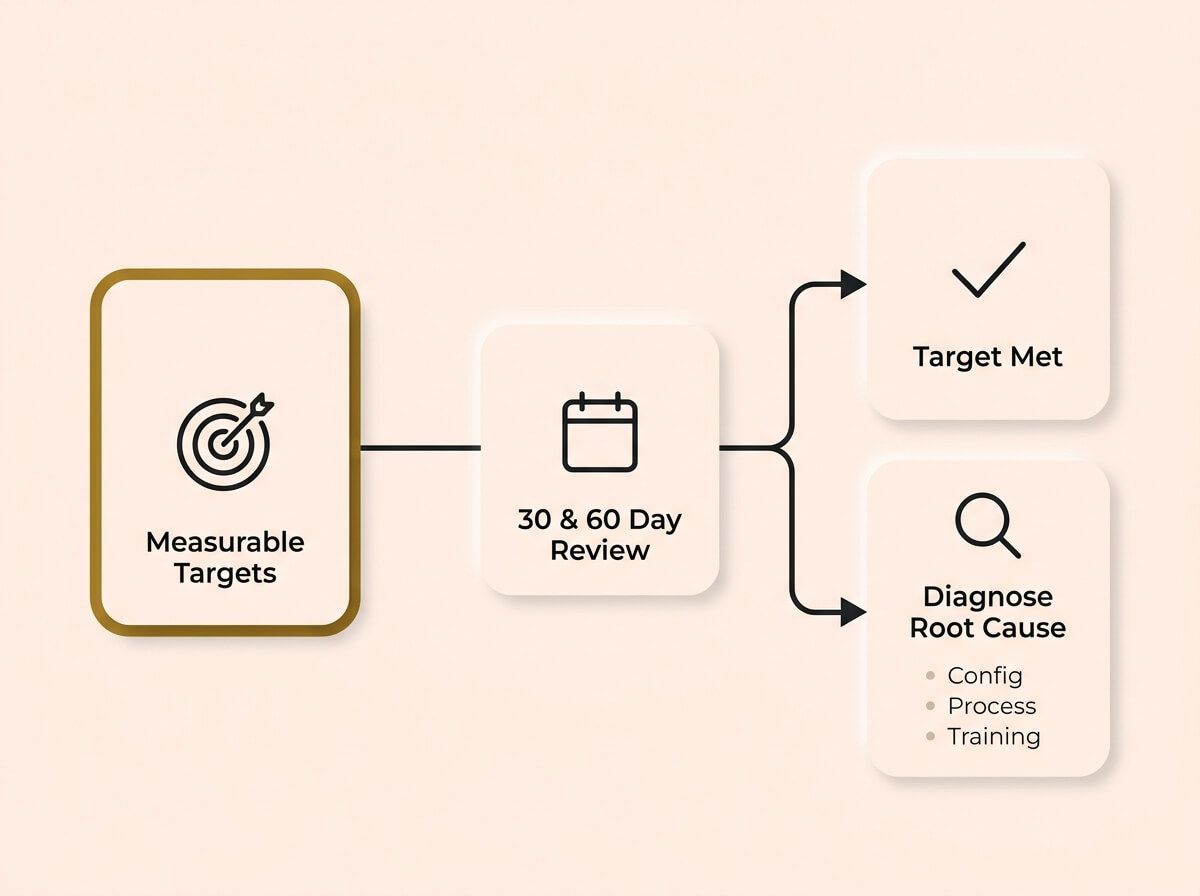
If you cannot define what adoption means, you cannot measure whether the training worked. Set clear targets before you start, review them at 30 and 60 days, and investigate specific gaps rather than blindly repeating the same training.
Designing the Training
Effective tool training looks nothing like a traditional classroom session. Nobody remembers a two-hour walkthrough of every feature. The training needs to be short, role-specific, and immediately applicable to the work the person does every day.
Short, task-focused sessions
The most effective training format for tool adoption is the micro-session: a five to fifteen minute walkthrough of one specific task. "How to create a new contact in the CRM." "How to move a deal to the next pipeline stage." "How to check the weekly leads report." One task, one session, done.
These sessions can be live (screen share with the team member) or recorded (a short video they can rewatch). Recorded sessions are more valuable long-term because they become a reference library the team can return to when they forget a step.
Communicate the change before the training
Before any training session, the team needs to understand why the change is happening. Not the technical details. The business reason. "We are switching to this system because we lost three leads last month that nobody followed up on. This tool makes sure that does not happen again. Here is what changes for your day, and here is the support available while you learn."
This is the step between deciding to use a tool and training the team on it. Skip it and the team feels like something is being done to them. Do it well and the team arrives at training already understanding why it matters. One short message from the business owner, sent before the first training session, makes a measurable difference to how quickly the team engages.
Show the why, not just the how
The biggest reason people do not adopt tools is that they do not understand why it matters. "Enter every lead into the CRM" is an instruction. "Enter every lead into the CRM so we can track which marketing channels are actually generating revenue and stop wasting money on the ones that are not" is a reason. When people understand the business impact of using the tool correctly, compliance goes up dramatically.
For every training task, connect it to a business outcome:
- Entering leads properly means the follow-up automation works and no leads are lost.
- Updating pipeline stages means the revenue forecast is accurate and the owner can plan.
- Logging call notes means the next person who speaks to that customer has full context.
Build the training into the tool
The best training happens inside the tool itself, not in a separate document or video. Tooltips, inline prompts, template records, and pre-filled examples reduce the need for external training because the guidance is right where the work happens.
If your tool supports it, create template records that show the team what a correctly filled contact, deal, or task looks like. A real example is worth more than an instruction manual.
How we do it
We create a library of short, task-focused training videos for every tool we deploy. Each video covers one task in under 10 minutes. We also build template records and inline guides inside the tool so the team has reference points while they work. The training is not a one-time event. It is a persistent resource the team can access whenever they need it.
Training Formats That Work
Different people learn differently, and different tasks require different formats. A well-designed training programme uses a mix of formats to cover all the bases.
Recorded screen walkthroughs
The most practical format for tool training. Record your screen while walking through a task, narrating each step. Keep it under 10 minutes. Use a consistent structure: state the task, show the steps, highlight the common mistakes, and end with what the finished result should look like.
Tools like Loom, ScreenPal, or the built-in screen recorder on most operating systems make this easy. Store the recordings in a shared location (a Notion page, a Google Drive folder, or the tool's own knowledge base) where the team can find them.
Written SOPs with screenshots
For team members who prefer reading, or for tasks that have many specific steps, a written standard operating procedure with annotated screenshots is more useful than a video. The SOP should be step-by-step, with a screenshot for each key action. Number the steps. Highlight the buttons and fields in the screenshots. Keep the language simple.
Written SOPs are also easier to update than videos when the tool's interface changes.
Live coaching sessions
For complex tasks or for team members who struggle with recorded training, a live coaching session where someone walks them through the task on their own screen is the most effective format. This is not a group presentation. It is one-on-one guidance that addresses their specific questions and their specific workflow.
Live coaching is more expensive than recorded training, but for key team members or critical processes, the investment is worth it.
AI-powered help
If your business has an internal AI assistant, it can serve as a 24/7 training resource. The team member asks "how do I move a deal to the quote stage" and the AI answers using your own SOPs and documentation. This reduces the need for live coaching and makes the training library searchable and conversational.
How we do it
We use a mix of all four formats. Recorded walkthroughs for standard tasks. Written SOPs for complex processes. Live coaching for key team members. And where the client has an internal AI assistant, we connect the training documentation so the team can ask questions and get answers in real time. The goal is that no team member ever has to say "I do not know how to do this" and have nowhere to turn.
Tools for Building Training Systems
The training system itself needs to live somewhere accessible, maintainable, and easy to navigate. Here is an honest breakdown of the options.
Knowledge base and documentation
- Notion: Strong for building internal wikis, SOP libraries, and training hubs. Flexible structure, easy to update, and searchable. The trade-off is that it requires setup discipline and the team needs to know where to find it.
- Google Docs/Drive: Simple and familiar. Good for smaller teams who do not need a structured knowledge base. The risk is that documents get scattered and hard to find as the library grows.
- Dedicated LMS platforms (Trainual, TalentLMS): Purpose-built for training. They offer structured courses, progress tracking, quizzes, and certifications. Good for larger teams or businesses with compliance training requirements. The trade-off is cost and setup time.
Video recording and hosting
- Loom: The fastest way to record and share screen walkthroughs. Free tier is sufficient for most small businesses. Videos are hosted and shareable with a link.
- ScreenPal (formerly Screencast-O-Matic): Similar to Loom with more editing features. Good for polishing training videos before sharing.
- YouTube (unlisted): Free hosting for training videos that do not need to be public. Simple but lacks organisation features.
AI-powered training assistants
If your business already uses an AI assistant, connecting your training documentation to it turns the AI into an on-demand trainer. The team member asks a question, the AI searches the SOPs and training guides, and provides a step-by-step answer. This is the most scalable training format because it works 24/7, handles every question individually, and improves as the documentation grows.
Cost considerations
A functional training system for a small business can run on free or low-cost tools. Loom's free tier covers video recording. Notion's free tier handles the SOP library. If you already have an AI assistant, connecting the training docs costs nothing additional. The total infrastructure cost is typically under $50 per month. Dedicated LMS platforms range from $100 to $500 per month depending on the number of users and features, and are only worth it for teams above 15 to 20 people or for businesses with formal compliance requirements.
How we do it
We build training systems in Notion for most clients because it handles SOPs, video embeds, and searchable documentation in one place. For clients with an AI assistant, we connect the training library so the team can ask questions conversationally. The client gets a living training system, not a folder of PDFs that nobody opens.
Driving Adoption After Training
Training is the start, not the finish. The most common pattern is a spike in tool usage after training, followed by a gradual decline back to old habits. Sustaining adoption requires ongoing reinforcement, measurement, and accountability.
Make the tool the path of least resistance
People will always take the easiest path. If updating the CRM takes more effort than not updating it, people will not update it. If the project management tool is slower than sending a text message, people will send a text message.
The goal is to make using the tool correctly the easiest option available:
- Reduce the number of fields to the minimum required.
- Pre-fill values where possible (default status, default owner, auto-populated dates).
- Pre-fill values where possible (default status, default owner, auto-populated dates).
- Make the mobile experience fast and usable so the team can update on the go.
Measure adoption, not just training completion
Completing a training session does not mean the person is using the tool. Measure actual usage:
- How many leads were entered this week compared to last week?
- What percentage of deals have all required fields completed?
- How many team members logged in this week?
- What is the average time between a lead arriving and being entered into the system?
These metrics tell you whether the training is translating into behaviour change. If the numbers are not moving, the training is not working and you need to investigate why.
Connect adoption metrics to business outcomes
Adoption metrics alone do not tell you whether the training was worth the investment. The real question is whether better adoption changed the business results. After training, track the outcomes that the tool was supposed to improve:
- Did lead response time decrease? By how much?
- Did CRM data completeness improve? Is the revenue forecast now reliable enough to plan with?
- Did the team stop using workarounds? Has the volume of manual data entry dropped?
- Are automated workflows running correctly because the data feeding them is clean?
Connecting adoption to outcomes is what turns "the team is using the tool" into "the tool is producing results." It also gives you the evidence to justify future tool investments, because you can show exactly what the training delivered.
Address resistance directly
Some team members will resist new tools. This is normal. The resistance usually comes from one of three places:
- "It takes too long." This is usually a configuration problem, not a training problem. Simplify the tool.
- "I do not see why it matters." This is a communication problem. Show them the business impact of their specific actions.
- "I was not involved in choosing it." This is an ownership problem. Involve key team members in the configuration and customisation so they feel invested in making it work.
Ignoring resistance does not make it go away. It makes it quieter and more persistent.
How we do it
We measure adoption at 30 and 60 days after training using specific metrics, not survey feedback. If adoption is below target, we diagnose the cause: is it a configuration issue, a training gap, or a process mismatch? We fix the specific problem rather than re-running generic training. Most adoption issues are solved by simplifying the tool, not by teaching harder.
Maintaining the Training System
Tools get updated. Processes evolve. Team members join and leave. A training system that is not maintained becomes outdated and loses trust. If the team opens a training video and the interface looks different from what they see on screen, they stop trusting the training.
Schedule regular content reviews
Review the training library at least quarterly. Check for:
- Interface changes: Has the tool been updated in a way that makes existing screenshots or videos inaccurate?
- Process changes: Has the business changed how it uses the tool since the training was created?
- New features: Has the tool added features that the team should know about?
- New team members: Has anyone joined since the last training update and not been onboarded?
Build an onboarding checklist
Every new team member should go through a structured onboarding process that includes the relevant training for their role. This checklist should be documented (not just explained verbally) and should include:
- Which tools they need access to
- Which training videos and SOPs to complete
- A defined period for supervised usage (where their work is checked for the first two weeks)
- A check-in at 30 days to assess confidence and answer questions
If onboarding is not structured, every new hire re-introduces the adoption problems you already solved.
Keep the feedback loop open
The team members who use the tools every day know what is working and what is not. Create a simple way for them to flag problems, request improvements, or suggest changes. This could be a shared channel, a form, or a standing item in a weekly meeting. The point is that feedback reaches the person who can act on it, and that the team sees their feedback leading to changes.
A training system that ignores user feedback becomes a compliance exercise. A training system that responds to it becomes a competitive advantage.
How we do it
We schedule quarterly training reviews for every client. We check the training library against the current tool interfaces and processes, update anything that has changed, and add training for new features. We also build an onboarding checklist that new team members follow on their first week. The training system stays current because it is maintained as infrastructure, not treated as a one-time project.
What Happens After Training Is Running
A training system that is producing consistent adoption and clean data is a significant achievement. But the real value comes from what it enables across the rest of the business.
When the team uses the tools correctly and consistently, the data in those tools becomes reliable. The CRM pipeline reflects reality. The project management board shows actual progress. The financial reports match what is happening. This is the foundation for everything else: accurate forecasting, informed decision-making, and dashboards that tell the truth.
If you are planning to build reporting dashboards, the quality of those dashboards depends entirely on the quality of the data your team enters. Training is the upstream investment that makes downstream visibility possible.
How we do it
We connect tool adoption metrics to the client's reporting dashboard. The business owner can see not just the business metrics, but the data quality metrics that underpin them. If CRM completion rates drop, the dashboard flags it before the data becomes unreliable.
Once the team has been through a structured training programme for one tool, the next tool adopts faster. They understand the format (short videos, SOPs, role-based training). They trust the process. They know that feedback leads to changes. The training infrastructure you build for the first tool becomes the template for every tool that follows.
How we do it
We build the training system as a reusable framework, not a one-off project. When the client adds a new tool, we create training content in the same format, add it to the same library, and follow the same adoption measurement process. The team knows exactly what to expect.
When processes are documented, training is recorded, and SOPs are maintained, the business is not held hostage by the knowledge in any single person's head. If a key team member is sick, on holiday, or leaves the business, the documentation and training materials ensure continuity. The knowledge belongs to the business, not to the individual.
This is one of the most undervalued benefits of a training system. It does not just improve tool adoption. It reduces operational risk.
How we do it
We treat documentation and training as risk mitigation, not just onboarding. Every process we build for a client is documented so that the business continues to operate if any individual becomes unavailable. The training system is a key part of that continuity.
Why Now, Not Later
Every month your team spends using tools incorrectly is a month of dirty data, missed follow-ups, wasted subscriptions, and growing frustration.
The cost is not just the subscription fees for tools that are not being used. It is the compounding effect of poor data quality on every decision the business makes. When the CRM is unreliable, the sales forecast is unreliable. When the project management tool is not maintained, deadlines are missed and nobody sees it coming. When the team works around the tools instead of through them, every new hire inherits the workarounds and the problems get harder to untangle.
* If you have invested in a CRM, automation, or AI tools (covered in our other guides), those investments only deliver their full value when the team uses them correctly. Training is the bridge between buying the tool and getting the return. * Every new team member who joins without structured onboarding re-introduces the adoption problems you already paid to solve. The cost of poor onboarding compounds with every hire. * AI tools and automations are only as good as the data your team feeds them. Poor adoption does not just waste the subscription fee. It undermines every intelligent system connected to that data. * The longer your team operates with workarounds and partial adoption, the more institutional resistance builds. Fixing adoption after two years of bad habits is significantly harder than building it right from the start.
The cost of building a training system is a fraction of the cost of the tools it makes productive. The longer you wait, the more money you waste on subscriptions that are not delivering and the harder the habits become to change.
How we do it
We build training systems alongside tool deployments, not after. When we set up a CRM or automation system for a client, the training programme is part of the same project. The tool and the training launch together. This is why our clients typically see adoption rates above 80% at 60 days, while industry averages for CRM adoption sit around 40% (CSO Insights).
How We Build It
You can take everything in this guide and do it yourself. We have written it specifically so that you can. But if you want a team to do it for you, here is exactly how we work. No surprises.
Step 1: Adoption audit. We assess which tools are being used, which are being used partially, and which have been abandoned. We identify the root causes of poor adoption: configuration problems, training gaps, or process mismatches.
Step 2: Tool reconfiguration. We simplify and reconfigure the tools to match the team's actual workflow. We remove unnecessary fields, fix broken automations, and make the mobile experience usable.
Step 3: Role-based training creation. We build short, task-focused training videos and SOPs for each role. Every training asset covers one task in under 10 minutes. We create template records and inline guides inside the tools.
Step 4: Rollout and coaching. We deliver the training, provide live coaching for key team members, and set adoption targets. The team has access to the full training library from day one.
Step 5: Measurement and maintenance. We measure adoption at 30 and 60 days. We fix specific problems as they appear. We schedule quarterly reviews to keep the training current. The client gets a system that sustains itself.
That is the process. Start to finish. Everything we described in this guide, delivered.
Team Training Diagnostic Checklist
Run your current tool adoption and training process against these checks. If you fail more than three, your tools are costing more than they are delivering.
Tool configuration
- Are your core tools configured to match your team's actual workflow (not a default template)?
- Have unnecessary fields and steps been removed to reduce friction?
- Do the tools work well on the devices your team actually uses (phone, tablet, desktop)?
- Are automations and notifications helpful rather than annoying or ignored?
Training infrastructure
- Is there a documented training programme for each tool your team uses daily?
- Is training role-based (different content for daily users, managers, and administrators)?
- Are training assets available on demand (videos, SOPs) rather than only delivered in live sessions?
- Does each training asset cover one specific task in under 10 minutes?
- Can a new team member complete onboarding without relying on verbal instructions from colleagues?
Adoption measurement
- Do you measure actual tool usage (logins, records created, fields completed), not just training completion?
- Do you have defined adoption targets (e.g. 90% of leads entered within 24 hours)?
- Do you review adoption metrics at least monthly?
- Can you identify which team members are under-adopting and why?
Maintenance and feedback
- Is the training library reviewed and updated at least quarterly?
- Is there a structured onboarding checklist for new team members?
- Is there a way for team members to flag problems or suggest improvements to the tools?
- Are training updates communicated when tools or processes change?
Data quality
- What percentage of CRM records have all required fields completed? (Target: above 90%)
- Is pipeline data reliable enough to forecast revenue accurately?
- Are reports and dashboards trusted by the people who read them?
- Has the team stopped using workarounds that bypass the tools?
Count your failures. If you scored under 15 out of 22, your tools are underperforming because your team is undertrained.
Ready to fix this?
Book a call and we will walk you through how this applies to your business. We will give you an honest read on whether it is worth doing right now, and if so, exactly where to start.
BOOK A CALLWe do not upsell. We do not surprise you with hidden costs. We tell you what you need, what it costs, and how long it takes. If it is not worth doing, we will tell you that too.