
How to automate a business in Australia: what automation is, what to automate first, what it costs, a 90-day plan and the mistakes that waste money.
In this article
A new matter arrives by email. Someone types the client's details into your practice management system, then again into the trust account. Someone emails the checklist, chases the documents twice and sets a reminder for the settlement date. Every step is simple. Together, they fill your conveyancers' week.
This guide shows how to automate a business in Australia, using a firm like yours: what automation is, what to automate first, what it costs, a 90-day plan, and the mistakes that waste money.
The short answer
Business automation is software doing the steps that repeat: copying details between systems, sending reminders, creating tasks and invoices. Start with one process that happens every day and follows clear rules. Time, automate and measure it, then do the next. Keep people on judgement calls. Connector apps' paid plans start at about A$13 (US$9) a month, paid yearly.
What business automation means
Automation is a rule that runs on its own: when something happens, do these steps. When a new matter email arrives, open the matter, add the client and send the checklist. When settlement is a week away, remind the client what's still missing.
Three kinds of tools do it:
- The automations already in your software. Practice management, accounting and email software have rules and reminders built in. Check what you already pay for first.
- Connector apps, such as Make, Zapier and n8n. Each watches one app for something new, such as an email or a form, and copies the details into the others. They're priced by how much they run each month, not by how many staff you have. Make's and Zapier's paid plans start at about A$13 and A$29 a month, paid yearly, and n8n's cloud at about A$32 (US$9, US$19.99 and €20 at the Reserve Bank's rate on 6 November; prices checked 7 November 2026).
- AI steps, for the parts that need reading or writing, such as pulling the details out of an email, or drafting a reply for a person to check. Our post on how Australian businesses use AI shows where most firms are with it.
Here's one, from start to finish:
- 01An agent emails the contract of sale to your new matters address.
- 02The connector app sees the email, and an AI step pulls out the names, the property address and the settlement date.
- 03It opens the matter in your practice management system and puts the key dates in the conveyancer's calendar.
- 04It emails the client your checklist, and sets reminders for anything still missing.
- 05If it can't read the email, or the client already has a matter, it sends the email to a person instead.
Will it work with your software?
Before anything else, ring your practice management provider and ask: "Can Make or Zapier open a matter in your system when an email arrives? And can other software read and write matters through an API?" An API is the door other software uses to read and write records. If they say yes, ask which details it can fill in. Make and Zapier also list the apps they connect to on their websites. If the answer to both is no, start with the steps around it, such as email and calendar reminders, and ask the provider what's planned.
What to automate first
Score each process on four questions: how often it happens, how long it takes, how often it goes wrong, and how clear the rules are. Start where the answers are often, slow, error-prone and clear. The chart below sorts an example firm's tasks by the first and last of those; within the box marked Start here, begin with the one that takes longest and goes wrong most.
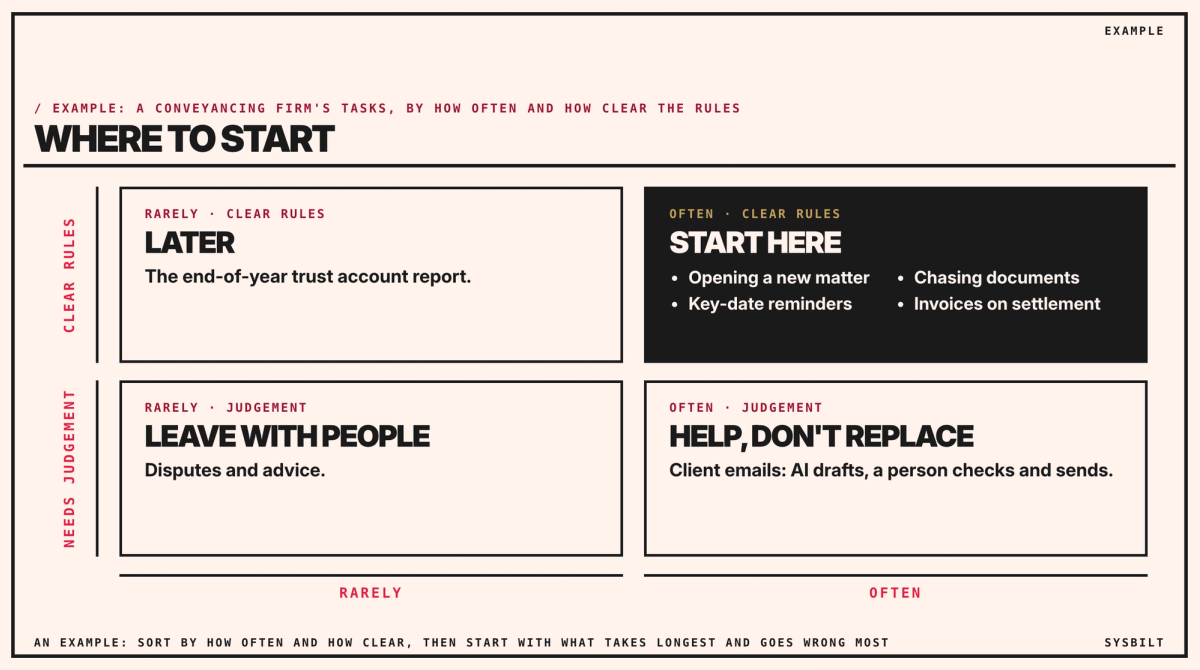
For a conveyancing firm, the usual first candidates are:
- 01Opening a new matter. Details typed once, in one place, and copied to the systems that need them.
- 02Chasing documents. Reminders that go out on a schedule and stop when the document arrives.
- 03Key-date reminders. Settlement, cooling-off and finance dates in the calendar, with reminders to the conveyancer and the client.
- 04Invoices. Raised when a matter settles, not when someone remembers.
- 05The weekly report. Matters open, settling this week and invoices overdue, built from the live data.
Our post on the first three tasks to automate goes further on where to begin.
What to keep with people, and safe
Automate the steps around a decision, not the decision. Advice, disputes, a client who's upset, and anything where a mistake costs money or trust stay with a person. The system gathers the facts and sends the reminders; the conveyancer decides. Three rules keep it safe:
- Money stays with a person. Reminders and reports about the trust account can be automated. Moving trust money can't: an automation can prepare an entry or an invoice, but a person approves every payment.
- Odd emails go to a person. When the automation can't match an email to a matter, or an AI step isn't sure, it sends the email to someone instead of guessing.
- Client details stay out of public AI tools. The privacy regulator's advice is not to put personal information, especially sensitive information, into publicly available AI tools (OAIC). If you use a paid business plan, read its terms on your data before anyone pastes in a client's file.
- Know where client details go. Make keeps data in the US or the EU, and Zapier in the US. n8n can also run on your own server in Australia, which keeps the data here but makes keeping it secure your job: updates, access and backups. If your business turns over more than $3 million a year, the Privacy Act covers it, and under Australian Privacy Principle 8 you stay responsible for how an overseas provider handles client details, so check your privacy policy says where they go.
If you're unsure, ask your trust account examiner and your professional indemnity insurer before an automation touches client money or documents.
What it costs and what it returns
Retyping is slow, but the bigger cost is the mistakes. In an Ipsos survey of over 500 accountants and finance decision-makers at Australian SMEs for OFX, a company that sells business payments, 38% named errors from manual data entry as their most common inefficiency in payments (October 2025).
These numbers are made up, so use your own. Say opening a new matter takes 20 minutes of typing, and you open 60 a month. That's 20 hours a month, or about A$13,200 a year at A$55 an hour, which covers wages, super and overheads: about one and a half times a A$36 hourly wage, once you add super, leave, payroll tax and desk costs.
Now say automating it takes 40 hours to set up and test, about A$2,200 at the same rate, plus about A$29 a month for a connector app on one of the starting plans above, and it saves 15 of those 20 hours. That's A$825 a month saved, about A$796 after the software, so it pays for itself in about three months.
The sum works for any process: hours saved a month, times the hourly cost, minus the software, against the set-up. The set-up is usually the bigger cost: mapping the process, building it, testing it and training the team, whether your own staff do it or a provider does. If nobody on your team has built one before, that's the part to get help with. If the payback is longer than a year, start with a different process.
A 90-day plan
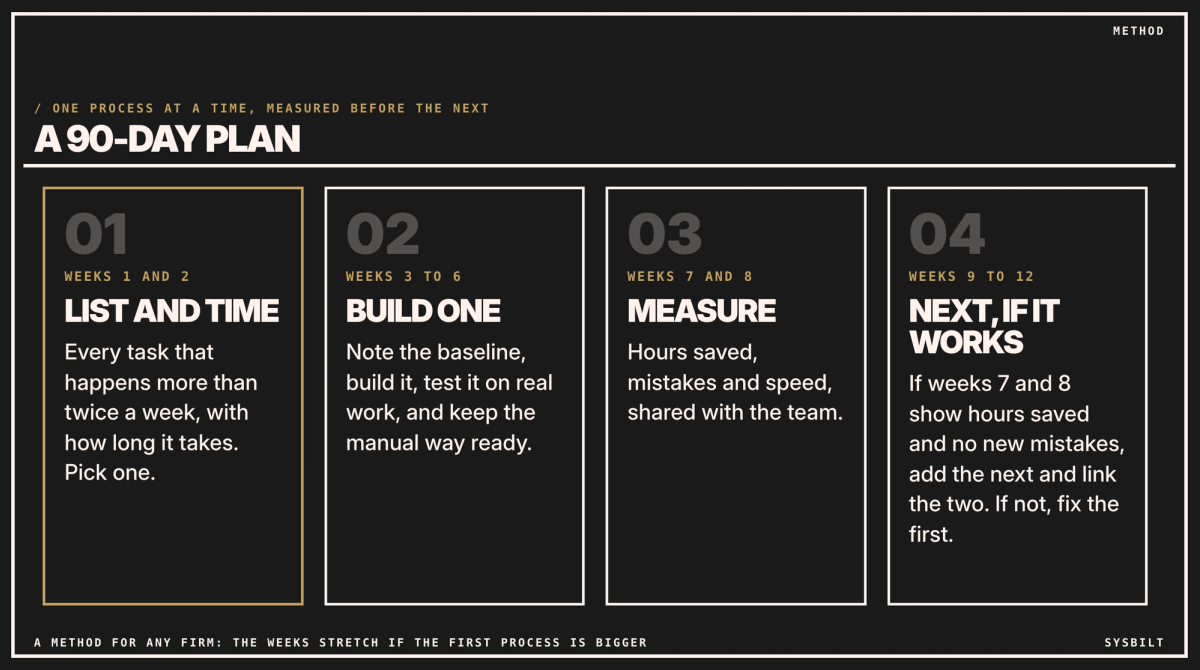
- Weeks 1 and 2: list and time. Write down every task that happens more than twice a week, with how long it takes. Pick the one that scores highest.
- Weeks 3 to 6: build one. Keep the times from weeks 1 and 2 as your baseline. Build it, or have it built, test it on real matters, and keep the manual way ready.
- Weeks 7 and 8: measure. Hours saved, mistakes, and how fast things happen now. Share the numbers with the team.
- Weeks 9 to 12: the next, if the first works. If weeks 7 and 8 show hours saved and no new mistakes, add the next process and link the two, so a new matter flows from the email to the weekly report without anyone typing it twice. If they don't, fix the first before adding anything.
Mistakes that waste money
- Automating a broken process. If every conveyancer opens matters differently, agree on one way first. Automation repeats whatever you give it.
- Tools without training. If the team doesn't know what an automation does, they'll work around it. Show them, and write it down.
- Too much at once. One process, working and measured, beats ten half-built.
- Set and forget. Check every automation each quarter, because software and forms change. Name one person who owns each automation and gets the alert when it fails, so nothing breaks quietly.
- Building it in one person's account. Keep the accounts in the firm's name, and write down what each automation does, so it doesn't leave with whoever built it.
If you'd rather have it set up, we map the process with your team, build the automation and train the people who use it. That's part of our Automation service.
If you'd like a second pair of eyes, book a 15-minute call with our team in Sydney, by phone or video. Bring the three tasks that take your team the most time each week, and the name of your practice management software, and we'll tell you which to automate first and what to ask your provider, so you leave knowing where to start. There's no obligation after the call, and we don't upsell.

WRITTEN BY
Felipe Chaparro
Systems Architect and Founder of SYSBILT. Felipe engineers custom automation, AI workflows, and performance web architectures for scaling Australian service businesses.