
HubSpot vs Pipedrive for Australian service businesses: what each costs once you need automation, what each does well, and how each connects to Xero.
In this article
Your consultancy has ten people, and four of you bring in the work. Leads come from referrals, your website and events, and proposals go out by email. You've narrowed the CRM (customer relationship management software) choice to HubSpot and Pipedrive, and most comparisons you find were written for American sales teams.
Here's HubSpot vs Pipedrive for Australian service businesses like yours: what each costs once you need automation, what each does well, how each connects to Xero, and how to choose in two weeks.
The short answer
Pipedrive is the simpler choice for a pipeline and automatic follow-ups, from A$49 a seat a month on Growth, billed annually. HubSpot keeps sales, marketing and service on one database: its Starter plan has simple workflows, and sequences start on Professional, at US$90 a seat plus a one-time US$1,500 fee. Prices checked 6 November 2026.
What each one costs
Both charge per seat, so count the people who'll use the CRM every day. The prices below come from each company's pricing page on 6 November 2026. Pipedrive's page shows Australian dollars to visitors in Australia, because it localises its prices. HubSpot's showed US dollars and says tax is extra, so check the currency and GST before you commit.
Pipedrive
| Plan | Billed annually | Billed monthly | What it adds |
|---|---|---|---|
| Lite | A$19 | A$34 | The pipeline, contacts, activities and an email inbox. No automations or two-way email sync |
| Growth | A$49 | A$69 | Two-way email sync, email templates and tracking, up to 50 automations and 5 sequences |
| Premium | A$79 | A$109 | Web forms, documents with e-signatures and projects, which are paid add-ons on Lite and Growth |
| Ultimate | A$109 | A$139 | Higher limits, such as 250 automations |
Prices are per seat per month, from Pipedrive's pricing page. Web forms come with LeadBooster, an add-on from A$32.50 a month on Lite and Growth (Pipedrive), and are included from Premium. Email campaigns are a paid add-on on every plan.
HubSpot Sales Hub
| Plan | Billed annually | Billed monthly | What it adds |
|---|---|---|---|
| Free tools | US$0 | US$0 | The CRM, for up to two users |
| Starter | From US$7 | US$20 | Paid seats, so more than two people can use it, and up to 50 workflows with restricted triggers and actions. No sequences. HubSpot says the lower price is for new customers only |
| Professional | US$90 | US$100 | Up to 300 fully customisable workflows, and sequences. Plus a one-time US$1,500 onboarding fee, which HubSpot's page calls required, for its remote setup help. The monthly price is still on a yearly contract |
| Enterprise | US$150 | Through HubSpot's sales team | Plus a required one-time onboarding fee of US$3,500 |
Prices are per seat per month, from HubSpot's pricing page. In plain words, workflows are rules that act for you, such as creating a task when a deal stalls. Starter's are limited to fewer triggers and actions, so check that yours can do the follow-up you need before you rely on it. Sequences are timed follow-up emails from your own inbox that stop when the client replies, and they start on Professional. Forms are on every plan (HubSpot), and view-only seats cost nothing, for people who only need to look.
What automation means day to day
Say a proposal has sat at "proposal sent" for five days with no reply. With automation, the CRM creates a follow-up task for the proposal's owner, or sends a reminder email for them. Pipedrive's automations can wait a set time and then act, and its Growth plan includes sequences too. HubSpot's sequences send a series of timed emails and create follow-up tasks, and its workflows can do the same kind of thing, with fewer options on Starter. If your proposals ever go a week without a follow-up, your four sellers need it.
What a firm your size pays
An example: four people who sell, before tax.
- Pipedrive Growth, billed annually: 4 seats × A$49 × 12 months = A$2,352. With LeadBooster for web forms (A$32.50 × 12 = A$390), that's A$2,742 a year, plus an app to connect it to Xero (see below).
- HubSpot Sales Hub Starter, paying monthly: 4 seats × US$20 × 12 months = US$960 a year, about A$1,391 at the Reserve Bank's rate on 6 November 2026 (RBA, A$1 = US$0.69). New customers can pay from US$7 a seat a month, billed annually. Forms and the Xero integration are included, but the workflows are the restricted kind, and there are no sequences.
- HubSpot Sales Hub Professional, billed annually: 4 seats × US$90 × 12 months = US$4,320, plus the US$1,500 onboarding fee, so US$5,820 in the first year, about A$8,435.
So the answer depends on your follow-ups. If Starter's simple workflows cover them, HubSpot is the cheapest here. If you need sequences or fuller automation, Pipedrive Growth costs about a third of HubSpot Professional in the first year, before Pipedrive's Xero app. Cloudify doesn't publish its prices, so ask for one at your invoice volume before you compare totals. The onboarding fee is paid once, so the gap narrows from the second year. The conversions are before any fee your bank or card charges, and neither page says how GST applies to an Australian business, so ask before you sign. In Pipedrive, price a seat for everyone who'll use it. In HubSpot, the rest of the team can have view-only seats at no cost.
What each one does well
Pipedrive is built around the pipeline: a board of every open deal by stage, with the next step on each. It's quick to learn, and the people who sell can set it up and run it themselves. From Growth, it syncs both ways with Gmail or Outlook and tells you when a client opens your email. Its limits: email campaigns cost extra on every plan, and Xero needs an app from another company.
HubSpot keeps sales, marketing and service on one database, so the email a lead opened, the proposal and any later support request sit on the same record. Its free tools give two people the CRM before you pay, every plan connects to Gmail or Outlook (HubSpot), and its Xero integration is its own. Its limits: full automation and sequences cost more, its marketing tools, such as email campaigns, are a separate product called Marketing Hub, and more features mean more setup. Plan for one person to own it, such as an operations manager or the partner most at home with systems.
How each one connects to Xero
When a proposal is won, the client's details and the invoice should reach Xero without anyone retyping them, and whether it's been paid should come back to the CRM.
- HubSpot has its own Xero integration, on every plan. It syncs contacts, products, invoices and payments, one way or both ways, and supports Australian dollars. Custom field mappings need at least Data Hub Starter, a paid product (HubSpot).
- Pipedrive connects through apps built by other companies, and Xero's App Store lists several. The one on Pipedrive's Marketplace, Cloudify, turns a deal into a Xero invoice or quote at a stage you choose, and can show whether it's been paid (Pipedrive Marketplace). Cloudify prices its plans by the number of invoices a month, so add that to Pipedrive's cost.
Before you choose, ask your bookkeeper three things: which details Xero needs for each client, whether invoices should start in the CRM or in Xero, and who fixes a sync that fails. Then test it with one real proposal.
Which one fits your firm
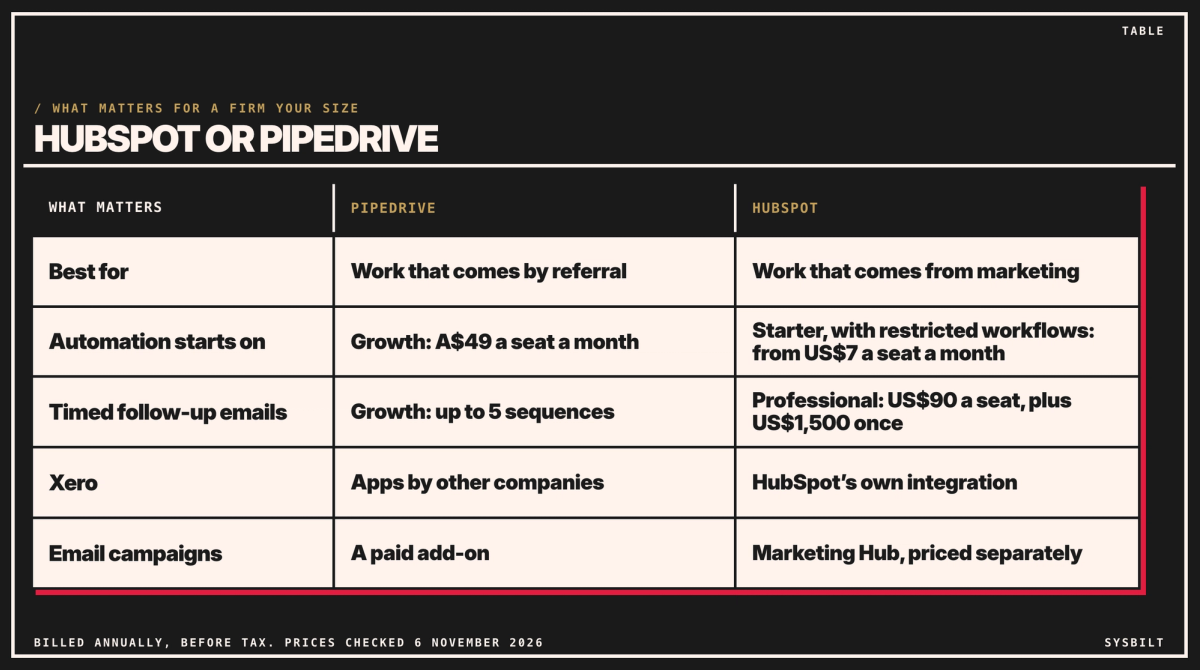
Choose Pipedrive if most of your work comes from referrals and your own networks, the people who sell will run it, and your marketing lives somewhere else.
Choose HubSpot if events, your newsletter and your website bring in a growing share of your work, you want marketing, sales and service on one record with Xero connected, and someone will own the setup.
For a consultancy like yours, it comes down to how you win work. If it's mostly referrals, Pipedrive Growth covers the pipeline and full follow-ups for well under HubSpot Professional, and HubSpot Starter is worth a look if simple workflows are enough. If events and your website matter more each year, HubSpot's single record and its own Xero integration are worth the extra. If you're somewhere in between, as many consultancies are, start from where most of your work comes from today, and let the two-week trial settle it.
How to choose in two weeks
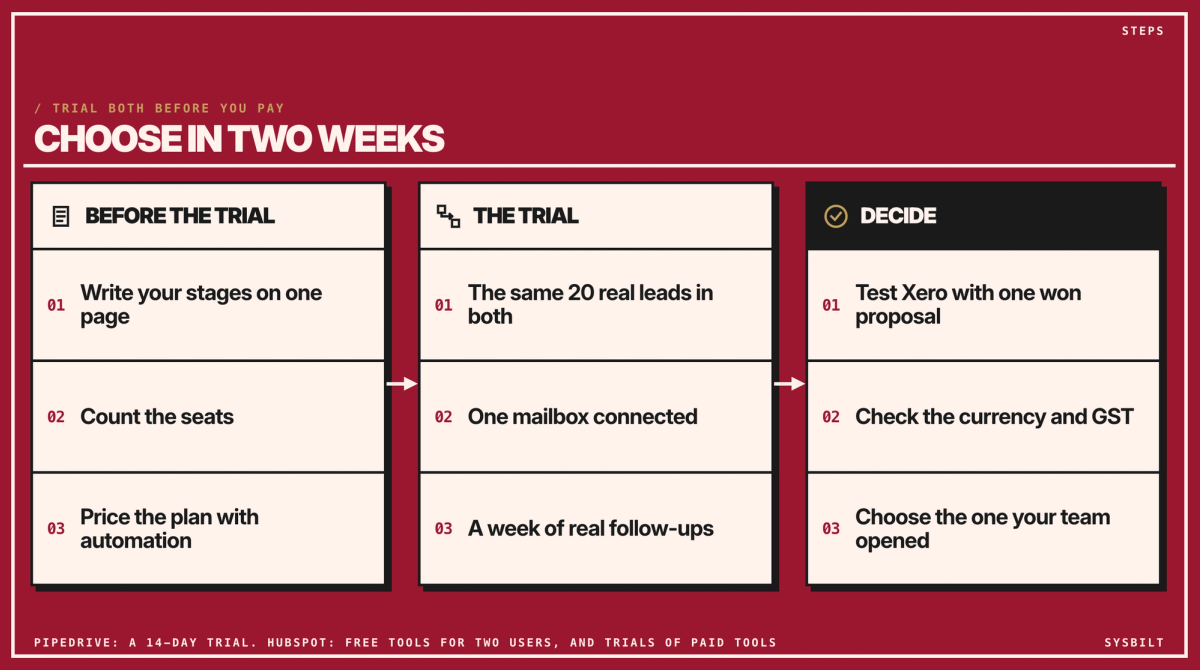
- 01Write your stages on one page, such as enquiry, first meeting, proposal sent, in review, won and lost. Name each stage for where the client is, not what you're doing. If you can't, agree them first, because neither CRM fixes an unclear process.
- 02Count the seats, and price the plan where automation starts, not the entry plan.
- 03Trial both with the same 20 real leads. Pipedrive has a 14-day trial that needs no credit card. HubSpot's free tools cover two users, and inside your account you can start a 14-day trial of paid tools such as sequences, which HubSpot says won't charge you when it ends (HubSpot). Both import a spreadsheet. Set up your stages, connect one mailbox and run a week of real follow-ups.
- 04Test the Xero connection with your bookkeeper, using one won proposal.
- 05Check the currency and GST before you sign, then choose the one your team opened without being asked.
We set up both HubSpot and Pipedrive for firms like yours, from choosing the plan to the stages, the follow-ups and the Xero connection. That's part of our CRM & Lead Tracking service, which makes sure every enquiry, by phone or form, gets followed up. Our post on replacing your spreadsheets with a CRM covers the move itself.
Before you book a demo with either, write your stages on one page and count the people who'll sell. If you'd like a second opinion, book a 15-minute call with our team in Sydney, by phone or video. Bring your stages and your seat count. We'll tell you which plan fits and what it would cost, and if your team can set it up yourselves, we'll say so. There's no obligation after the call, and we don't upsell.

WRITTEN BY
Felipe Chaparro
Systems Architect and Founder of SYSBILT. Felipe engineers custom automation, AI workflows, and performance web architectures for scaling Australian service businesses.